How to See Who Screenshotted Your Public Snapchat Story
Want to know how to see who screenshotted your public Snapchat story? This guide explains exactly what Snapchat shows, what it hides, and how to protect your content from unwanted screenshots.
If you have ever posted something on your Snapchat story and wondered who has been saving it, you are not the only one. Knowing how to see who screenshotted your public Snapchat story is one of the most searched Snapchat questions, and the answer is not as simple as most guides make it sound. Snapchat does show you screenshot information, but there is a significant catch when it comes to public stories specifically. This guide walks through what you can see, what you cannot, why that gap exists, and what you can do about it.
Does Snapchat Notify You When Someone Screenshots Your Story?
Yes, Snapchat does detect screenshots of your story and marks them in your viewer list. But there is an important distinction between how this works for private stories versus public ones, and that difference catches a lot of people off guard.
For private stories (shared with your friends or a custom list): You get full visibility. Any friend on your list who screenshots your story will appear in your viewer list with a screenshot icon next to their name. This applies during the 24-hour window your story is live.
For public stories (visible to anyone who visits your profile): You can only see screenshot information from people who are already in your friends or followers list. Anyone outside that list, meaning strangers or people you do not follow back, can screenshot your public story without you ever knowing who they are.
This is the part most people do not realize before they post. Public stories reach a wider audience by design, but that wider reach comes with reduced visibility into who is saving your content.
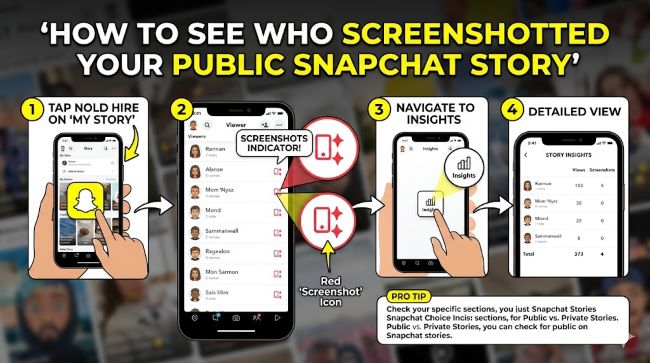
How to See Who Screenshotted Your Public Snapchat Story: Step-by-Step
Here is how to check screenshot data while your story is still active:
- Open Snapchat and tap your profile icon or Bitmoji in the top left corner of the screen.
- Under My Stories, find the story you want to check and tap on it.
- While your story is open, swipe up from the bottom of the screen, or tap the eye icon at the bottom.
- A list of everyone who has viewed your story will appear.
- Look for the double arrow icon (two overlapping arrows) next to a viewer’s name. This icon means that person took a screenshot of your story.
- The eye icon next to a name means they only viewed it without screenshotting.
You can also check timestamps below each person’s name to see when the screenshot was taken.
Important Time Limit
Screenshot data is only available while your story is live, typically for 24 hours after you post it. Once the story expires, the viewer and screenshot data disappears along with it. There is no way to go back and check who screenshotted a story after it has expired.
Why You Cannot See Everyone Who Screenshotted Your Public Story
After a 2023 update, Snapchat changed how public story visibility works. Before that update, users could see viewer information from non-friends on public stories. Now that visibility has been removed.
The reasoning from Snapchat’s side is about balancing creator tools with user privacy. Allowing anyone who views a public story to be identified by name when they screenshot would discourage casual browsing and feel invasive to viewers who did not expect to be tracked.
The practical effect is that if someone outside your friends list finds your public profile and saves your content, you have no way to identify them through Snapchat. This is worth knowing before you post anything sensitive to a public story.
What Does the Screenshot Icon Look Like?
The icon that indicates a screenshot in your viewer list looks like two overlapping arrows forming a circular or double-arrow shape. This is different from:
- The eye icon, which indicates someone only viewed the story
- The replay icon, which indicates a rewatch (visible to Snapchat+ subscribers)
On some device interfaces, the screenshot icon appears slightly differently, but it is always distinct from the view icon and sits directly next to the viewer’s name.
Can Someone Screenshot Your Snapchat Story Without You Knowing?
Yes, in several situations:
Public story, non-friend viewer: As covered above, anyone outside your friends list who views your public story can screenshot it without you seeing their identity.
Using airplane mode: Some users screenshot in airplane mode to try to bypass Snapchat’s detection. This workaround does not always work reliably and Snapchat’s systems have become better at catching it, but it is a method some people attempt.
Second device: Taking a photo of the screen with a separate phone or camera captures your story without triggering any screenshot detection at all. Snapchat has no way to detect this method.
Screen recording: On some devices, screen recording does not always trigger Snapchat’s screenshot notification system, though this behavior varies by device and app version.
These limitations exist for the same reason they exist across most platforms: the app can only detect what happens within its own system. Anything happening outside that system, such as a separate camera pointed at the screen, is invisible to it.
What You Can Do to Protect Your Content
Knowing the limits of Snapchat’s screenshot detection should shape how you decide what to share publicly.
Switch from public to private story: A private story limits who can view and screenshot your content to people you have manually added. This gives you much better visibility into who is saving what.
Use a custom story setting: Instead of posting to your full friends list, create a custom story and select only the people you want to include. Go to your profile, tap My Stories, tap Private Story, and choose your audience.
Avoid posting sensitive content on public stories: The clearest rule is the simplest one. If you would not want a screenshot of something to exist outside Snapchat, do not post it where anyone can see it. Public stories are built for reach, not for privacy.
Block specific users: If someone in your friends list is repeatedly screenshotting your content and it makes you uncomfortable, you can block them. Go to your profile, tap the three dots under My Story, tap Story Settings, and use the Custom option to block specific people from viewing your stories.
Snapchat+ rewatch data: If you subscribe to Snapchat+ at around $3.99 per month, you get access to rewatch counts, which shows how many times a friend watched your story. This does not solve the public screenshot visibility issue, but it does give you more data on how your audience is engaging with your content.
Does Snapchat Send a Push Notification for Screenshots?
Snapchat does not send a traditional push notification the moment someone screenshots your story. Instead, it marks the screenshot in your viewer list using the double arrow icon. You have to actively check your viewer list to see this. You are not automatically alerted unless you open your story and look.
This is different from how direct snap screenshots work. If someone screenshots a direct snap sent in a conversation, Snapchat does send a notification. Stories work differently.
Managing Your Digital Privacy More Broadly
Understanding what platforms show and hide about your content is an important part of managing your presence online. Snapchat’s screenshot visibility system is one example of how apps balance creator transparency with viewer privacy. Similar trade-offs exist across other apps and services. Understanding how your device and account settings affect your privacy is worth thinking about beyond just Snapchat. And keeping your software and accounts updated matters too, as security-related app updates often change how these visibility features behave.
Key Takeaways
- How to see who screenshotted your public Snapchat story: Open the story, swipe up, and look for the double arrow icon next to viewer names. This only works while the story is live, within 24 hours of posting.
- For public stories, you can only see screenshot information from people already in your friends or followers list. Strangers who view and screenshot your public story are invisible to you.
- For private stories, you get full screenshot visibility for anyone on your custom list.
- Screenshot data disappears when your story expires after 24 hours. There is no retroactive check.
- Methods like using a second device or pointing a camera at the screen cannot be detected by Snapchat.
- The most effective protection is choosing who can see your stories in the first place: private or custom stories give you significantly more control than public ones.
- Snapchat does not send a push notification for story screenshots. You have to check your viewer list manually.