What Is Two Factor vs Two Step Verification? The Real Difference Explained
Two-factor authentication and two-step verification are terms that get used interchangeably so often, including by major tech companies in their own settings menus, that most people assume they’re simply two names for the exact same thing. There is a genuine technical distinction between them, though in everyday practice the difference matters less than the terminology confusion might suggest. Understanding what’s actually happening behind each term helps you make more informed decisions about how you’re securing your accounts.
The Core Technical Difference
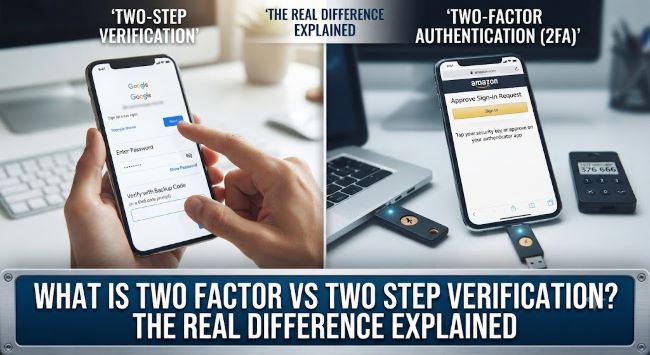
Two-factor authentication (2FA) requires verification from two genuinely different categories of authentication factors. Security professionals typically define three possible factor categories: something you know (a password or PIN), something you have (a physical device like your phone or a hardware security key), and something you are (biometric verification like a fingerprint or face scan). True two-factor authentication combines two factors from different categories — for example, your password (something you know) plus a code generated by an app on your phone (something you have).
Two-step verification simply requires two steps in the login process, but those steps don’t necessarily need to come from different factor categories. A common example: entering your password, then entering a second password or PIN, or receiving a code via email tied to the same account you’re already logged into elsewhere. Both steps could technically fall into the “something you know” category, meaning it’s two steps but not necessarily two distinct factors in the strict security sense.
Why the Confusion Exists
In practice, most major platforms — Google, Apple, Microsoft, and the vast majority of online services — use the terms “two-factor authentication” and “two-step verification” to describe essentially the same setup: your password plus a code sent via SMS, generated by an authenticator app, or delivered through a push notification to a trusted device. Because this common implementation does involve two genuinely different factors (something you know plus something you have), it technically qualifies as both two-factor authentication and two-step verification simultaneously, which is exactly why the terms get used so loosely and interchangeably across different companies’ settings menus and marketing materials.
Google specifically uses “2-Step Verification” as their official terminology for what is, in its standard implementation, genuine two-factor authentication by the stricter security definition. Apple uses “Two-Factor Authentication” for a very similar underlying mechanism. The functional security benefit to you as a user is essentially identical regardless of which term a specific company chooses to use in their interface.
When the Distinction Actually Matters
The meaningful difference shows up in edge cases and less common implementations:
SMS codes sent to the same device you’re using to log in. If you’re logging into an account on your phone and the verification code is also sent to that same phone via SMS, this represents a weaker security setup than a true second factor, since compromising that single device potentially compromises both the login session and the verification code simultaneously. This is technically closer to a two-step process using a related rather than independent verification method.
Security questions as a “second step.” Some older or less security-focused systems use a security question (something you know) as a second verification step after your password (also something you know). This satisfies a two-step process but doesn’t provide the security benefit of true two-factor authentication, since both elements draw from the same vulnerable category — information that could potentially be known or guessed by an attacker through research or social engineering.
Backup codes generated and stored alongside your password. If backup verification codes are stored in the same password manager or location as your primary password, a single breach of that location compromises both factors simultaneously, undermining the security benefit that genuine factor separation is designed to provide.
Which Provides Stronger Security in Practice
For the vast majority of real-world account security purposes, the practical answer is: it doesn’t matter what a company calls their feature — what matters is the actual mechanism being used for that second verification step. The relative strength ranking from strongest to weakest among common implementations:
Hardware security keys (like a YubiKey) provide the strongest protection, since they require physical possession of a specific device that’s extremely difficult to remotely compromise, and they’re resistant to phishing in ways that codes are not.
Authenticator apps (Google Authenticator, Authy, Microsoft Authenticator) generating time-based codes are the next strongest common option, since the code generation happens on your device without depending on a potentially interceptable network like SMS.
Push notifications to a trusted device (where you simply approve a login attempt with a tap rather than typing a code) offer strong convenience and good security, assuming the device itself is properly secured with its own lock screen protection.
SMS-based codes are the most common implementation but also the weakest of the genuinely common options, since SMS messages can potentially be intercepted through SIM-swapping attacks or other telecom-level vulnerabilities, even though this remains far better than having no second verification step at all.
Email-based codes, particularly when sent to an email account that uses the same password as the account you’re trying to protect, provide the weakest practical security benefit among common verification methods, since a compromised password could potentially grant access to both the account and the email used to verify it.
Practical Recommendations Regardless of Terminology
Rather than worrying about whether a specific platform’s feature is technically “two-factor” or “two-step” by the strict definition, focus on these practical priorities: enable some form of additional verification beyond just a password on every account that offers it, particularly email, banking, and any account tied to financial transactions. Prefer authenticator apps or hardware keys over SMS when a platform offers the choice, since this represents a meaningful security upgrade with minimal added inconvenience. Store backup codes somewhere genuinely separate from your primary password (not in the same password manager entry, and not in plain text in an easily accessible location), and avoid security questions with answers that could be researched or guessed (your mother’s maiden name, for example, is often discoverable through public records or social media).
Key Takeaways
- True two-factor authentication requires verification from two genuinely different categories: something you know, something you have, and something you are; two-step verification simply requires two steps, which may or may not come from different categories
- Most major platforms (Google, Apple, Microsoft) use these terms interchangeably because their standard implementation — password plus a device-based code — technically satisfies both definitions simultaneously
- The distinction matters most in edge cases: SMS codes to the same device you’re logging in from, security questions as a “second step,” or backup codes stored alongside your primary password all weaken the security benefit despite technically being a second step
- Hardware security keys and authenticator apps provide stronger practical security than SMS codes, which remain vulnerable to SIM-swapping and interception despite being the most common implementation
- Regardless of which term a specific platform uses, focus on enabling some additional verification beyond just a password on every important account, prioritizing authenticator apps or hardware keys when given the choice
- Store backup verification codes separately from your primary password, and avoid security questions with answers that could be researched or socially engineered