“Free Msg: Unable to Send Message – Message Blocking Is Active”: What It Means and How to Fix It
The error “Free Msg: Unable to send message – Message blocking is active” is one of the more confusing text messaging errors because it can mean several completely different things. The message implies you’ve set up a block, but most people who see it haven’t intentionally done anything. This guide covers every cause and every fix, organized from the most common to the least.
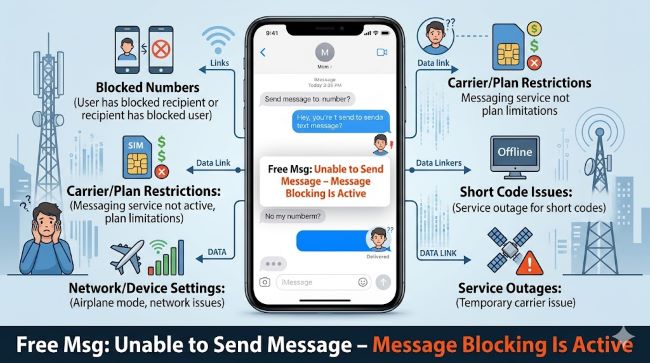
What “Message Blocking Is Active” Actually Means
This error is generated by your carrier’s network, not your phone. It appears when the carrier’s system is preventing the message from being sent or received. The phrase “Free Msg” in the prefix indicates the notification itself is from the carrier (it’s being sent as a carrier service message without charge).
The blocking can originate from multiple places:
- A premium messaging block on your account (carrier-applied)
- A parental control or account restriction
- The recipient’s carrier is blocking messages from your number or carrier
- Short code messaging (5-6 digit numbers) is blocked on your account
- Your account has been flagged for spam or robo-texting
- There’s a billing issue on your account that’s triggering service restrictions
- A do-not-disturb or call-blocking feature is active
Fix 1: Check for Premium Messaging Block (Most Common Cause)
Carriers often apply a premium messaging block by default or upon request. This block prevents sending to or receiving from short codes (5-6 digit numbers used for two-factor authentication, subscription services, and business messages) and can sometimes extend to regular messages depending on the carrier.
AT&T: log into your AT&T account at att.com, go to Account Overview > Manage my plan > Add-ons and apps > Messaging. Look for a premium messaging block or short code block and disable it. Alternatively, call AT&T customer service at 611 from your AT&T phone and ask them to check for and remove any message blocking on your line.
Verizon: log into My Verizon account, go to Account > Lines > [your line] > Block services. Check whether text messaging blocks are active. You can also dial *611 from your Verizon phone to reach customer service.
T-Mobile: log into your T-Mobile account, go to Account > Line Settings > Block Services. Check for active messaging blocks. T-Mobile customer service is reached at 611.
All carriers: the most reliable fix is to call customer service at 611 from the affected line and say “I’m getting a message blocking error when I try to send a text.” The representative can see your account’s block status and remove anything that’s causing the issue.
Fix 2: Verify Your Account Is in Good Standing
Carriers can apply service restrictions including message blocking when there’s a past-due balance on an account. Even a small balance from a previous billing cycle can trigger restrictions on certain services.
Log into your carrier account online or call 611 to check your balance and payment status. If there’s an outstanding balance, paying it should remove the restriction within a few hours.
Fix 3: Check If Short Code Messaging Is the Specific Issue
If the error only appears when texting a 5 or 6-digit number (like a verification code request or a subscription service), the issue is specifically short code blocking rather than all messaging.
Short code messaging can be blocked at the account level, and carriers apply this block more commonly than most users realize. Call customer service and specifically ask to enable “short code messaging” or “premium message sending and receiving” on your line.
Fix 4: Check the Recipient’s Status
If the error only appears when texting a specific person, the problem may be on the recipient’s end:
- The recipient may have blocked your number
- The recipient’s carrier may have their account restricted
- The recipient may have a full message storage (less common with modern smartphones but still possible on some devices)
- The recipient may have moved to a different carrier and their number port isn’t fully complete
Try contacting the person through a different method (call, email, different messaging app like iMessage, WhatsApp) to determine if the issue is specific to your carrier SMS communication with them.
Fix 5: Third-Party Call Blocking or Do Not Disturb Apps
Apps like Hiya, Nomorobo, RoboKiller, or similar spam-blocking apps can sometimes interfere with outgoing messages. If you have any call or message blocking apps installed, temporarily disable them and test messaging.
Similarly, check your phone’s built-in Do Not Disturb or Bedtime mode: while these typically only affect incoming notifications rather than outgoing messages, some device-specific implementations vary.
Fix 6: Reset Network Settings
If the issue appeared suddenly without any account changes, a network settings reset sometimes resolves carrier communication issues:
iPhone: Settings > General > Transfer or Reset iPhone > Reset > Reset Network Settings. Note this also clears saved Wi-Fi passwords.
Android (Samsung): Settings > General Management > Reset > Reset Network Settings.
After resetting, reconnect to Wi-Fi if needed and test messaging.
Fix 7: Contact Your Carrier Directly
If none of the above resolves the issue, the carrier’s customer service has the most direct access to your account’s complete blocking status and can identify causes that aren’t visible through your online account portal. Tell them exactly what the error message says: “Free Msg: Unable to send message – Message blocking is active.” This specific error language helps them identify the account restriction causing it quickly.
When the Error Appears on iMessage vs. SMS
Understanding which messaging protocol is triggering the error helps diagnose it:
On iPhone: iOS automatically attempts to send messages as iMessage (Apple’s proprietary system using data/Wi-Fi) when texting between Apple devices. If iMessage fails, it falls back to SMS (carrier text messaging). The “message blocking is active” error specifically appears for SMS/MMS attempts — it’s a carrier error, not an iMessage error.
If you’re seeing the error when texting another iPhone user, it may indicate iMessage is failing AND the SMS fallback is also failing. Check whether iMessage is enabled in Settings > Messages, and confirm your phone number is registered with iMessage (Apple ID settings).
For Android users, all text messages typically go through SMS/MMS by default unless you’re using Google Messages with RCS enabled. The message blocking error on Android is a pure carrier issue.
Knowing whether the error affects all text recipients or only specific ones helps narrow the cause: if it’s all recipients, it’s an account-level restriction; if it’s one person, it’s likely specific to the communication channel between your number and theirs.
Key Takeaways
- “Free Msg: Unable to send message – Message blocking is active” is a carrier-level error indicating the carrier’s network is blocking the message, not a phone setting you’ve intentionally applied
- The most common cause is a premium messaging or short code block on your account: call 611 or log into your carrier account to check and remove it
- A past-due balance on your carrier account can trigger service restrictions including message blocking: check your balance and pay any outstanding amount
- If the error only appears with 5-6 digit numbers, short code messaging specifically is blocked: ask customer service to enable it
- If the error only appears with one specific recipient, the issue may be on their end: their account may be restricted, they may have blocked your number, or their number port may be incomplete
- Calling carrier customer service at 611 and describing the exact error is the fastest resolution path: representatives can see your full account blocking status directly
- As a last resort, resetting network settings on your phone can resolve carrier communication issues that appeared without obvious account changes