What Does Sent as SMS Mean?
You hit send on a message and instead of the usual confirmation, you see a small note: “Sent as SMS.” It might appear in green instead of blue on an iPhone, or show up as a different notification label on Android. Either way, it raises a question most people haven’t thought about before: what does “sent as SMS” mean, and is anything wrong? Nothing is wrong. But understanding what happened tells you a lot about how your phone actually handles messages, and why the distinction matters more than you’d think.
What Does SMS Mean in Texting?
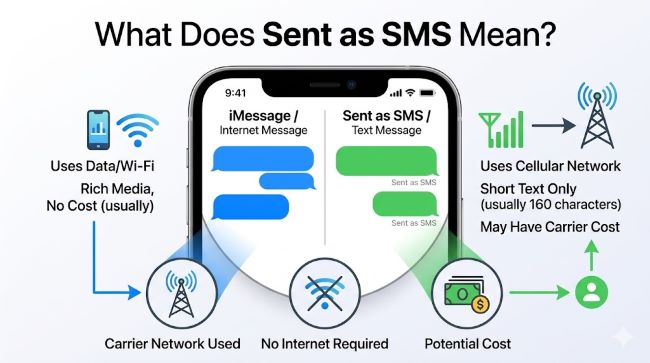
Start with the basics. What does SMS mean in texting? SMS stands for Short Message Service. It’s the original text messaging protocol built into mobile networks, developed in the 1980s and standardised as part of the GSM mobile standard. Every mobile phone plan includes SMS capability by default, because it operates through your carrier’s cellular network rather than the internet.
SMS has a few defining characteristics:
- Character limit: Standard SMS messages are limited to 160 characters. Messages longer than that are split into multiple SMS segments and reassembled on the recipient’s device.
- No internet required: SMS travels through the cellular network’s control channel, not through a data connection. This means it works anywhere you have a cellular signal, even with mobile data turned off.
- No end-to-end encryption: Standard SMS messages are not encrypted end-to-end. Your carrier can read them. They can be intercepted. They do not offer the same privacy as iMessage, Signal, or WhatsApp.
- No read receipts by default: Standard SMS has no native delivery or read confirmation system beyond a basic “delivered” status that not all carriers support.
- Broad compatibility: SMS works between every mobile phone on every network in every country. It’s the universal baseline of mobile messaging.
This is what your phone falls back to when its preferred messaging protocol isn’t available.
What Does “Sent as SMS” Actually Mean?
When your iPhone or Android phone shows “sent as SMS,” it means your device attempted to send the message through its default internet-based messaging protocol and couldn’t, so it switched to SMS instead.
On iPhone, the default protocol is iMessage, which uses Apple’s servers and requires both sender and recipient to have an active internet connection and an Apple device. When iMessage isn’t available (recipient is on Android, no internet connection, iMessage servers are temporarily unavailable, or the recipient has turned iMessage off), iPhone falls back to SMS. The message bubble turns green instead of blue to signal this switch.
On Android, the situation depends on which messaging app you’re using. Google Messages uses RCS (Rich Communication Services) as its preferred protocol when available. RCS is essentially the modern upgrade to SMS: it supports read receipts, typing indicators, high-resolution media, and group messaging, and it works over Wi-Fi and mobile data. When RCS isn’t available (recipient doesn’t support it, no data connection, or the carrier doesn’t support RCS), the app falls back to standard SMS.
In both cases, “sent as SMS” means the message left as a standard cellular text rather than through the internet-based protocol your app prefers.
Why Does This Happen?
Several specific situations trigger the SMS fallback:
No internet connection on your end. If your Wi-Fi drops or your mobile data is turned off, iMessage and RCS can’t connect to their servers. Your phone switches to SMS, which only needs a cellular signal.
No internet connection on the recipient’s end. If the person you’re texting has their phone in airplane mode, is in an area with no data coverage, or has data turned off, they can’t receive iMessage or RCS. Your phone detects this and sends SMS instead.
The recipient uses a different platform. iMessage only works between Apple devices. If you text an Android user from an iPhone, it always goes as SMS (or RCS if you’re using Google Messages and they support it). This is the most common reason iPhone users see green bubbles.
iMessage is temporarily unavailable. Apple’s iMessage servers occasionally experience outages or delays. During those periods, iPhones often fall back to SMS for messages that would normally go through iMessage.
The recipient has a new or reset phone. When someone gets a new phone or resets their device, there’s a brief window where their iMessage or RCS registration hasn’t completed. Messages during that time go as SMS.
RCS isn’t supported by the carrier. Not all mobile carriers support RCS. In regions or on networks where RCS isn’t available, Android messaging falls back to SMS entirely.
Does “Sent as SMS” Mean the Message Was Delivered?
Not necessarily, and this is where people get confused. “Sent as SMS” tells you how the message was sent. It does not confirm the message was received.
SMS delivery depends on the recipient’s phone being on, having cellular coverage, and the carrier successfully routing the message. SMS messages can be delayed by carrier congestion, fail silently if the recipient’s number has changed, or queue until the recipient’s phone comes back online.
If you need to confirm someone received your message and SMS is the only option, the most reliable approach is to ask them directly or follow up through another channel. Notification indicators across different messaging platforms vary significantly: what looks like a delivery confirmation in one app means something different in another, and SMS has the weakest confirmation system of all the major options.
Privacy: What SMS Fallback Means for Your Messages
This is the part most people don’t think about. When a message goes as SMS instead of iMessage or RCS, it loses the privacy protections that came with the preferred protocol.
iMessage uses end-to-end encryption. Your carrier cannot read iMessage content. When that same message falls back to SMS, it is sent without end-to-end encryption. Your carrier can read it. It can be intercepted by third parties with the right equipment. For most everyday messages, this doesn’t matter. For anything sensitive — financial information, personal data, confidential discussions — it matters considerably.
Standard SMS is also not protected from SIM-swapping attacks, SMS interception via SS7 vulnerabilities, or malicious actors who can access carrier infrastructure. Security testing and data protection at every layer of communication matters more as mobile messaging carries more sensitive content, and SMS is the least protected layer in the stack.
If privacy is important for a specific conversation, use an end-to-end encrypted messaging app like Signal, which doesn’t fall back to unencrypted SMS under any circumstance.
How to Control SMS Fallback on Your Device
On iPhone: Go to Settings > Messages. The toggle “Send as SMS” controls whether your phone falls back to SMS when iMessage is unavailable. If you turn this off, messages won’t send at all if iMessage can’t connect. Most people leave it on for reliability, but turning it off ensures you’re always using iMessage or nothing.
On Android (Google Messages): Go to Messages > Settings > General > Enable chat features. This controls RCS. If you want to see when messages fall back to SMS, the app shows a label below the message. You can’t disable SMS fallback entirely in Google Messages, but you can use Signal or WhatsApp exclusively if you want to avoid SMS altogether.
SMS vs RCS vs iMessage: A Quick Comparison
| Feature | SMS | RCS | iMessage |
|---|---|---|---|
| Internet required | No | Yes | Yes |
| End-to-end encryption | No | Optional (Google Messages encrypts RCS) | Yes |
| Read receipts | No | Yes | Yes |
| Typing indicators | No | Yes | Yes |
| Character limit | 160 | None | None |
| Works cross-platform | Yes | Partially | Apple only |
| Works without data | Yes | No | No |
Understanding how your messaging apps present information to you — whether that’s a green bubble, a label below a message, or a notification indicator — is the first step to knowing what’s actually happening with your communications.
Key Takeaways
- What does sent as SMS mean: your phone couldn’t send the message through its preferred internet-based protocol (iMessage or RCS) and sent it through the cellular SMS system instead.
- What does SMS mean in texting: Short Message Service. The original mobile text protocol, limited to 160 characters, requires only a cellular signal, and carries no end-to-end encryption.
- SMS fallback happens when there’s no internet connection on either end, the recipient uses a different platform, or the preferred protocol’s servers are unavailable.
- “Sent as SMS” confirms how the message was sent, not that it was received. SMS has no reliable built-in delivery confirmation.
- SMS messages are not end-to-end encrypted. When a message falls back to SMS, it loses the privacy protections of iMessage or RCS.
- To prevent SMS fallback on iPhone, go to Settings > Messages and turn off “Send as SMS.” For maximum privacy regardless of fallback, use Signal.