Behringer X32: The Complete Guide to Every Model and Whether It’s Right for You
The Behringer X32 is a 32-channel digital mixer used in live sound, recording studios, and houses of worship worldwide. This guide covers every X32 model, key features, routing, and how the X32 Rack, Compact, and Producer versions compare.
If you spend any time around live sound, you have seen the behringer x32 on stage, in churches, at corporate events, and in recording studios. It launched in 2012 and changed the market for digital mixers by delivering a 32-channel desk with sophisticated routing, built-in effects, and remote control capability at a price that previously bought you a basic analog board. More than a decade later, it is still one of the most widely used digital consoles in the world. This guide covers everything you need to know about the X32 ecosystem: the different models, what they share, what makes each one the right choice for specific situations, and what to look at in the manual before you touch a fader.
What the Behringer X32 Actually Is
The behringer x32 digital mixer is a full-format digital audio workstation in a console form factor. At its core it is a 32-channel input mixer with 16 mix buses, 6 matrix outputs, and a 25-bus main LR/mono configuration. It runs on a proprietary DSP architecture that handles mixing, dynamics, EQ, and effects processing simultaneously without the latency issues that plagued earlier budget digital desks.
The console ships with 32 onboard Midas-designed preamps (Behringer acquired Midas in 2013, and the X32 preamp design predates that but shares engineering heritage). The preamps are one of the most discussed features of the desk: they measure well, have low noise, and hold up against consoles costing significantly more.
The X32 runs onboard software that Behringer updates periodically. Firmware version 4.x and above introduced significant workflow improvements. Always check the current firmware version before a major event.
The X32 Model Lineup: Which One to Choose
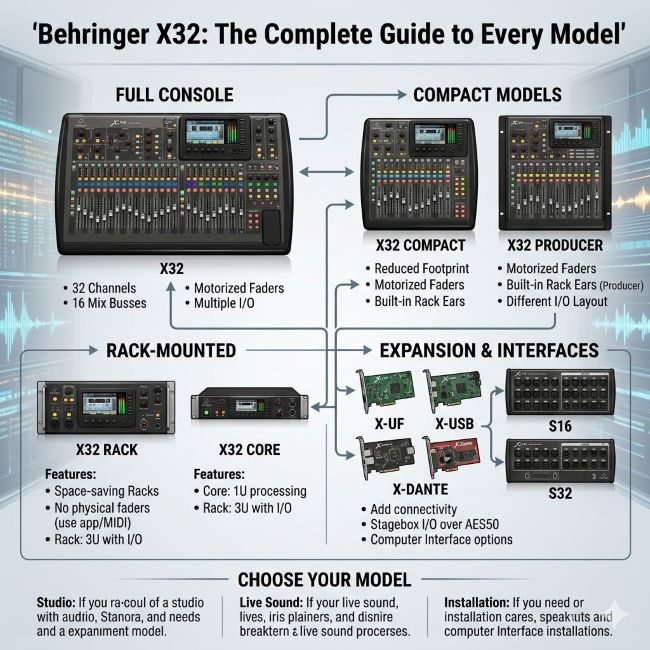
The behringer x32 family includes four main variants. They share the same core processing engine, the same effects library, and the same routing architecture. The differences are physical: size, number of physical faders, and onboard channel strips.
Behringer X32 (Full Size)
The flagship model. It has:
- 40 mix-position faders (32 channel strips + 8 bus masters)
- Full scribble strip LCD displays for every channel
- Built-in 17-inch touchscreen for navigation and routing
- 6 auxiliary sends and returns
- AES50 ports for stage box connection (connects to Behringer S16 or S32 stage boxes)
- USB recording interface for stereo and multi-track recording
- Dimensions: 474mm x 533mm x 269mm
This is the desk for fixed installations: large venues, main stages, theater production, and any situation where you need physical faders for every channel simultaneously. The learning curve is real but the physical layout rewards experienced engineers.
Behringer X32 Rack
The behringer x32 rack version is the same processing engine in a 3U rack mount chassis. It has no motorized faders. Control happens through:
- An iPad or tablet running the free X32-Mix app
- The X32 Edit software on a Mac or Windows computer
- Physical encoders on the front panel for channel-by-channel adjustment
The X32 Rack is the most compact option in the lineup. Engineers who work in fly-rigs, compact touring setups, or recording studio environments where a touchscreen and tablet workflow is preferred often choose it. Without motorized faders, workflow is different but the audio output is identical to the full-size desk.
It has the same 32 preamp inputs via its rear connections and AES50 interface for external stage boxes.
Behringer X32 Compact
The behringer x32 compact sits between the full-size and the Rack. It has:
- 16 motorized faders
- 17 LCD scribble strips
- Built-in touchscreen display (smaller than the full X32)
- All the same routing and processing as the full desk
- A significantly smaller footprint
The Compact is the most popular X32 for mid-size live sound applications: venues up to 500 people, corporate events, touring acts that need real faders without the full desk’s footprint. Church sound teams and small production companies frequently choose the Compact because it is portable, has physical faders for key channels, and fits in a medium road case.
Behringer X32 Producer
The behringer x32 producer is a hybrid of the Rack and the Compact. It has:
- 16 motorized faders
- No built-in touchscreen
- External control via iPad/tablet strongly recommended
- The same core processing
The Producer is positioned for studio recording environments and home use. Without the touchscreen it requires more navigation through external software, but the motorized faders make it more tactile than the pure Rack model.
Core Features Across Every X32 Model
All four models share the same processing capabilities. Understanding what is in the box across the lineup helps you evaluate whether the X32 suits your specific application.
Channel Processing
Every input channel on the X32 has:
- 4-band parametric EQ with high-pass and low-pass filters
- Gate (expander) with full threshold, ratio, attack, hold, and release controls
- Compressor with multiple models (VCA, Opto, FET style)
- Insert point for routing to external gear
- Pre-fader listen (PFL) and after-fader listen (AFL)
- 100ms channel delay
The processing quality is competitive with dedicated outboard gear at the price point. The compressor models sound different from each other in usable ways. The default compressor is effective for general use; the opto model works well for vocals.
Built-In Effects
The X32 includes 8 stereo effects engines running simultaneously. The library covers:
- Reverb (hall, room, plate varieties)
- Delay (tape, digital, stereo ping-pong)
- Modulation (chorus, flanger, phaser)
- Dynamics (additional compressors and limiters)
- Pitch correction (basic pitch shift and harmony)
The effects engines route through the FX send/return structure. You send channels to an effects bus, the effect processes the signal, and you return it as a stereo channel on the mix. This is standard send-return effects routing, identical to how high-end consoles handle it.
AES50 and Stage Box Integration
The AES50 digital snake protocol is one of the X32’s most practical features for live sound. A single CAT5e or CAT6 cable carries 48 channels of audio (24 in each direction) between the console and a stage box like the Behringer S16 or S32.
This eliminates analog snake runs, which in large venues or outdoor stages can be expensive, heavy, and subject to ground hum. Running a single network cable from FOH to the stage significantly simplifies setup. The AES50 link also carries control data, so gain changes at the console adjust the stage box preamps.
Remote Control and the X32 Edit App
Every X32 model can be controlled remotely over a standard network. Behringer provides:
- X32 Edit: Free desktop software for Mac and Windows, full parameter access
- X32-Mix: iPad app for wireless console control
- X32-Q: iPad app for monitor mix self-mixing by performers
The network control capability makes the X32 genuinely useful for scenarios where the mix position is not at the console: monitor engineering from the stage, front-of-house work at remote positions, or studio sessions where the engineer is in the tracking room.
The Behringer X32 Manual: What to Read First
The behringer x32 manual covers 120 pages. For a first-time user, the sections to prioritize are:
Routing: The X32 routing matrix is powerful but initially confusing. The console can send any input to any output through software routing. Understanding the signal flow (input channel to bus to mix output to physical output) before the first show prevents mistakes.
Bus structure: The X32 uses 16 mix buses that function as auxes or subgroups depending on how you configure them. They default to aux sends (for monitor mixes, effects sends). Reconfiguring them as subgroups is a menu operation covered in the manual’s bus configuration section.
DCA groups: The X32 has 8 DCA (digitally controlled amplifier) groups. A DCA is not a subgroup; it controls multiple channels’ levels without summing their audio. Understanding the difference between a DCA and a subgroup is essential for live mixing.
Scenes and snapshots: The X32 scene recall system saves complete console states or partial states (channel settings, bus assignments, effects parameters). For theater and broadcast work, scene recall replaces manual console resets between show segments.
The manual is available as a free PDF download from the Behringer support page. Behringer also maintains a YouTube channel with tutorial videos that supplement the written documentation effectively.
X32 in Practice: Common Use Cases
Live Sound (Small to Mid-Size Venues)
The X32 Compact covers most live sound needs up to 500 people. A typical setup:
- Vocals and instrument channels on the left fader bank
- Bus masters (monitor mixes for each performer) on the right
- DCA groups for drums, keyboards, guitars as mix groups
- 2 effects buses (reverb for vocals, delay for lead vocal)
With the S16 stage box connected via AES50, the analog cabling at the stage is just microphone cables and instrument cables going to the box. The snake to FOH is one Ethernet cable.
Houses of Worship
The X32 is one of the most common digital consoles in church sound. Reasons:
- Consistent audio quality across services
- Scene recall saves complete weekend configurations
- The self-mixing X32-Q app lets worship team members dial their own monitor mixes from the stage on an iPad
- The price fits most church budgets
The X32 Compact or full X32 are the most common choices for fixed installations. Churches with dedicated sound booths often install the full X32 with a S32 stage box.
Recording and Home Studios
The X32 Rack or Producer works as a multi-channel interface. Connected via USB, it presents as a multi-channel audio interface to a DAW on Mac or Windows. The 32 channels of input from its preamps record simultaneously. For home studio use where physical faders are less critical, the Rack provides maximum routing flexibility in minimum rack space.
The X32’s channel processing can be used on tracked audio during mixing, though most recording engineers prefer to track clean and process in the DAW.
Understanding the interface and workflow design behind tools like the X32 connects to broader principles of how great application interfaces communicate function. The way Behringer designed the X32’s physical layout (fader banks, scribble strips, central navigation section) reflects the same thinking that applies to how typography and layout guide attention in any designed system. For audio engineers who work across multiple clients and venues, tracking console configurations, firmware versions, and show files across projects benefits from structured approaches to data and project organization.
Known Limitations and What to Watch
No analog backup path: If the DSP fails, you have no signal. Always have a contingency plan for critical events.
Learning curve: The routing matrix and bus structure require real study before a live event. First-time users should spend several hours in X32 Edit (the software) before touching a real show.
Firmware dependency: Older firmware versions have known issues. Keeping firmware current is not optional for stable operation.
Third-party plugin incompatibility: The X32 runs on a closed DSP. You cannot install third-party plugins. The built-in processing is what you have.
USB recording: Multi-track USB recording requires a USB 3.0 drive. Slower drives drop frames. Always test before recording a live show.
Key Takeaways
- The Behringer X32 is a 32-channel digital mixer with 16 mix buses, 8 built-in effects engines, and AES50 stage box connectivity. It runs on Midas-heritage preamps at a price significantly below comparable competition.
- The X32 full size is for large fixed installations and main stages where physical faders for all 32 channels simultaneously matter.
- The Behringer X32 Rack is for fly-rigs, compact touring, and studio use where tablet or software control is acceptable and size matters.
- The Behringer X32 Compact is the most versatile model for live sound: physical faders, moderate footprint, full processing. The most popular X32 for mid-size venues and church installations.
- The Behringer X32 Producer bridges the Rack and Compact: motorized faders without a built-in screen. Best suited for studio and hybrid applications.
- All four models share the same DSP engine, effects library, AES50 connectivity, and remote control capability.
- Read the routing and bus configuration sections of the Behringer X32 manual before the first show. Routing mistakes are the most common first-time user issue.
- The X32 Edit software (free, Mac and Windows) lets you configure the desk offline and is the best learning tool before handling a live event.
- For remote control, X32-Mix (iPad) handles full engineer control, and X32-Q (iPad) allows performers to self-mix their monitor sends.