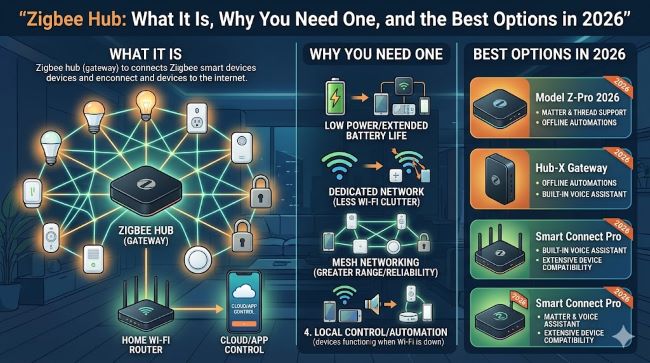
Zigbee Hub: What It Is, Why You Need One, and the Best Options in 2026
Everything you need to know about the Zigbee hub: what Zigbee is, how a zigbee smart home hub works, the best zigbee hub for your setup, compatible devices, and how a zigbee light switch fits in.
If you are building a smart home or trying to make sense of why your devices need a specific hub, a zigbee hub is probably somewhere in the conversation. It is one of the most widely used wireless protocols in home automation, and the hub is what ties all your zigbee devices together into something you can actually control. This guide covers what Zigbee is, how the hub fits into the picture, which devices run on it, what a zigbee light switch does differently from a standard smart switch, and which hubs are worth buying in 2026.
What Is Zigbee?
Zigbee is a wireless communication protocol built for low-power, short-range communication between smart home devices. It runs on the 2.4 GHz frequency band and transmits data at around 250 kbps. That sounds limited, but for the kind of data a light switch or motion sensor needs to send, it is more than sufficient.
The reason Zigbee exists is that Wi-Fi and Bluetooth, the two protocols most people are already familiar with, are not well suited for connecting many low-power devices across a home. Wi-Fi eats battery life and creates network congestion when you have dozens of devices on it. Bluetooth has limited range and does not mesh. Zigbee solves both problems.
What sets Zigbee apart is its mesh networking capability. Every mains-powered Zigbee device, such as a smart plug, light bulb, or light switch, acts as a signal repeater. So if you have a sensor in the garden that is too far from the hub, the signal hops through other Zigbee devices on the way. The network extends itself as you add more devices. Battery-powered devices like sensors and remotes do not repeat signals, but they benefit from the mesh that the plugged-in devices create around them.
Zigbee 3.0 is the current standard and includes 128-bit encryption for secure communication across the mesh.
What Does a Zigbee Hub Actually Do?
Every Zigbee network needs a coordinator, and that is the zigbee hub. It manages all the traffic between your devices, translates Zigbee signals into a format your phone or voice assistant can understand, and connects your device network to the internet or your home automation software.
Without a hub, your Zigbee devices cannot talk to anything outside their own mesh. The hub is what makes them controllable from an app, through voice, or as part of automation routines.
A zigbee smart home hub typically connects to your router via Ethernet or Wi-Fi and communicates with Zigbee devices wirelessly. It handles:
- Pairing new devices to your network
- Routing commands (turn on the light, unlock the door, trigger an alert)
- Running local automations that respond to device states
- Bridging Zigbee to voice assistants like Alexa, Google, or Siri
- Enabling remote access when you are away from home
Some hubs run automations locally, which means they work even without an internet connection. Others depend on cloud processing, which adds a point of failure and latency. Local processing is generally the better long-term choice.
Best Zigbee Hub in 2026: The Main Options
The right hub depends on your ecosystem, your budget, and how much control you want. Here are the strongest options right now:
Amazon Echo Dot Max (Best Overall Value, ~$80-$100)
The Echo Dot Max includes a built-in Zigbee coordinator alongside Thread and Matter support. For most households, this removes the need for a separate hub. It pairs zigbee devices in minutes through the Alexa app, and at around $100 it is one of the most practical entry points available. It also functions as a smart speaker, so you get two products in one.
Aeotec Smart Home Hub 2 / SmartThings (~$130)
Runs Samsung’s SmartThings platform and supports Zigbee, Matter, and Thread. The V4 version adds Thread Border Router capability. SmartThings has one of the broadest third-party Zigbee device compatibility lists of any consumer hub, and local processing means automations run even when the internet goes down. Good choice if you are building a larger, multi-protocol setup.
Philips Hue Bridge / Bridge Pro (~$35-$99)
Purpose-built for Philips Hue lights. If most of your zigbee devices are Hue bulbs, this is the cleanest option. Simple setup, reliable performance, Matter support built in. The limitation is that it is designed specifically for Hue ecosystem devices rather than the broader Zigbee device pool.
Hubitat Elevation C-8 Pro (~$200)
The power user option. All processing happens locally on-device, which means zero cloud dependency. Complex automation rules, advanced configuration options, and support for both Zigbee and Z-Wave make it the most capable hub on the market. The tradeoff is a steeper learning curve and a higher price.
Aqara Hub M2 / M3 (~$35-$65)
Best for Apple HomeKit users. The M2 connects natively to HomeKit and handles up to 128 devices with local automation processing. The M3 adds Thread support and Matter bridging. Aqara’s own sensors, switches, and cameras work particularly well with this hub.
Home Assistant SkyConnect / Home Assistant Green (~$35-$99)
For DIY-inclined users who want maximum flexibility and zero cloud dependency. Home Assistant is open-source software with a massive community and support for thousands of device types. SkyConnect is a USB dongle that adds Zigbee to an existing device running Home Assistant. The Green is a dedicated hardware device with Home Assistant pre-installed.
Zigbee Devices: What Can You Connect?
The range of zigbee devices is broad and covers most of the smart home categories people actually care about:
Lighting:
- Smart bulbs (Philips Hue, Innr, Sengled, IKEA TRADFRI)
- Zigbee light strips
- Ceiling fixtures with Zigbee built in
Switches and Controls:
- Zigbee light switch (in-wall and surface-mount)
- Wireless remote controls and scene controllers
- Dimmer modules
Sensors:
- Motion sensors
- Door and window contact sensors
- Temperature and humidity sensors
- Water leak detectors
- Presence sensors
Plugs and Power:
- Smart plugs with energy monitoring
- In-wall outlets
- Relay modules for existing wiring
Security:
- Smart locks
- Sirens and alarm devices
- Cameras (some models)
The mesh networking capability means zigbee devices extend the network range as you add more mains-powered units. A house with 20 smart plugs has a much stronger mesh than one with just a couple of bulbs and a hub.
What Is a Zigbee Light Switch and Why Does It Matter?
A zigbee light switch replaces your existing wall switch and connects directly to your Zigbee mesh rather than needing a separate Wi-Fi connection. This is an important distinction from Wi-Fi-based smart switches.
Why it matters:
Wi-Fi smart switches each create a new device on your router. In a home with 15 smart switches, that is 15 additional devices on your Wi-Fi network, adding congestion and complexity. Zigbee light switches do not connect to Wi-Fi at all. They join the Zigbee mesh and communicate through the hub. This keeps your Wi-Fi network cleaner and your smart switches more responsive.
A zigbee light switch also acts as a Zigbee repeater, strengthening the mesh for other nearby devices like sensors and remotes. And because Zigbee light switches are controlled through the hub, you can include them in complex automation routines involving motion sensors, time of day, presence detection, and voice commands, all processed locally if your hub supports it.
Popular zigbee light switch options include models from Aqara, SONOFF, IKEA, and various manufacturers in the Tuya ecosystem. Compatibility with your chosen hub matters here, so check the device compatibility list for your specific hub before purchasing.
How to Choose the Right Zigbee Smart Home Hub
Running through a few practical questions makes the decision clearer:
Which voice assistant do you use? If you are on Alexa, the Echo Dot Max is the simplest path. Apple users benefit from Aqara’s HomeKit integration. Google users can use SmartThings or Homey Pro.
Do you want local or cloud processing? For reliability during internet outages, choose Hubitat, Home Assistant, or Aqara. For maximum simplicity and you don’t mind cloud dependency, Alexa-based hubs and Tuya hubs are easier to set up.
How many devices are you planning to connect? Budget hubs typically support 32 to 64 devices. Mid-range options like Aqara and SmartThings handle up to 128. Hubitat and Home Assistant scale higher.
Are you starting fresh or adding to an existing system? If you already have Philips Hue lights, the Hue Bridge is the natural choice. If you are starting from scratch, a multi-protocol hub like Aeotec or Homey Pro gives you the most flexibility.
Keeping your smart home devices synced and connected requires good organizational thinking about how each device category integrates with your hub. The same structured approach that applies to managing syncing and connectivity across digital services applies to building a Zigbee network: when connections are well organized from the start, troubleshooting later is much easier. And for anyone who manages technology systems at home or at work, understanding how modern tech platforms and tools fit together is increasingly relevant as smart home infrastructure becomes more complex.
Key Takeaways
- What is Zigbee? A low-power wireless protocol designed for mesh networking across smart home devices. It runs on 2.4 GHz, uses 128-bit encryption, and does not require a Wi-Fi connection for device-to-device communication.
- A zigbee hub is the coordinator for your Zigbee mesh. It manages all device communication, connects to the internet for app and voice control, and runs your automations.
- Best zigbee hub in 2026: Echo Dot Max for value and simplicity, Aeotec/SmartThings for compatibility breadth, Aqara for Apple users, Hubitat for power users, Home Assistant for DIY flexibility.
- Zigbee devices span lighting, switches, sensors, smart plugs, locks, and more. Mains-powered devices extend the mesh; battery-powered devices benefit from it.
- A zigbee light switch connects to the mesh rather than Wi-Fi, reducing network congestion, extending mesh coverage, and enabling complex local automations.
- Zigbee smart home hub selection comes down to your voice assistant ecosystem, local vs cloud processing preference, device count, and whether you are starting fresh or extending an existing system.