Cannot Use Import Statement Outside a Module — Here’s What’s Actually Going On
If you’ve ever run a JavaScript file and hit SyntaxError: Cannot use import statement outside a module, you know that specific kind of frustration. The code looks fine. The syntax is correct. Yet Node throws an error like you wrote something illegal.
This guide breaks down exactly why this happens, where it shows up most often, and how to fix it cleanly across different environments.
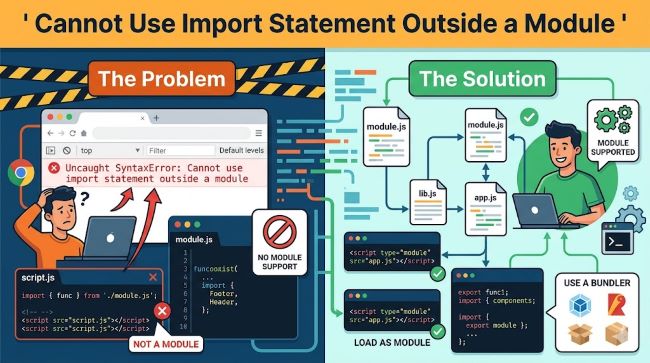
Why This Error Happens
The short answer: you’re using ES Module syntax (import) in a context that still expects CommonJS (require).
JavaScript has two module systems:
- CommonJS (CJS) — the older system Node.js used by default. You
require()things, youmodule.exportsthings. - ES Modules (ESM) — the modern standard. You
importandexport.
When you write import something from './something' but your environment doesn’t know you’re using ES Modules, it panics. It sees import and has no idea what to do with it.
That’s the whole error. It’s a mismatch between the module system your code uses and the one your environment expects.
Where You’ll See It
Node.js
The node cannot use import statement outside a module error is one of the most common versions people hit. By default, Node.js treats .js files as CommonJS. So if you write:
import express from 'express';…and run it with node index.js, you’ll get the error immediately.
Node added ES Module support in version 12, but it doesn’t just assume you want it. You have to explicitly tell it.
Browser JavaScript
Browsers support ES Modules natively, but only when the <script> tag has type="module" set. Without it:
<script src="app.js"></script>The browser treats the file as a classic script. Classic scripts don’t support import. Hence the Uncaught SyntaxError: Cannot use import statement outside a module you see in the console.
Jest
jest cannot use import statement outside a module trips up a huge number of developers. Jest runs in Node.js and uses CommonJS by default. If your source files use ES Module imports, Jest will choke unless you configure it to handle them. This is one of the messier setups to get right, especially in mixed codebases.
How to Fix Cannot Use Import Statement Outside a Module
There’s no single universal fix. The right solution depends on your environment. Here are the main approaches:
Fix 1 — Add "type": "module" to Your package.json
This is the cleanest fix for Node.js projects. Open your package.json and add:
{
  "type": "module"
}
This tells Node that all .js files in your project should be treated as ES Modules. You can now use import freely.
The tradeoff: you can no longer use require() in those files. If you have existing CommonJS code, you’ll either need to convert it or rename files to .cjs to keep them in CommonJS mode.
Fix 2 — Rename Your File to .mjs
If you don’t want to change the whole project, just rename the file using ES Modules from .js to .mjs. Node treats .mjs files as ES Modules regardless of what package.json says.
index.mjsThen run:
node index.mjsDone. No config changes needed.
Fix 3 — Convert import to require (CommonJS approach)
If you’re not ready to move to ESM, the simplest fix is to switch back to CommonJS syntax:
const express = require('express');This works everywhere by default in Node. If you’re just building something quick and don’t have a specific reason to use ES Modules, this is often the path of least resistance.
Fix 4 — Fix the Browser Script Tag
If you’re hitting Uncaught SyntaxError: Cannot use import statement outside a module in the browser, the fix is straightforward. Add type="module" to your script tag:
<script type="module" src="app.js"></script>That tells the browser this file uses ES Module syntax. It will now parse import correctly.
Note that type="module" scripts are deferred by default and run in strict mode. That’s usually fine, but worth knowing.
Fix 5 — Fix Jest Configuration
For the jest cannot use import statement outside a module error, you have a few options depending on your setup.
Option A — Use Babel
Install the necessary packages:
npm install --save-dev babel-jest @babel/core @babel/preset-envCreate a babel.config.js file:
module.exports = {
  presets: [['@babel/preset-env', {targets: {node: 'current'}}]],
};
This transforms your ES Module syntax into CommonJS before Jest runs it.
Option B — Use Jest with Native ESM Support
Jest has experimental ESM support. Set it up by:
- Adding
"type": "module"topackage.json - Adding
--experimental-vm-modulesto your Jest command:
node --experimental-vm-modules node_modules/.bin/jestThis approach avoids Babel but is still considered experimental in some Jest versions.
Using Babel or a Bundler
If your project uses a bundler like Webpack, Vite, or Rollup, they handle module transformation for you. The error often means the bundler isn’t set up correctly, or you’re running a file directly with Node instead of through the build process.
For Webpack, make sure you have the appropriate loaders. For Vite, it handles ESM natively and you rarely hit this issue in browser code, but the Node side of your config might still need attention.
Quick Reference — Which Fix to Use
| Situation | Fix |
|---|---|
| Node.js, new project | Add "type": "module" to package.json |
| Node.js, single file | Rename to .mjs |
| Node.js, staying on CommonJS | Switch to require() |
| Browser error | Add type="module" to script tag |
| Jest failing | Use Babel transform or experimental ESM |
| Using a bundler | Check bundler config, not the JS file |
A Few Things Worth Knowing
You can mix both systems carefully. If your package is "type": "module", use .cjs for CommonJS files. If it’s CommonJS by default, use .mjs for ES Module files. Node respects the file extension over the package setting.
The error message varies slightly. You might see:
SyntaxError: Cannot use import statement outside a moduleUncaught SyntaxError: Cannot use import statement outside a moduleSyntaxError: Cannot use import statement in a script
All of them mean the same thing. Same fix applies.
Node version matters. ES Module support in Node improved significantly after version 14. If you’re running something older, upgrade first, then apply the fixes above.
Key Takeaways
- The error comes from a mismatch between ES Module syntax and a CommonJS environment
- In Node.js, set
"type": "module"inpackage.jsonor use.mjsfile extensions - In browsers, add
type="module"to your<script>tag - For Jest, use Babel to transform modules or enable experimental ESM support
- If you’re using a bundler, check the bundler config before touching your JS files
If you want to deepen your skills around JavaScript tooling and build workflows, exploring topics like CSS frameworks and popular code editors can help you build a stronger foundation. And if you’re working on the UI side of things, checking out AI tools for designers and developers is worth your time.
Once you understand what’s causing the error, the fix is always straightforward. It’s one of those things that feels cryptic the first time, and obvious every time after.