Vulkan vs DX12: Which Graphics API Should You Use for Gaming?
Vulkan vs DX12 compared: performance, compatibility, stability, and when to use each. Includes what Vulkan runtime libraries are and how DirectX 11 fits in.
If you have launched a modern PC game recently, you have probably seen a prompt asking whether you want to run it with Vulkan or DX12. Most people click one without really knowing what the difference is, or they just go with whatever the game recommends and move on. But if you are trying to squeeze out better performance or troubleshoot frame rate issues, understanding the Vulkan vs DX12 choice actually matters. This guide breaks down what each API does, where they differ, and which one to pick based on your situation.
What Are Vulkan and DX12?
Both Vulkan and DirectX 12 are graphics APIs, which stands for Application Programming Interface. In simple terms, they are the bridge between a game and your GPU. Instead of game developers writing separate code for every graphics card on the market, they write to one of these standardized APIs and the GPU manufacturer handles the rest through drivers.
DirectX 12 (DX12) is developed by Microsoft. It has been included in Windows 10 and 11 and is the current version of the DirectX suite, which has been the dominant graphics standard on Windows PCs since the mid-1990s. The original version most people are familiar with is DirectX 11, which ran most games throughout the 2010s.
Vulkan was developed by the Khronos Group, a consortium of over 150 companies that also created OpenGL and WebGL. Vulkan grew out of an AMD project called Mantle and is considered the successor to OpenGL. It is cross-platform, meaning it runs on Windows, Linux, Android, Nintendo Switch, and other systems.
Vulkan vs DX12: The Key Differences
Performance and Frame Rates
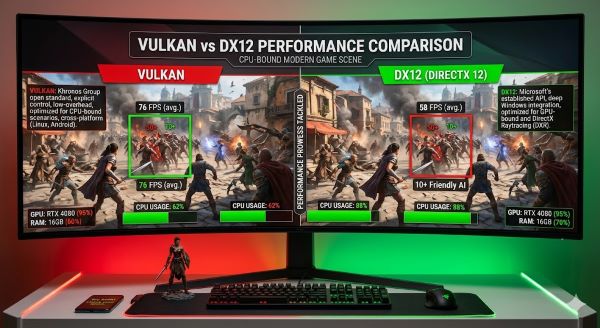
In terms of raw performance, Vulkan often edges ahead of DX12 in benchmark tests, particularly in frame rate. In CPU-limited scenarios, Vulkan’s low-overhead design means it draws less on the processor, which can produce higher average frame rates.
The trade-off is stability. Vulkan tends to produce more frame rate fluctuations than DX12. DirectX 12, while often delivering slightly lower peak frame rates, usually provides a more consistent experience with fewer drops and spikes. In practice, Red Dead Redemption 2 is a well-documented example: Vulkan can improve FPS rates by 10% or more with no loss of visual quality compared to DX12, though DX12 delivers a marginally more stable frame pacing experience.
For most players, frame stability matters more than raw peak FPS. A consistent 90fps feels smoother than 110fps that regularly drops to 70fps.
Cross-Platform Compatibility
This is where Vulkan has a meaningful structural advantage. DirectX has been developed for Windows and Windows only, meaning a game developed for Microsoft’s operating system must be ported to a different API before it can be released for game consoles or other platforms. Vulkan is a cross-platform API compatible with Linux, Android, Nintendo, macOS, and many other operating systems.
For players on Linux or using Steam’s Proton compatibility layer to run Windows games, Vulkan is often the only real option. Linux gaming has grown significantly and Vulkan’s cross-platform design is a core reason why.
Developer Complexity
DX12 has been around longer than Vulkan in its current form, and many game studios have more experience with it. Both APIs are considered “low-level,” meaning they give developers more direct control over GPU hardware than older APIs like DirectX 11 or OpenGL. That control comes with complexity, and developer experience with a given API often shows up in how well the game performs on it.
When a game runs better on Vulkan than DX12 or vice versa, developer implementation is often a bigger factor than the API itself.
What Is DirectX 11 vs Vulkan?
DirectX 11 is the older generation of the DirectX API that powered most PC games between roughly 2009 and 2019. Compared to both Vulkan and DX12, DirectX 11 is a higher-level API, meaning it handles more things automatically on behalf of the developer at the cost of some efficiency.
In practice, DirectX 11 tends to be more stable and easier to implement correctly than either DX12 or Vulkan. It is also more CPU-heavy than both modern alternatives because the driver layer does more work. For modern hardware-intensive games, DirectX 11 vs Vulkan or DX12 is not really a fair competition on performance grounds. Both modern APIs are more efficient under load on capable hardware.
Where DirectX 11 still holds ground is in older games and wider driver support across legacy hardware. If a game only offers DX11, it is not a cause for concern. It just means the developer chose the more universally stable option.
What Are Vulkan Runtime Libraries?
If you have checked your installed programs on Windows and seen “Vulkan Runtime Libraries” listed, you might have wondered what it is and whether it should be there.
Vulkan runtime libraries are a set of files installed on your system that allow Vulkan-based applications and games to run. They are installed automatically by GPU drivers from NVIDIA, AMD, and Intel. If you have a modern graphics driver installed, you almost certainly have Vulkan runtime libraries on your system.
You do not need to install them separately, and you should not uninstall them. Removing Vulkan runtime libraries would break any game or application that uses the Vulkan API. If you see them listed in your programs, they are working as intended.
Vulkan vs DX12: Which Should You Choose?
The practical answer is: test both if the game gives you the option, then stick with whichever performs better on your specific hardware.
A few useful guidelines:
- If you are on Windows with a high-end CPU: DX12 tends to deliver more stable frame pacing, which may matter more than raw FPS in competitive or visually intense games.
- If your CPU is older or less powerful: Vulkan’s lower CPU overhead can produce meaningfully better frame rates by reducing the processing burden on the processor.
- If you game on Linux or use Proton: Vulkan is almost always the correct choice. DirectX games running through Proton use a translation layer that converts DX calls to Vulkan anyway.
- If a game is running poorly in one API: Switch to the other. Some games are better optimized for one than the other regardless of general benchmarks.
- NVIDIA vs AMD: Vulkan has roots in AMD’s Mantle technology and sometimes performs slightly better on AMD hardware. NVIDIA’s drivers are strong for both, but DX12 is often the smoother pick on NVIDIA cards in titles where both are well-supported.
Quick Comparison Table
| Feature | Vulkan | DirectX 12 |
|---|---|---|
| Developer | Khronos Group | Microsoft |
| Platform support | Windows, Linux, Android, macOS, Switch | Windows only |
| Performance | Higher peak FPS in many titles | More consistent frame pacing |
| CPU overhead | Lower | Slightly higher |
| Developer maturity | Growing | Established on Windows |
| Best for | Linux gaming, AMD GPUs, CPU-limited systems | Windows PC gaming, consistent stability |
The Short Answer
Vulkan and DX12 are both modern low-level graphics APIs that give developers direct access to GPU hardware for better performance than older APIs like DirectX 11. Vulkan tends to deliver higher frame rates but with more variability. DX12 tends to be more stable, especially on Windows with NVIDIA hardware. Vulkan wins on cross-platform flexibility and CPU efficiency. If a game lets you choose, try both and pick the one that runs better on your specific setup. Vulkan runtime libraries on your system are normal and should not be removed.