Best Small Business Accounting Software: 10 Tools Compared by Price, Users, and Real Limits
Good books keep a small business alive. They show you what you earn, what you spend, and what you owe the tax office. The right software does most of that work for you. The wrong one costs you hours every month, or locks you into a plan you outgrow fast.
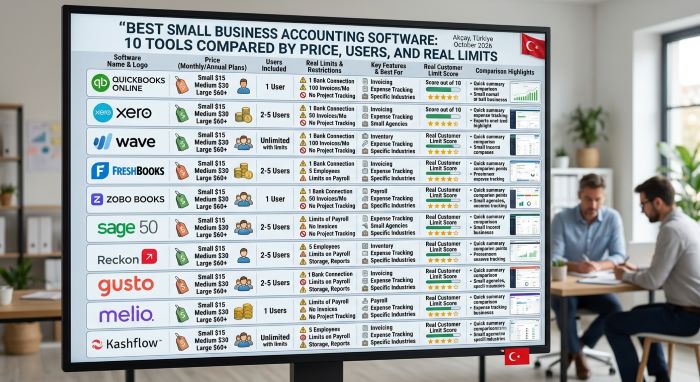
This guide compares ten tools for small business accounting. It covers paid leaders like QuickBooks Online and Xero, simple invoicing tools like FreshBooks, and free options like Wave, Zoho Books, and GnuCash. Each pick lists the price, the user limit, and the catch. If you are hunting for the best small business accounting software, start with the quick comparison table and then read the picks that fit your size.
A note on method: we checked prices and plan limits in September and October 2026 on vendor pricing pages and on recent third-party price trackers. We did not run long-term hands-on tests of every tool. Prices change often, promos come and go, and some figures differ by region and billing term. Confirm the price on the vendor’s own page before you sign up.
What Accounting Software Does for a Small Business
Accounting software records every dollar that comes in and goes out. It then turns those records into reports you can use.
Most tools handle these core jobs:
- Invoicing: create and send invoices, take card or bank payments, and chase late payers.
- Expense tracking: log bills and receipts and sort them into categories.
- Bank feeds: pull transactions from your bank so you do not type them in.
- Reconciliation: match your books to your bank statement each month.
- Reports: profit and loss, balance sheet, and cash flow.
- Tax prep: track sales tax and 1099 contractors, and give your accountant clean numbers.
Some tools add payroll, inventory, projects, and time tracking. These add value, but they also add cost. Pay only for what you use today and the next year.
Accounting vs Bookkeeping Software
People use these words as if they mean the same thing. They overlap, but there is a difference.
| Term | What It Covers | Who Usually Does It |
|---|---|---|
| Bookkeeping | Recording daily transactions, categorizing expenses, reconciling accounts | Owner, office manager, or bookkeeper |
| Accounting | Reading and using the records: reports, tax planning, forecasts, audits | Owner with an accountant or CPA |
| Accounting software | A tool that does both: records transactions and produces reports | Everyone above |
When people search for the best bookkeeping software for small business, they usually want the daily recording side done fast. Most tools in this guide cover both jobs. The difference matters when you choose a plan: the cheapest tiers cover bookkeeping, while forecasting, budgets, and advanced reports sit in higher tiers.
Best Small Business Accounting Software: Quick Comparison
Prices below are standard monthly list prices in US dollars as checked in October 2026. Promo prices are noted separately.
| Software | Free Plan | Starting Paid Price | Users on Entry Plan | Best For |
|---|---|---|---|---|
| QuickBooks Online | Solopreneur Free (very limited) | $38/month (Simple Start) | 1 | Most small businesses |
| Xero | No | $27/month (Early) | No per-user fees | Growing teams that need many users |
| FreshBooks | No | $23/month (Lite) | 1 | Service businesses and freelancers |
| Zoho Books | Yes (under about $50K revenue) | $15/month billed yearly | 1 user plus 1 accountant on Free | Best value and best free plan |
| Wave | Yes (Starter) | $19/month (Pro) | 1 on Starter | Very small businesses on a budget |
| Patriot Accounting | No | $20/month (Basic) | Not stated | US businesses that want cheap payroll |
| Odoo | One App Free | About $31.10/user/month | Unlimited on One App Free | Businesses that want a full ERP later |
| Manager.io | Desktop Edition | About $59/month (Cloud) | 1 on Desktop | Offline books at no cost |
| GnuCash | Fully free | None | 1 | Hands-on owners who know accounting |
| Akaunting | No permanent free plan | $12/month (Cloud Standard) | Varies by plan | Low-cost cloud invoicing |
The 10 Best Small Business Accounting Software Picks
1. QuickBooks Online: Best Overall
QuickBooks Online is the most widely used small business accounting tool in the US. Most accountants know it, which makes tax season easier.
| Plan | Monthly Price | Users | Key Additions |
|---|---|---|---|
| Solopreneur Free | $0 | 1 | 2 invoices a month, 1 bank account |
| Solopreneur Lite | About $20 | 1 | Unlimited invoices, sales tax tracking |
| Simple Start | $38 | 1 | Full double-entry books, bank feeds, bills |
| Essentials | $85 | 3 | Multi-currency, time on invoices |
| Plus | $140 | 5 | Projects, budgets, inventory |
| Advanced | $340 | 25 | Custom permissions, batch invoicing, workflow automation |
Intuit raised Essentials, Plus, and Advanced prices on August 1, 2026, according to reports from accounting trade sites. Simple Start stayed at $38. New customers can usually pick a 30-day free trial or a discount for the first few months.
Pros: Deep feature set, huge app marketplace, and nearly every accountant can work in it. Strong bank feeds and reports.
Cons: Price climbs quickly as you add users. Payroll, payments, and time tracking cost extra. The Solopreneur plans are a lighter product without a custom chart of accounts.
Choose it if: you want the safe, standard choice and plan to work with an outside accountant. For most readers, this is the best small business accounting software to test first.
2. Xero: Best for Teams That Need Many Users
Xero charges by plan, not by seat. That makes it cheaper than QuickBooks once you have several people who need access.
| Plan | Regular Price | Limits and Key Features |
|---|---|---|
| Early | $27/month | 20 invoices and quotes, 5 bills a month, 30-day cash flow forecast |
| Growing | $59/month | Full invoicing and bill automation, budgets, auto-reconciliation |
| Established | $97/month | Multi-currency, projects, expense claims, 180-day forecast |
Xero raised US list prices on October 1, 2026. Its pricing page also lists an 80% discount for three months for new US customers. Payroll runs through Gusto as an add-on at $36 a month plus $6 per person.
Pros: No per-user license fees. Clean design. Strong bank reconciliation and a large app store.
Cons: The Early plan’s caps on invoices and bills are tight. Payroll is a separate service.
Choose it if: you have a bookkeeper, a partner, and an accountant who all need to log in.
3. FreshBooks: Best for Service Businesses
FreshBooks began as an invoicing tool, and it still shows. Its invoices, time tracking, and client portal are among the easiest to use.
| Plan | Monthly Price | Billable Clients |
|---|---|---|
| Lite | $23 | 5 |
| Plus | $43 | 50 |
| Premium | $70 | Unlimited |
| Select | Custom quote | Unlimited |
Each plan includes one user. Extra team members cost about $11 a month each. FreshBooks often runs deep discounts for the first few months, so check the regular price that follows.
Pros: Fast, friendly invoicing. Good time tracking and project tools for agencies and consultants.
Cons: Client caps on the lower plans. Accounting reports start on Plus. Costs rise as your team grows.
Choose it if: you bill clients for time or projects and want invoicing to feel effortless.
4. Zoho Books: Best Value and Best Free Plan
Zoho Books gives you a lot for little money. It also has one of the most generous free plans in this guide.
| Plan | Price Billed Yearly | Price Billed Monthly | Users | Invoices a Year |
|---|---|---|---|---|
| Free | $0 | $0 | 1 plus 1 accountant | 1,000 |
| Standard | $15/month | $20/month | 3 | 5,000 |
| Professional | $40/month | $50/month | 5 | 10,000 |
| Premium | $60/month | $70/month | 10 | 25,000 |
| Elite | $120/month | $150/month | 10 | 100,000 |
The free plan is aimed at businesses with less than about $50,000 in yearly revenue. It covers invoices, expenses, bank reconciliation, and many reports. Automatic bank feeds and sales tax tracking need a paid plan.
Pros: Low prices, strong automation, and smooth links to other Zoho apps like CRM and Inventory.
Cons: Fewer US accountants know it. The free plan drops bank feeds, which means more manual work.
Choose it if: you want solid features at a low price, or you already use other Zoho tools.
5. Wave: Best Free Option for Very Small Businesses
Wave has long been the name people think of first for free accounting software for small business owners. Its plans changed in 2026, so read the details.
| Plan | Price | What You Get |
|---|---|---|
| Starter | $0 | Unlimited invoicing, manual income and expense tracking, core reports |
| Pro | $19/month or $190/year | Automatic bank feeds, receipt scanning, collaborator access, auto reminders |
On June 1, 2026, Wave moved to two tiers. Automatic bank feeds and extra users are now Pro only. Starter users must upload statements or enter transactions by hand. Starter is available in the US and Canada. Card payments cost extra per transaction, and payroll is a separate paid service.
Pros: Truly free invoicing and reports. Simple to learn.
Cons: No bank feeds on the free plan now. Limited support. Thin features for growing firms.
Choose it if: you are a solo owner with few transactions and a tight budget.
6. Patriot Accounting: Best Low-Cost Pick With Payroll
Patriot Software is a US company known for cheap, simple payroll. Its accounting product pairs well with it.
| Plan or Add-On | Monthly Price |
|---|---|
| Accounting Basic | $20 |
| Accounting Premium | $30 |
| Basic Payroll | $17 plus $4 per person |
| Full Service Payroll | $37 plus $4 per person |
Full Service Payroll files and pays federal, state, and local payroll taxes for you. Patriot has often offered a 30-day trial to new customers, but confirm current terms with the company.
Pros: Low combined price for books and payroll. US-based support.
Cons: Smaller app ecosystem. Fewer advanced reports than QuickBooks or Xero.
Choose it if: you have a few employees and want accounting and payroll in one cheap place.
7. Odoo Accounting: Best for Businesses That Want an ERP Later
Odoo is a suite of business apps: accounting, CRM, inventory, sales, and more. Its One App Free plan lets you run one app at no cost.
| Plan | Price | What You Get |
|---|---|---|
| One App Free | $0 | One app of your choice, unlimited users, hosting |
| Standard | About $31.10/user/month billed yearly | All apps, Odoo Online hosting |
| Custom | About $46.70/user/month billed yearly | Studio, multi-company, external API |
If you pick Accounting as your one free app, you get full double-entry books with unlimited users. The moment you add a second app, you move to a paid plan for every user.
Pros: Free for unlimited users on one app. Room to grow into a full business system.
Cons: Steeper learning curve. Paid plans get costly with large teams.
Choose it if: you expect to add inventory, sales, or manufacturing tools down the road.
8. Manager.io: Best Free Desktop Accounting
Manager.io offers a free Desktop Edition with full accounting features and no usage limits. It runs on Windows, Mac, and Linux and works offline.
| Edition | Price | Notes |
|---|---|---|
| Desktop | Free | Full features, offline, single computer |
| Cloud | About $59/month (trackers also list $39) | Remote and multi-user access, automatic backups |
Pros: Free with no caps. Strong double-entry tools. Your data stays on your computer.
Cons: No bank feeds on desktop. You handle your own backups. Few US accountants use it.
Choose it if: you want real accounting at no cost and do not need cloud access.
9. GnuCash: Best Open-Source Option
GnuCash is free, open-source desktop software. It has been around for more than two decades and uses true double-entry bookkeeping.
Pros: Completely free with no subscription. Handles invoices, bills, and reports. Runs on Windows, Mac, and Linux.
Cons: Dated look. No built-in payroll or cloud access. You need to understand debits and credits.
Choose it if: you know accounting basics and want full control at zero cost.
10. Akaunting: Best Low-Cost Cloud Option
Akaunting is a web-based accounting tool with an app store for extra features.
| Plan | Monthly Price |
|---|---|
| Cloud Standard | $12 ($8 billed yearly) |
| Cloud Premium | $36 |
| Cloud Elite | $84 |
| Cloud Ultimate | $218 |
Trackers report that double-entry tools and bank feeds start on Premium, so check what the entry plan includes before you buy. It offers a free trial but no permanent free plan on the cloud version.
Pros: Low entry price. Modern design. Extra apps for specific needs.
Cons: Key features sit in higher tiers. Smaller support network.
Choose it if: you want a cheap cloud tool for invoicing and simple books.
Best Free Accounting Software for Small Business
Free tools can work well, but each one cuts something. Here is what you give up.
| Tool | What Is Free | Main Catch |
|---|---|---|
| Wave Starter | Unlimited invoices, core reports | No bank feeds or extra users |
| Zoho Books Free | 1 user plus accountant, 1,000 invoices a year | Revenue limit near $50K, no bank feeds |
| QuickBooks Solopreneur Free | Basic income and expense split | Only 2 invoices a month, 1 bank account |
| Odoo One App Free | Full accounting app, unlimited users | Adding a second app triggers paid plans |
| Manager.io Desktop | Full features, no limits | Offline only, no bank feeds |
| GnuCash | Everything | Steep learning curve, desktop only |
The best free accounting software for small business owners depends on how many transactions you have. Under 50 a month, manual entry is fine, so Wave Starter or Zoho Books Free works. Above that, the hours you spend typing cost more than a paid plan. That is when bank feeds pay for themselves.
How to Choose the Right Tool
Picking the best small business accounting software comes down to five questions.
| Question | Why It Matters | What to Look For |
|---|---|---|
| How many people need access? | Many tools charge per user | Xero or Odoo for large teams |
| Do you run payroll? | Payroll adds the most cost | Patriot, QuickBooks, or Xero with Gusto |
| How many transactions a month? | Manual entry gets slow fast | Paid plans with bank feeds above about 50 |
| What does your accountant use? | Shared tools save fees | Ask before you choose |
| Do you sell products? | Inventory needs special features | QuickBooks Plus, Zoho Books, or Odoo |
Before you pick a tool, get your plan straight. If you are just starting, our guide on what must an entrepreneur do after creating a business plan covers the steps that come before setting up your books, like registering the business and opening a bank account.
Which Tool to Pick by Business Type
| Business Type | Top Pick | Runner-Up |
|---|---|---|
| Freelancer or solo consultant | FreshBooks | Wave |
| Small retail or ecommerce shop | QuickBooks Online | Zoho Books |
| Agency with 5+ staff | Xero | QuickBooks Online |
| Startup on a tight budget | Zoho Books Free | Wave Starter |
| Firm with hourly employees | Patriot Accounting | QuickBooks Online |
| Manufacturer or distributor | Odoo | QuickBooks Plus |
| Owner who prefers offline books | Manager.io | GnuCash |
For most owners searching for the best bookkeeping software for small business use, the choice narrows to QuickBooks Online, Xero, or Zoho Books. All three link to banks, handle sales tax, and work well with accountants.
Hidden Costs to Watch
The sticker price is rarely the full cost. Watch for these extras.
| Cost | Typical Range | Where It Shows Up |
|---|---|---|
| Promo price ending | Price can jump 2x to 5x | QuickBooks, Xero, FreshBooks |
| Extra users | About $3 to $11 per user per month | FreshBooks, Zoho Books |
| Payroll | About $17 to $50+ per month plus a per-person fee | Nearly every tool |
| Card processing | About 2.9% plus a fixed fee per payment | All tools with online payments |
| Receipt scanning | Often a paid tier or add-on | Wave, FreshBooks Lite |
| Price increases | Often yearly | QuickBooks raised prices in August 2026 |
Software bills add up, just like any other expense. Our list of best practices to avoid small business overspending has tips for auditing subscriptions and cutting costs you no longer need.
How to Switch or Set Up Your Books
Even the best small business accounting software only works if you set it up well. Moving to a new tool takes planning. Follow these steps.
- Pick a start date. The start of a month or quarter is cleanest.
- Export your data. Pull your chart of accounts, customer list, vendor list, and open invoices.
- Close the old period. Reconcile your bank accounts up to the switch date.
- Set up the new tool. Import lists, connect bank feeds, and set opening balances.
- Run both for one month. Compare reports to catch errors.
- Bring in your accountant. Give them access and ask them to review the setup.
Many tools offer free import help. FreshBooks has a paid Easy Switch service on its Select plan, and Xero offers a coach for the first 90 days.
Common Mistakes to Avoid
Small business accounting goes wrong in a few familiar ways.
- Mixing personal and business money. Open a separate business account and card.
- Skipping monthly reconciliation. Errors pile up and become hard to find.
- Buying more plan than you need. Start small and upgrade when a limit bites.
- Ignoring sales tax. Set up tax rates on day one.
- Not backing up desktop files. Desktop tools like GnuCash need your own backups.
- Choosing alone. Ask your accountant which tool they prefer.
Frequently Asked Questions
What is the easiest accounting software for a beginner? FreshBooks and Wave are the easiest to learn. Both focus on invoicing and simple expense tracking.
What is the best bookkeeping software for small business owners who hate data entry? Pick a paid plan with bank feeds and auto-categorizing, such as QuickBooks Online, Xero, or Zoho Books Standard.
Is there truly free accounting software? Yes. Wave Starter, Zoho Books Free, Odoo One App Free, Manager.io Desktop, and GnuCash all have no monthly fee. Each has limits, such as no bank feeds or a revenue cap.
Is QuickBooks worth the price? For many businesses, yes. Its features and accountant support save time. Very small firms may do fine with a cheaper tool.
Which tool is best for a business with many users? Xero and Odoo. Xero has no per-user fees, and Odoo One App Free allows unlimited users on one app.
Do I still need an accountant if I use software? Usually yes, at least at tax time. Software records the numbers, and an accountant helps you plan and file.
Can I switch accounting software mid-year? Yes. Pick a clean start date, close your old books to that date, and import opening balances into the new tool.
Which tools include payroll? QuickBooks, Patriot, Wave, and Xero (through Gusto) offer payroll, all as paid add-ons.
What is a bank feed? A bank feed is a live link that pulls transactions from your bank into your books. It saves hours of typing each month.
Final Thoughts
There is no single winner for every firm. QuickBooks Online is the safe all-round choice. Xero suits teams with many users. FreshBooks fits service businesses that live on invoices. Zoho Books offers the best value and a strong free plan. Wave, Manager.io, and GnuCash prove you can keep good books for free if you accept some manual work.
The best small business accounting software is the one you will open every week. Pick a tool that fits your size today, check that your accountant can use it, and confirm the current price before you commit. Then reconcile every month. Good habits matter more than any feature list.
Key Takeaways
- The best small business accounting software for most firms is QuickBooks Online, with Xero and Zoho Books as strong alternatives.
- QuickBooks raised Essentials, Plus, and Advanced prices on August 1, 2026, while Simple Start stayed at $38 a month.
- Xero charges by plan, not by user, which saves money for larger teams.
- Zoho Books has the most generous free plan, aimed at firms under about $50,000 in revenue.
- Wave Starter is still free, but bank feeds moved to the paid Pro plan in June 2026.
- Watch for promo prices that end, per-user fees, and payroll add-ons.
- Confirm prices on each vendor’s site before you buy, since plans change often.