How to Turn Video Into Transcript and Convert Videos to Text
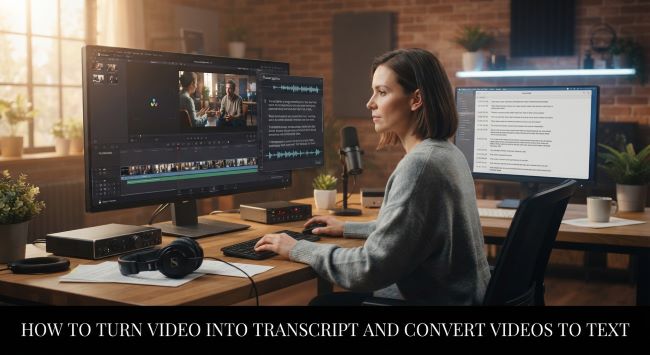
A few weeks ago, I received a recorded interview that contained several useful answers for a project. The video itself was clear, and the conversation was easy to understand when watching it.
The difficult part came later.
I needed to find one specific point from the discussion, but I could only remember the general topic. I did not remember the exact minute, the wording of the answer, or where the speaker mentioned it.
Going through the entire recording again was possible, but it was not the most efficient way to find one piece of information.
This is a common problem with long videos. The content exists, but accessing a specific detail requires searching through a timeline.
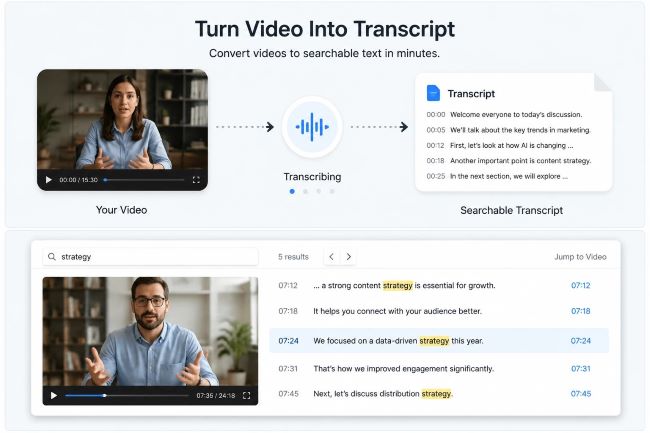
Learning how to turn video into transcript creates a different way to work with recordings. A transcript converts spoken content into searchable text, allowing people to find important sections, review information faster, and return to the original video when context is needed.
The goal is not to replace the video. It is to make the information inside the video easier to access.
Why Turn Video Into Transcript?
Videos are useful because they capture complete conversations, explanations, and demonstrations. However, video content is usually designed to be watched from beginning to end.
Searching inside a video is different from searching inside a document.
When someone needs to find a specific detail, they often have to:
- Remember approximately when it appeared
- Move through the timeline
- Listen to several sections
- Confirm whether the information is relevant
This process becomes difficult as videos become longer.
A one hour interview may contain only a few minutes of information that someone needs. A recorded class may contain one explanation that a student wants to review. A webinar may include a specific answer that a team needs later.
A video to transcript workflow creates a searchable text layer around the recording.
Instead of searching only by time, users can search by words, topics, and phrases.
This makes video content easier to revisit after the original viewing.
How to Turn YouTube Video Into Transcript
Many useful videos are published on YouTube.
The platform contains interviews, tutorials, educational videos, industry discussions, and presentations. These videos often contain valuable information, but finding one specific part inside a long recording can take time.
A transcript makes the process more efficient.
When you turn YouTube video into transcript, the spoken content becomes available as searchable text.
This allows users to:
- Search important keywords
- Find specific sections
- Review discussions faster
- Create research notes
- Return to exact moments through timestamps
For example, someone researching a topic may not need to watch several hours of interviews again. They can search transcripts to identify relevant sections first, then review the original videos for additional context.
A transcript helps locate information. The original video confirms the complete meaning.
How to Create Transcript From Video Files
Not every important video is available online.
Many recordings are stored as files, including:
- Interviews
- Online courses
- Meeting recordings
- Training videos
- Presentations
- Personal recordings
These videos often contain useful information, but reviewing them manually takes time.
A workflow that can create transcript from video helps convert uploaded recordings into searchable text.
The process usually follows a simple path:
- Upload the video file.
- Generate the transcript.
- Search or review the text.
- Return to the original recording when necessary.
This approach is useful when the video is private or stored locally.
The transcript provides a faster way to locate information while keeping the original recording available for verification.
What Can You Do With a Video Transcript?
A transcript becomes valuable when people need to reuse information from existing videos.
The purpose is not simply creating another file. The purpose is making the content easier to work with.
Research and Learning
Students, researchers, and professionals often use videos as sources of information.
A transcript allows them to search lessons, interviews, and discussions without replaying the entire recording.
Important explanations, definitions, and viewpoints become easier to find.
This is especially useful for long educational videos where important details may appear only once.
Content Creation
Many articles, newsletters, and social posts begin with video research.
Creators may watch interviews, discussions, or tutorials before writing new content. The challenge is remembering where useful ideas appeared.
A transcript helps organize this process.
Writers can identify:
- Common questions
- Frequently discussed topics
- Useful explanations
- Relevant quotes
The transcript supports research while the original video remains the source for context.
Business Review and Documentation
Organizations often record meetings, presentations, and customer conversations.
These recordings may contain important decisions or insights, but finding them later can be difficult.
A transcript makes previous discussions easier to review.
Teams can search past conversations, locate important points, and create written references without watching every recording again.
How to Review a Video Transcript Correctly
A transcript makes searching faster, but important information still needs review.
Spoken language contains details that text alone may not fully represent.
A good review process includes several steps.
Check the Original Video
After finding a useful section in the transcript, return to the recording.
The video provides:
- Tone
- Visual information
- Speaker intention
- Additional context
This helps avoid misunderstanding short sections that may depend on the surrounding conversation.
Verify Important Details
Some information requires extra attention.
Common examples include:
- Names
- Numbers
- Dates
- Technical terms
- Product names
A small transcription mistake can affect the meaning of important information.
For published content, research, or business decisions, verification is an important step.
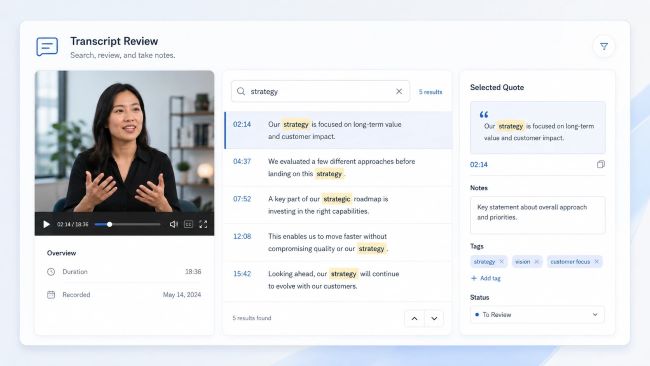
Keep Timestamps With Notes
A transcript becomes more useful when notes remain connected to the original recording.
Useful notes usually include:
- The important passage
- Timestamp
- Source video
- Additional comments
This allows people to return to the exact section later without searching again.
What Makes a Useful Video Transcript?
A useful transcript is more than a block of converted text.
Several elements make it easier to use.
Searchable Content
The main advantage of transcription is being able to find information quickly.
Users should be able to search words and topics instead of reading every sentence manually.
Timestamps
Timestamps connect written content with the original video.
They help users verify information and return to specific moments.
Clear Formatting
Long transcripts can become difficult to read without structure.
Readable sections, speaker labels, and organized formatting make reviewing easier.
Connection to the Original Video
The transcript should always remain connected to the source.
Text improves accessibility, but the original recording contains information that text cannot fully capture.
How Accurate Are Video Transcripts?
Automatic transcription can save significant time, but accuracy depends on the recording quality.
Several factors can influence results:
- Background noise
- Audio quality
- Multiple speakers
- Uncommon vocabulary
- Different accents
For general review, a transcript may provide enough information.
For important content, users should compare key sections with the original video.
The best workflow combines speed with careful review.
Use the transcript to find information. Use the video to confirm it.
Final Thoughts
Videos often contain valuable information, but finding that information later can be difficult.
Learning how to turn video into transcript creates a practical connection between spoken content and searchable text.
Whether the source is a YouTube video, an interview recording, or another type of video file, transcripts help people locate information faster and organize content more efficiently.
The purpose of transcription is not to replace video. It is to make existing video content easier to search, review, and use.