Which of the Following Is True of Removable Media and Portable Electronic Devices?
Removable media and portable electronic devices have become a fact of modern life. You might use a USB flash drive to back up files, carry an external hard drive between home and office, or sync data on a smartphone or tablet. These devices offer flexibility and mobility that felt impossible just two decades ago. But with that convenience comes real complexity, and not every statement you hear about them is accurate.
If you’re studying for an exam, preparing for workplace security training, or just trying to understand your tech setup better, understanding what’s actually true about removable media and portable electronic devices matters. Let’s break down the facts, separate them from common misconceptions, and help you make smarter decisions about how you handle your data.
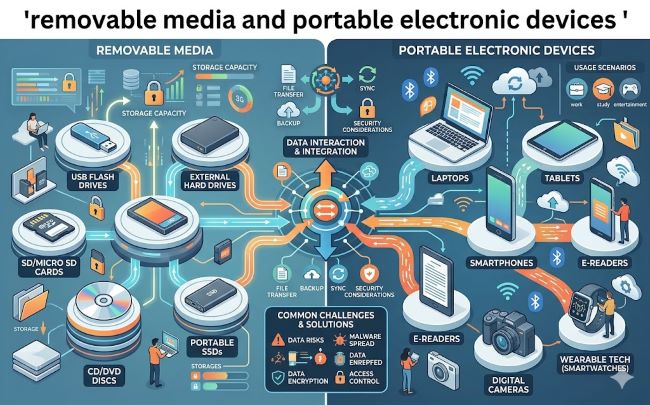
What Counts as Removable Media and Portable Electronic Devices
Before we answer which statements are true, let’s define what we’re talking about. Removable media includes any physical storage device that plugs into a computer or other system. USB flash drives are the most common example. External hard drives, SD cards from digital cameras, optical discs like CDs and DVDs, and magnetic tapes all fit this category. You remove them from one device and insert them into another.
Portable electronic devices are broader. They include laptops, tablets, smartphones, smartwatches, fitness trackers, Bluetooth headphones, and e-readers. These devices can move with you from place to place and often contain their own storage built in. The key feature is that they’re designed to be transported while still holding data and possibly connecting to networks wirelessly.
The overlap matters. A smartphone is a portable electronic device that also contains removable media if you can add an SD card. A laptop is portable but usually doesn’t have removable storage. An external hard drive is removable media that’s somewhat portable, though you probably wouldn’t take it everywhere. Understanding these categories helps you recognize why the statements about them matter.
Key Truths About Removable Media and Portable Devices
Several facts consistently hold up across real-world use and security research. Let’s walk through the important ones.
Removable media poses data loss and theft risks. This is perhaps the most fundamental truth. Any device that can be disconnected and carried away can be lost or stolen. When a USB drive disappears from your desk, you lose not just the device but all the data stored on it. When an external hard drive is taken during a break-in, the thief gets access to potentially years of files, photos, and documents. This vulnerability has been true since the first USB drives appeared and remains true today. The difference is that now, the impact is bigger because we store more data on these devices.
They are vulnerable to malware and viruses. Unknown USB drives carry real danger. You should never plug in a USB device from an untrusted source. Malicious actors have created infected USB drives that appear to be promotional giveaways or innocent lost items, but once plugged into your computer, they deliver malware, ransomware, or trojans. Even if you got the drive from someone you know, if you’re unsure how they handled it, the risk remains. This is one area where the security community is nearly unanimous. The phrase “never plug in an unknown USB drive” appears in security training from government agencies, corporations, and security firms worldwide.
Encryption significantly reduces the impact if a device is lost or stolen. If your removable media and portable devices are encrypted, and someone gains physical access to them, the data remains unreadable without the encryption key or password. This is why security policies at organizations often require that confidential information stored on portable devices be encrypted. On smartphones and tablets, modern encryption is built in and tied to your passcode. For external hard drives and USB devices, encryption is an additional step you need to take, but it’s one of the most effective protections available. This truth has only grown more important as data breaches have increased and privacy regulations have tightened.
Portable devices require the same security practices as computers. Many people treat their phones and tablets more casually than they treat their laptops, but this creates a real security gap. Your smartphone contains contacts, emails, financial information, location history, and photos. It connects to networks regularly. Yet people often use weak passwords, never update their software, and fail to lock their screens. The truth is that your phone needs a strong passcode, regular software updates, and careful app permissions just as much as your computer does. This includes understanding privacy controls on your devices so you know what information they’re tracking and sharing.
Data loss from removable media is often permanent. While it’s technically possible to recover data from a deleted device in some cases, recovery is expensive, time consuming, and not guaranteed. For most people with personal devices, once data is gone from removable media, it’s gone for good. This is why the backup strategy matters so much. If your only copy of your family photos is on a USB drive, and that drive fails or gets lost, you’ve lost those photos permanently.
Common Misstatements and What’s Actually True
Several claims about removable media and portable devices sound plausible but don’t hold up to scrutiny.
“Cloud storage has made removable media completely obsolete.” While cloud services like Google Drive, OneDrive, and Dropbox have reduced the need for removable media in many cases, they haven’t eliminated it. Millions of people still use USB drives and external hard drives. Organizations often restrict cloud uploads for security reasons, making local storage the only option. Cloud services can be compromised or inaccessible if your internet connection fails. For these reasons, removing removable media entirely from your strategy would be unwise for most people.
“If I encrypt my device, I don’t need to worry about losing it.” Encryption helps, but it’s not a complete solution. If you lose a device, you still lose the hardware itself. That external hard drive or laptop that went missing represented an investment. Encryption protects your data, but it doesn’t get your hardware back or prevent the inconvenience of replacing it. A backup strategy combined with encryption is more robust than encryption alone.
“All portable devices have built-in security that protects everything.” Modern smartphones and tablets do encrypt data by default, which is good. But encryption is just one layer. You still need to set a strong passcode, enable automatic locking, keep your software updated, and manage app permissions carefully. Built-in security is a foundation, not a complete system.
Best Practices for Removable Media and Portable Devices
Now that we’ve covered what’s actually true, here’s how to use this knowledge in practice.
- Encrypt sensitive data. Whether you’re using a USB drive for work files or storing backup data on an external hard drive, encrypt the device. For portable devices like tablets and phones, enable your device’s encryption feature. This is one of the highest-impact security decisions you can make.
- Never plug in unknown USB devices. This rule is absolute. If you find a USB drive in a parking lot, don’t plug it in. If someone hands you a USB drive and you’re unsure about it, don’t use it without scanning it with security software first. A single infected drive can compromise your entire system.
- Lock your devices physically and digitally. Use a strong password or passcode. Enable automatic screen locking. For work devices, consider using biometric authentication like fingerprints or face recognition as a second factor. Make sure your home wireless network is also secure, since you’ll likely use these devices on that network. Simple steps like updating your router password significantly reduce your risk.
- Keep multiple backups. Follow the 3-2-1 backup rule: keep three copies of important data, on two different types of storage, with one copy stored off-site. This means if your external hard drive fails, you still have your data on cloud storage and another backup.
- Update your devices regularly. Software updates often include security patches. Outdated devices are vulnerable devices. Whether it’s your laptop, phone, or tablet, prioritize keeping the operating system current.
- Use caution on public networks. Portable devices frequently connect to public Wi-Fi at coffee shops and airports. Avoid accessing sensitive information like banking or work files on these networks. If you must, use a VPN to encrypt your connection.
- Label and document removable media. If you use removable media, label it with the maximum classification of data it contains, the date it was created, and who created it. This sounds formal, but it prevents accidents where someone else uses the drive with sensitive data without understanding what’s on it.
Key Takeaways
- Removable media and portable devices are essential tools that carry real security and data loss risks which require careful handling to mitigate effectively
- Encryption is one of the highest-impact security measures you can take to protect data if a device is lost or stolen
- Unknown USB drives pose serious malware threats and should never be connected to your systems without expert security scanning
- Portable devices like smartphones require the same strong security practices as computers, including passcodes, updates, and privacy controls
- Data loss from removable media is often permanent without expensive and unreliable recovery services, making backup strategies critical
- Cloud services have reduced but not eliminated the need for local removable media in most personal and business scenarios
- Physical security matters as much as digital security because a lost or stolen device represents both hardware loss and potential data exposure
- A comprehensive approach combining encryption, backups, careful device handling, and regular updates provides the strongest protection for your removable media and portable devices