Partial Prerendering: What It Is, How It Works, and Why It Changes Web Performance
Partial prerendering is a Next.js rendering strategy that serves a static HTML shell instantly while streaming dynamic content in parallel. This guide explains how it works, what caching means in this context, and why it matters for web performance.
Web rendering has been a problem looking for a better solution for years. Static sites are fast but cannot handle dynamic, personalized content. Server-rendered pages handle dynamic content but introduce latency on every request. Client-side rendering handles interactivity but produces blank screens during initial load. Every approach involves a trade-off that developers have been working around rather than solving. Partial prerendering is Next.js’s attempt to resolve this trade-off at the framework level rather than leaving developers to patch it together themselves.
Introduced as an experimental feature in Next.js 14 and moved toward stable in Next.js 15, partial prerendering fundamentally changes how a page can be delivered: the static shell of the page arrives from a cache at near-instant speed, while dynamic sections stream in from the server in parallel. The user sees something immediately. The dynamic content fills in without blocking the initial render. This guide explains how that works, what caching means throughout the process, and what you need to understand to start using it.
What Is Prerendering?
Before getting into the partial version, it is worth being clear about what prerendering itself means in web development.
Prerendering is the process of generating HTML for a page before a user requests it. Instead of waiting for a user to visit a URL and then running server-side logic to produce the HTML, prerendering produces that HTML in advance and stores it so it can be served immediately when requested.
The most familiar form of prerendering is Static Site Generation (SSG), where the framework builds every page’s HTML at build time. You deploy the HTML files, and when a user visits, they get instant HTML with no server processing required.
The limitation of traditional prerendering is that the HTML is generated once and stays the same until the next build. For pages with content that changes frequently or content personalized to each user, full static prerendering does not work. You need some server-side logic on each request.
Partial prerendering takes prerendering and applies it selectively: only the parts of the page that can be determined in advance get prerendered. The parts that require per-request data are handled differently.
How Partial Prerendering Works in Next.js
Partial prerendering in Next.js operates through a combination of three existing technologies: React Suspense, streaming, and the edge cache.
The Static Shell
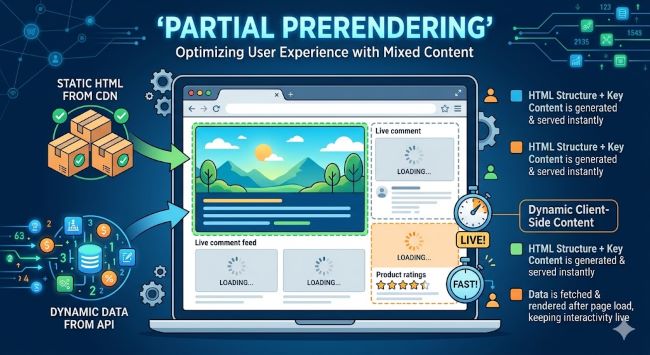
When you build a Next.js application with partial prerendering enabled, the build process generates a static HTML shell for each page. This shell contains everything that is the same for every visitor: the layout, navigation, header, footer, any static content, and Suspense boundary placeholders where dynamic content will appear.
The shell does not contain dynamic data. It contains the structure of the page and visual placeholders for the parts that will be filled in per-request.
This shell is stored in the cache at the CDN edge, close to users around the world. When a user requests the page, the shell arrives within milliseconds because it is served from the nearest edge location without any server processing.
The Dynamic Holes
The parts of the page that require per-request logic are wrapped in React Suspense boundaries in your code. Anything inside a Suspense boundary that uses dynamic functions (cookies(), headers(), or fetches without caching) gets identified by Next.js as a dynamic section.
When partial prerendering is active, these dynamic sections become the “holes” in the static shell. They are represented by a loading state or skeleton in the shell, and the actual content streams in from the server simultaneously with the shell being delivered.
The key word is simultaneously. The static shell does not wait for dynamic content. The server starts computing the dynamic sections at the same time the shell is being delivered to the browser. By the time the shell has rendered in the user’s browser, the dynamic content is either already on its way or already arrived.
How This Looks to the User
From a user experience perspective, partial prerendering produces a page that appears to load in two stages:
- The page structure appears immediately, with loading states where dynamic content will go
- The dynamic content streams in and replaces the loading states within a short time
This is measurably faster than waiting for all server-side processing to complete before showing anything, which is what server-side rendering (SSR) does. And it is more flexible than pure static generation because the dynamic sections can show fresh, personalized data on every request.
What Is Caching in This Context?
Partial prerendering introduces several layers of caching that work together. Understanding what is caching at each layer clarifies why the approach is faster than alternatives.
What Is App Cache?
What is app cache in a Next.js partial prerendering context refers to Next.js’s own data cache, which stores the results of fetch calls. When your dynamic section makes a fetch request to an API, Next.js can cache that response so subsequent requests for the same data do not need to re-fetch from the origin. The app cache sits at the application level and is distinct from the browser cache and the CDN cache.
What Is Cached Data?
What is cached data is a broader concept that applies across all layers. Cached data is a previously computed result stored so it can be retrieved faster than computing it again. In partial prerendering:
- The static shell is cached data: computed at build time and stored at the CDN edge
- Fetch responses can be cached data: stored in the data cache with configurable expiry times
- Route data can be cached: the Full Route Cache stores the rendered output of routes that are fully static
What Are Caches in the Next.js Rendering Pipeline?
What are caches in Next.js covers four distinct layers:
- Request Memoization: Within a single server render, identical fetch calls return the same result without hitting the network twice
- Data Cache: Persists fetch responses across requests and deployments, with configurable revalidation
- Full Route Cache: Stores the statically generated output of pages at build time or after revalidation
- Router Cache: Client-side cache that stores page segments the user has already visited, enabling instant navigation between already-seen pages
Partial prerendering primarily interacts with the Full Route Cache (for the static shell) and the Data Cache (for the fetch calls inside dynamic sections).
Enabling Partial Prerendering in Next.js
Partial prerendering is enabled per-route in Next.js 15. To activate it:
// In your layout.tsx or page.tsx file
export const experimental_ppr = true
You also need to enable it in your next.config.js:
/** @type {import('next').NextConfig} */
const nextConfig = {
  experimental: {
    ppr: 'incremental',
  },
}

module.exports = nextConfig
The 'incremental' option means partial prerendering is opt-in per route rather than applied globally. This lets you migrate routes gradually rather than converting everything at once.
Once enabled, Next.js automatically identifies which parts of your page are static and which are dynamic based on whether they use dynamic functions (cookies, headers, searchParams) or uncached fetches.
Writing Code for Partial Prerendering
The main change to your code involves wrapping dynamic sections in Suspense boundaries. This is the signal to Next.js that a component should be treated as a dynamic hole rather than part of the static shell.
import { Suspense } from 'react'
import { StaticContent } from './static-content'
import { DynamicFeed } from './dynamic-feed'
import { DynamicSkeleton } from './dynamic-skeleton'

export default function Page() {
  return (
    <main>
      <StaticContent />  {/* This goes into the static shell */}
      <Suspense fallback={<DynamicSkeleton />}>
        <DynamicFeed />  {/* This streams in dynamically */}
      </Suspense>
    </main>
  )
}
The DynamicSkeleton component is what users see in the static shell while DynamicFeed is loading. The skeleton should visually represent the space and approximate shape of the content it is loading, so the layout does not shift when content arrives.
The DynamicFeed component makes its data fetches and does its server-side work. Because it is inside a Suspense boundary, Next.js knows to exclude it from the static shell and stream it separately.
Partial Prerendering vs. Other Rendering Approaches
Understanding how partial prerendering compares to existing approaches clarifies when to use it.
vs. Static Site Generation (SSG): SSG generates a fully static page at build time. Fast, but cannot handle dynamic, per-request content. Partial prerendering adds the ability to have dynamic sections within a static page.
vs. Server-Side Rendering (SSR): SSR generates the full page on each request. Handles dynamic content but introduces request-time latency. Partial prerendering moves the static parts to the cache, so only the dynamic parts need request-time processing.
vs. Client-Side Rendering (CSR): CSR sends a mostly empty HTML file and renders everything in JavaScript in the browser. Causes blank screens during initial load and is bad for SEO. Partial prerendering sends real HTML immediately (the shell) and streams in real content, not empty JavaScript placeholders.
vs. Incremental Static Regeneration (ISR): ISR regenerates static pages on a timer or on-demand, keeping them fresh without a full rebuild. Partial prerendering handles per-request dynamic content that ISR cannot, because ISR pages are still fully static.
When Partial Prerendering Makes Sense
Partial prerendering is not always the right choice. It works best for pages where:
- A significant portion of the layout is static (navigation, headers, sidebars, marketing copy)
- Dynamic sections are isolated and can be wrapped in Suspense boundaries
- You need personalized or real-time content alongside static content
- Time to First Byte (TTFB) and perceived load performance matter
It is less useful for pages that are entirely dynamic (every user sees completely different content from the same page structure) or for pages that are entirely static (just use full static generation).
E-commerce product pages are a strong use case: the product layout, images from a CDN, and static copy can all be in the static shell, while pricing (potentially varying by user location or promotions), stock availability, and personalized recommendations stream in dynamically.
Dashboard pages are another strong use case: the dashboard structure, navigation, and widgets without data can form the shell, with actual data filling in through streaming.
The performance principles underlying partial prerendering connect to broader web usability and performance design thinking that has always emphasized showing users something fast. The architectural decisions involved in structuring pages for partial prerendering relate to how software tools and systems are designed to work together. For development teams managing Next.js upgrades and tracking feature adoption across projects, project management tools help coordinate the migration work across multiple routes and environments.
Key Takeaways
- Partial prerendering is a Next.js rendering approach that serves a cached static HTML shell instantly from the CDN edge while streaming dynamic content from the server in parallel.
- The static shell is generated at build time and stored in the Full Route Cache. Dynamic sections are marked by React Suspense boundaries and computed per-request, then streamed to the client.
- Users see the page structure immediately (from the shell) while dynamic content fills in, producing better perceived performance than waiting for full SSR or blank CSR.
- What is caching in this context covers four Next.js cache layers: Request Memoization, Data Cache, Full Route Cache, and Router Cache. The shell relies on the Full Route Cache. Dynamic fetch calls use the Data Cache.
- What is app cache in Next.js refers to the Data Cache, which stores fetch call responses with configurable revalidation. What is cached data is any previously computed result stored for faster retrieval.
- What are caches in the pipeline: the CDN edge cache delivers the shell, the Data Cache serves fetch responses, and the Router Cache handles client-side navigation between already-visited routes.
- Enable partial prerendering with
experimental_ppr = truein your page file andppr: 'incremental'innext.config.js. It is opt-in per route in Next.js 15. - Wrap dynamic components in Suspense with a skeleton fallback. Next.js identifies Suspense-wrapped components that use dynamic functions as the dynamic holes automatically.
- Best use cases: e-commerce pages, dashboards, and any page with a stable layout containing isolated dynamic sections.