?[31m Explained: ANSI Escape Codes for Terminal Colors
If you have seen ?[31m appear as literal characters in your terminal output instead of producing red text, you are dealing with one of the most common sources of confusion in terminal programming. The sequence \e[31m or \033[31m is the ANSI escape code that tells a terminal to switch its text color to red. When it works correctly, you never see the code itself — the terminal interprets it silently and just shows you red text. When it fails, the raw characters print to the screen and you see something like ?[31m or ^[[31m or \033[31m sitting in your output, which is confusing if you do not know what you are looking at. This guide explains what [31m means, how the full escape sequence is built, why the display breaks in some environments, and how to use ANSI color codes correctly in Python and Bash.
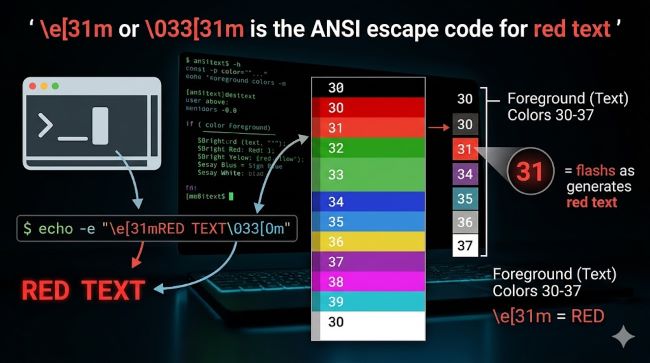
What Does \e[31m Actually Mean?
The full sequence is \e[31m, where each part has a specific meaning:
\eis the escape character. It is a single, non-printable ASCII character with the decimal value 27, hexadecimal value 0x1B. This is why you also see it written as\x1b,\033(octal), or\u001b(Unicode). They all refer to the same byte.[is the opening bracket that starts the Control Sequence Introducer (CSI).31is the color code. In the ANSI standard, codes 30 through 37 control foreground text colors.mterminates the sequence and applies the Select Graphic Rendition (SGR) command.
The full meaning: set the terminal’s foreground text color to red.
The complete ANSI color code table for foreground colors (30-37):
| Code | Color |
|---|---|
| 30 | Black |
| 31 | Red |
| 32 | Green |
| 33 | Yellow |
| 34 | Blue |
| 35 | Purple / Magenta |
| 36 | Cyan |
| 37 | White |
| 0 | Reset (all attributes) |
Background colors follow the same pattern but use codes 40 through 47 (red background = \e[41m).
Why You See ?[31m Instead of Red Text
When \e[31m appears as literal text on screen, specifically as ?[31m or ^[[31m, it means the terminal or output environment did not interpret the escape character.
The escape character (\e, byte 27) is invisible and non-printable. When a terminal supports ANSI escape codes, it reads that byte, recognizes it as the start of a control sequence, and processes what follows silently. The text changes color and the escape sequence itself is never shown.
When ANSI support is off or absent, the escape character gets displayed as a replacement character, which is where the ? comes from. Some terminals show it as ^[ (caret notation). Either way, the sequence is being printed as text rather than interpreted as a command.
Common reasons this happens:
- Windows Command Prompt (cmd.exe) before Windows 10 version 1511: Old Windows console environments did not support ANSI escape codes at all. Text with ANSI codes printed the raw characters.
- Output redirected to a file: When you redirect terminal output to a file (
script.py > output.txt), the file captures raw bytes including the escape sequences. Opening that file in a text editor shows the literal codes. - Non-interactive environments: Some CI/CD systems, log aggregators, and piped commands strip or display ANSI codes as text because they are not connected to a terminal that can interpret them.
- Incorrect string formatting: In Python, writing
"\e[31m"in a regular string does not produce the escape character. Python does not recognize\eas an escape sequence the way Bash does. This produces a backslash and the lettereinstead of byte 27.
How to Use \e[31m in Bash
In Bash, \e, \033, and \x1b are all valid representations of the escape character when used with echo -e or printf.
# Using echo with -e flag (interprets escape sequences)
echo -e "\e[31mThis text is red\e[0m"

# Using \033 (octal notation)
echo -e "\033[31mThis text is red\033[0m"

# Using printf (does not need -e flag)
printf "\e[31mThis text is red\e[0m\n"

# Bold red text
echo -e "\e[1;31mThis text is bold red\e[0m"

# Red background
echo -e "\e[41mRed background\e[0m"
The \e[0m at the end resets all color and style attributes. Without it, the red color continues into all subsequent terminal output, including your prompt, until something else resets it.
How to Use ANSI Color Code 31m in Python
Python handles the escape character differently from Bash. The \e escape sequence is not recognized in Python strings. You need to use \033 (octal), \x1b (hex), or \u001b (Unicode).
# Using \033 (octal)
print("\033[31mThis text is red\033[0m")

# Using \x1b (hex, most common in Python)
print("\x1b[31mThis text is red\x1b[0m")

# Using \u001b (Unicode)
print("\u001b[31mThis text is red\u001b[0m")

# Bold red
print("\x1b[1;31mBold red text\x1b[0m")

# Defining color constants for cleaner code
RED = "\x1b[31m"
RESET = "\x1b[0m"
GREEN = "\x1b[32m"
YELLOW = "\x1b[33m"

print(f"{RED}Error: file not found{RESET}")
print(f"{GREEN}Success: build complete{RESET}")
print(f"{YELLOW}Warning: missing optional dependency{RESET}")
Why "\e[31m" does not work in Python: Python’s string escape sequences include \n, \t, \r, \x, \u, \033, and others, but not \e. Using \e in a Python string results in a literal backslash followed by the letter e, which is why it prints as text instead of triggering color.
The Full ANSI SGR Code Reference for [31m and Related Sequences
Understanding the full SGR (Select Graphic Rendition) parameter system makes all ANSI codes predictable.
Text style codes (prefix modifier):
| Code | Effect |
|---|---|
| 0 | Reset all |
| 1 | Bold |
| 2 | Dim |
| 3 | Italic |
| 4 | Underline |
| 9 | Strikethrough |
Combining styles and colors:
Style codes and color codes can be combined in a single sequence using semicolons:
echo -e "\e[1;31mBold red\e[0m"
echo -e "\e[4;31mUnderlined red\e[0m"
echo -e "\e[1;4;31mBold underlined red\e[0m"
echo -e "\e[2;37;41mDimmed white on red background\e[0m"
Bright/high intensity colors (90-97):
| Code | Color |
|---|---|
| 90 | Bright black (dark gray) |
| 91 | Bright red |
| 92 | Bright green |
| 93 | Bright yellow |
| 94 | Bright blue |
| 95 | Bright magenta |
| 96 | Bright cyan |
| 97 | Bright white |
Bright red uses \e[91m rather than \e[31m. Bright red is lighter and more vivid. Regular red (\e[31m) is a deeper, darker red on most terminals.
Fixing ?[31m in Python Scripts
If your Python script is printing ?[31m as literal text, the cause is one of three things:
1. You used "\e[31m" instead of "\x1b[31m"
# Wrong - produces ?[31m
print("\e[31mRed text\e[0m")

# Correct
print("\x1b[31mRed text\x1b[0m")
2. Your terminal does not support ANSI codes
Test with a known working terminal. On Windows, use Windows Terminal, PowerShell 5.1+, or VS Code’s integrated terminal. Old cmd.exe requires enabling ANSI support manually or using the colorama library.
3. Output is being piped or redirected
When output goes to a file or pipe, color codes appear as raw text. This is expected behavior, not a bug.
Using colorama on Windows
For Python scripts that need to run on Windows across different console environments, colorama is the standard solution. It detects the platform and translates ANSI codes to Windows API calls where necessary:
from colorama import init, Fore, Style

init()  # Initialize colorama

print(Fore.RED + "This text is red" + Style.RESET_ALL)
print(Fore.GREEN + "This text is green" + Style.RESET_ALL)
print(Fore.YELLOW + Style.BRIGHT + "Bold yellow" + Style.RESET_ALL)
colorama.init() enables ANSI support on Windows consoles that would otherwise display raw escape codes as text. On Linux and macOS, it passes through without modification.
Stripping ANSI Codes from Output
When you log colored terminal output to a file and need to clean up the raw escape sequences, use sed in Bash or a regex in Python.
In Bash using sed:
# Remove ANSI escape codes from a file
sed 's/\x1b\[[0-9;]*m//g' colored_output.txt > clean_output.txt
In Python using regex:
import re

def strip_ansi(text):
    ansi_escape = re.compile(r'\x1b\[[0-9;]*m')
    return ansi_escape.sub('', text)

colored = "\x1b[31mError: file not found\x1b[0m"
clean = strip_ansi(colored)
print(clean)  # Error: file not found
This pattern matches \x1b[ followed by any combination of digits and semicolons, followed by m, which covers all standard SGR sequences including \x1b[31m, \x1b[1;31m, \x1b[0m, and so on.
For developers building terminal tools and CLI interfaces, understanding how web and app interfaces use color and visual hierarchy translates directly to terminal design principles. Anyone working on tools that output to both terminal and log files benefits from understanding how color functions as a communication tool across different media. And for teams building Python developer tools and CLI applications, exploring what makes app interfaces clear and usable applies equally to terminal output design.
Key Takeaways
\e[31mis the ANSI escape code for red foreground text. The\eis the escape character (byte 27, also written as\x1b,\033, or\u001b). The31is the red color code. Themends the SGR command.?[31mappears as literal text when the terminal does not support ANSI codes or when the escape character is not being interpreted. The?is a substitution for the invisible escape byte.- In Bash, use
echo -e "\e[31m"orprintf "\e[31m". Both work. - In Python, use
"\x1b[31m"or"\033[31m". Do not use"\e[31m"because Python does not recognize\eas an escape sequence. - Always reset with
\e[0mafter colored output to prevent color bleeding into subsequent terminal text. - Combine style and color codes with semicolons:
\e[1;31mis bold red,\e[4;31mis underlined red. - Bright red uses code 91 (
\e[91m), not 31. Code 31 is standard (darker) red. - Use
coloramain Python for cross-platform support on Windows. - Strip ANSI codes from log files using
sedin Bash or a simple regex in Python.