public static void main(String[] args): What Every Word Actually Means
If you’ve written any Java, you’ve typed public static void main(String args) before you wrote a single line of your own logic. It’s the first thing every Java program requires, and for most beginners it’s a block of words they copy from a tutorial without really understanding. That’s fine at first. But if you want to write better Java, understand compiler errors, or explain your code to someone else, you need to know what each part of this signature means and why removing any of it breaks the program. This guide covers every word, what it does, and why it has to be there.
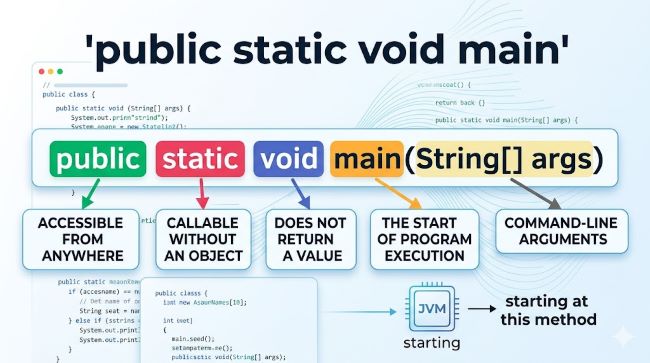
The Full Signature
Here’s the standard java public static void main method:
public static void main(String[] args) {
    // your code here
}
Six distinct pieces make up that line. Let’s take each one.
public: Why the Main Method Must Be Accessible
public is an access modifier. It controls which parts of the codebase can call this method.
In Java, access modifiers include public, private, protected, and package-private (no modifier). A private method can only be called from within its own class. A public method can be called from anywhere.
The java main method must be public because the Java Virtual Machine (JVM) needs to call it from outside your class. When you run a Java program, the JVM looks for the main method to start execution. If main is private, the JVM can’t access it and the program can’t start. If it’s protected, the JVM still can’t call it from the outside. It has to be public.
Try changing it:
private static void main(String[] args) {
    System.out.println("Hello");
}
You’ll get this error when you try to run it:
Error: Main method not found in class MyClass, please define the main method as:
   public static void main(String[] args)
The JVM is telling you exactly what it expects.
static: Why main Belongs to the Class, Not an Instance
static means this method belongs to the class itself, not to any object created from the class.
In Java, you normally create an object from a class before calling its methods:
MyClass obj = new MyClass();
obj.doSomething();
The JVM can’t do this for main because it hasn’t created any objects yet. Nothing exists when a Java program starts. The JVM needs something it can call before any objects are created. static makes main callable on the class directly:
MyClass.main(args); // JVM calls this internallyWithout static, the JVM would need to create an instance of your class first, but to do that it would need to run code, which it can’t do until it has a main method to call. Static breaks this circular dependency.
If you remove static:
public void main(String[] args) {
    System.out.println("Hello");
}
You get the same “Main method not found” error, because the JVM found a method called main that isn’t static and therefore can’t call it as the program entry point.
void: Main Returns Nothing
void is the return type of the method. It means main doesn’t return a value.
In Java, every method has a return type. Methods that return something declare it explicitly:
public int add(int a, int b) {
    return a + b;
}
The main method doesn’t return anything to the JVM. It’s the end of the line. When main finishes executing, the program ends. There’s no calling code waiting for a return value from main, so the return type is void.
If you wanted to communicate an exit status back to the operating system, you’d use System.exit(0) for success or System.exit(1) for failure rather than a return value from main. The convention of exit codes is separate from Java’s method return types.
main: The Entry Point Name the JVM Looks For
main is not a keyword in Java. It’s a name with a specific meaning: it’s the name the JVM looks for when starting a program.
The JVM doesn’t just look for any method. It looks for a method named exactly main, with the exact signature public static void main(String[] args). Name it anything else and the program won’t start:
public static void start(String[] args) {
    // JVM won't find this as an entry point
}
You can have other methods named main in your class with different parameters (method overloading), but only the one with String[] args serves as the program entry point.
Since Java 21, there’s a preview feature allowing simpler entry points for small programs without the full public static void main(String[] args) signature. But in standard Java, this signature is still the required form.
String[] args: The Command-Line Arguments
String[] args is a parameter. It’s an array of strings that the JVM passes to main when the program starts, containing any command-line arguments the user typed when running the program.
String[] declares the type: an array of String objects. args is the name given to that array (you can name it anything, though args and argv are the conventions). It could also be written as String... args using varargs syntax, which Java also accepts.
When you run a Java program from the command line:
java MyProgram hello world 42The args array contains:
args[0] = "hello"
args[1] = "world"
args[2] = "42"
If no arguments are passed, args is an empty array, not null. That’s an important distinction:
public static void main(String[] args) {
    System.out.println(args.length);  // Prints 0 if no args passed
    // args is not null, just empty
}
Always check args.length before accessing args[0]. Accessing an index that doesn’t exist throws ArrayIndexOutOfBoundsException.
A practical example of using args:
public static void main(String[] args) {
    if (args.length < 1) {
        System.out.println("Please provide a filename as an argument.");
        return;
    }
    String filename = args[0];
    System.out.println("Processing file: " + filename);
}
The String[] vs String… Distinction
Java accepts both forms:
public static void main(String[] args)   // Array syntax
public static void main(String... args)  // Varargs syntax
Both work as the program entry point. Both receive command-line arguments the same way. The varargs form was introduced in Java 5 and is equivalent at the bytecode level. Most developers stick with String[] args because it’s more explicit about the type and is what nearly every Java resource uses.
What Happens If You Change the Signature
Here’s a quick reference for what each change does:
| Modified signature | Result |
|---|---|
private static void main(String[] args) |
JVM can’t access it, error |
public void main(String[] args) |
JVM can’t call it without an instance, error |
public static int main(String[] args) |
Wrong return type, JVM ignores it, error |
public static void start(String[] args) |
Not named main, JVM doesn’t find it |
public static void main() |
No String[] parameter, JVM doesn’t match it |
public static void main(String[] args) |
Correct, program runs |
Can a Java Program Have More Than One Main Method?
Yes, and this is a common source of confusion. Each class can have its own public static void main(String[] args) method. When you run a Java program, you specify which class to start from:
java ClassA   # Runs ClassA.main()
java ClassB   # Runs ClassB.main()
This is useful for testing individual classes or creating multiple entry points for different purposes in the same project. Java’s staying power in enterprise development is partly due to design decisions like this: the language is explicit about entry points, which makes large multi-class projects more predictable to maintain.
The Java Main Method in Modern Java
Java 21 introduced a preview feature called Unnamed Classes and Instance Main Methods, which allows simpler programs without the full signature:
void main() {
    System.out.println("Hello, Java 21!");
}
This is specifically for educational contexts and small scripts. For any production Java code, the standard public static void main(String[] args) signature remains the form you’ll encounter in every real codebase.
Java consistently ranks among the most in-demand programming languages precisely because of its stability and predictability. Features like the main method signature change slowly and deliberately, which is why code written twenty years ago still compiles and runs without modification.
Practical Tips for Working with main
Keep main thin. The main method is an entry point, not a logic container. It should create objects and call methods, not implement business logic directly:
public static void main(String[] args) {
    Application app = new Application(args);
    app.run();
}
Always handle args safely. Check args.length before accessing any index. Don’t assume arguments were passed.
Use System.exit() for status codes when needed. If your program needs to signal success or failure to the calling process (a shell script, a CI pipeline), use System.exit(0) for success and a non-zero value for failure.
One main per project entry point. Having multiple main methods across classes is fine for testing, but production code should have one clear primary entry point. Understanding how AI tools increasingly interact with Java applications makes the entry point design more important: AI-powered services often need clear lifecycle management that starts in main and cascades through the application.
Key Takeaways
- public static void main(String[] args) is the required signature for the Java program entry point. Every word has a specific purpose.
public: the JVM must be able to call main from outside the class. Without it, the program can’t start.static: main must be callable without creating an object first. Without it, the JVM can’t start the program.void: main returns nothing. UseSystem.exit()for status codes if needed.main: the exact name the JVM looks for. It’s not a keyword, just a convention with built-in JVM support.String[] args: an array of command-line arguments. Always checkargs.lengthbefore accessing indices.- The java main method can be written as
String[] argsorString... args. Both work identically. - Each class can have its own main method. You specify which class to run on the command line.
- Keep main thin. Use it as a launch point, not a place to write application logic.
- Java public static void main hasn’t fundamentally changed in 30 years. Learning it properly means you understand code written at any point in Java’s history.