How Many Words Is 10 Pages Double Spaced 12 Font?
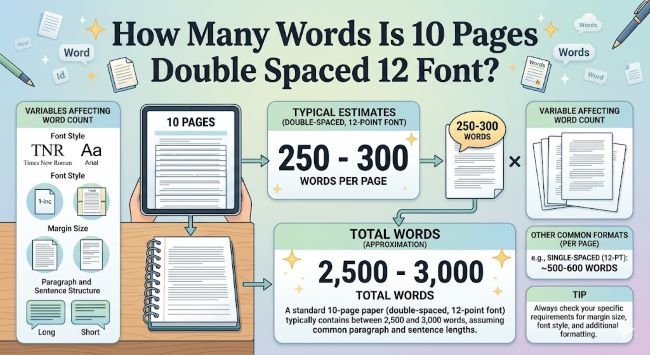
Wondering how many words is 10 pages double spaced 12 font? The answer is around 2,500 words. Here is what affects that number and how to hit your page count accurately.
You have a 10-page paper due and you are staring at a blank document trying to figure out how much you actually need to write. Or maybe you are 2,000 words in and wondering if you are close. Either way, the question is the same: how many words is 10 pages double spaced at 12 point font?
The short answer is approximately 2,500 words. But that number shifts depending on a few formatting details, and understanding those details helps you plan your writing more accurately. This post breaks it all down.
How Many Pages Is 1000 Words Double Spaced 12 Font?
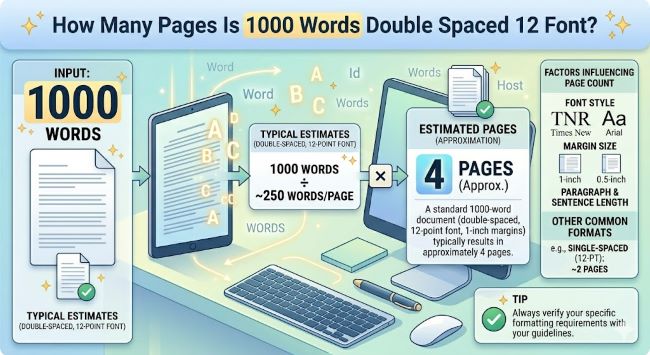
How many pages is 1000 words double spaced 12 font? The answer is 4 pages. Here is what affects that number and how to format your document correctly every time.
The Standard Answer: 10 Pages Double Spaced, 12 Font
Under the most common academic formatting settings, which means 12 point font, double spacing, standard margins of one inch on all sides, and a typical font like Times New Roman or Arial, one page holds roughly 250 to 275 words.
Multiply that by 10 and you get:
- At 250 words per page: 2,500 words
- At 275 words per page: 2,750 words
So the working estimate for a 10 page double spaced paper at 12 point font is 2,500 words. That is the number most students and writers use, and it holds up well across standard word processors like Microsoft Word and Google Docs.
What Changes the Word Count Per Page
The 250 words per page estimate assumes a specific combination of settings. Change any one of them and the count shifts.
Font choice matters more than you might expect.
Times New Roman at 12 point is narrower than Arial at 12 point. Georgia takes up more space than both. A page of Times New Roman 12pt will fit slightly more words than a page of Arial 12pt at the same size. The difference per page is small, maybe 10 to 20 words, but across 10 pages it adds up.
Margins affect page count too.
The standard is one inch on all sides. If your margins are set to 1.25 inches (a common Word default), each page holds fewer words. Wider margins mean less text per page, which means you need fewer words to fill 10 pages. Narrower margins push more text onto each page and raise your word count target.
Paragraph spacing adds hidden space.
Some formatting styles add extra space between paragraphs on top of double spacing. If you are using APA or Chicago style and adding space after each paragraph, your effective word count per page drops. A page might hold closer to 230 words instead of 250.
Headers, footnotes, and titles eat into your page count.
A title page, section headers, and footnotes all take up space without adding to your word count in the same way body text does. If your assignment calls for a title or headers on each page, expect to write slightly more words to reach 10 full pages of content.
Word Count Estimates for Common Page Counts
If you are working on a different length assignment, here is a quick reference using the standard 250 words per page estimate for double spaced, 12 point font:
- 1 page: 250 words
- 2 pages: 500 words
- 3 pages: 750 words
- 5 pages: 1,250 words
- 7 pages: 1,750 words
- 10 pages: 2,500 words
- 15 pages: 3,750 words
- 20 pages: 5,000 words
These are reliable starting points for planning. They are not exact, because your specific formatting will always vary slightly, but they are close enough for any writing assignment or project estimate.
How to Check Your Page Count as You Write
Rather than calculating and guessing, you can let your word processor do the work.
In Microsoft Word, look at the bottom left of the screen. It shows your current page number and total pages in real time as you type.
In Google Docs, go to Tools > Word Count to see your current word and page totals. You can also turn on a live word count display that stays visible while you write.
If you want to hit a specific page count, set up your formatting before you start writing. Get the font, size, spacing, and margins right at the beginning. That way, the page count you see while writing matches what you will submit.
A Practical Note on Hitting Your Page Count
If you are short on pages, the temptation is to adjust margins or bump up the font size slightly. Most instructors notice this. A better approach is to look at your argument and find places where you can expand. Add more evidence, explain your reasoning in more detail, or bring in an additional example. That approach adds genuine content rather than just visual bulk.
If you are over the page limit, tighten your sentences. Cut adverbs, eliminate repetition, and trim any paragraph that is making the same point twice. Good editing almost always brings a draft into range without losing anything important.
The Bottom Line
A 10 page double spaced paper at 12 point font is roughly 2,500 words under standard formatting. That number can range from about 2,300 to 2,750 depending on your font, margins, and spacing settings.
Set your formatting first, write to your argument, and check your page count as you go. The word count will take care of itself.