How to Publish a Book on Amazon
Not long ago, getting a book into stores meant landing an agent, winning over a publisher, and waiting a year or more. Today, you can upload a finished manuscript to Amazon and see it for sale within days. That shift has made Amazon self publishing one of the most popular paths for new authors, from novelists and memoir writers to coaches, chefs, and teachers.
If you’ve been wondering how to publish a book on Amazon, this guide walks you through the whole process using Kindle Direct Publishing (KDP). You’ll learn how to prepare your files, set up your book, choose a price, understand royalties after the 2026 changes, and give your book its best shot at finding readers.
What Is Amazon KDP?
Kindle Direct Publishing, or KDP, is Amazon’s free platform for self publishing on Amazon. It lets you publish:
- Kindle ebooks for Kindle devices and apps
- Paperbacks printed on demand when a reader orders
- Hardcovers, also printed on demand
You keep the rights to your work, set your own price, and earn royalties on every sale. There are no upfront fees to publish, and because print books are made on demand, you don’t need to buy inventory.
Before You Start: What You’ll Need
Before you jump into how to publish a book on Amazon, gather these items:
- A finished, edited manuscript. Typos and errors lead to bad reviews.
- A professional cover. Your cover is your first impression.
- A book description. A short, compelling summary for your product page.
- Keywords and categories. These help readers find your book.
- Tax and bank details. KDP needs these to pay you.
- An author name or pen name. You can publish under either.
How to Publish a Book on Amazon: Step by Step
Here’s exactly how to self publish on Amazon from start to finish.
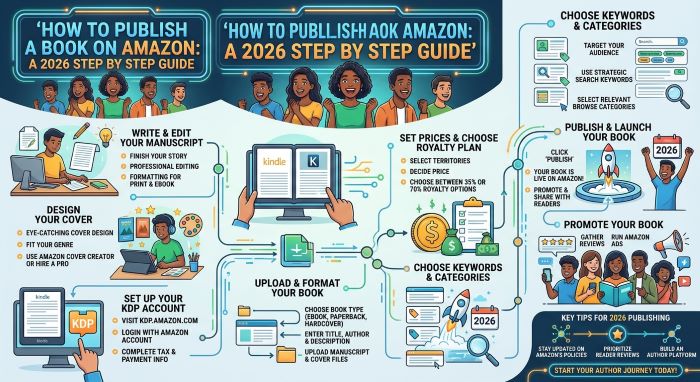
Step 1: Create a KDP Account
Go to kdp.amazon.com and sign in with your Amazon account, or create a new one. Complete your author profile, tax interview, and payment information. You can’t receive royalties until these are done.
Step 2: Format Your Manuscript
Formatting makes your book look professional on every device, and it’s a step many first timers rush when they figure out how to publish a book on Amazon.
- For ebooks: Upload a Word document, EPUB, or KPF file. Amazon’s free Kindle Create tool can help you format.
- For paperbacks and hardcovers: Upload a print ready PDF with the correct trim size, margins, and bleed settings.
Use KDP’s previewer to check how your book looks before you publish.
Step 3: Design or Upload Your Cover
You have two options:
- Use KDP Cover Creator, a free tool with templates.
- Upload a custom cover designed by you or a professional.
Print covers need a full wraparound design with front, spine, and back, sized to your page count. KDP offers a cover calculator and templates to get the dimensions right.
Step 4: Enter Your Book Details
In your KDP Bookshelf, click Create and choose ebook, paperback, or hardcover. Then fill in:
- Title and subtitle
- Author and contributors
- Book description
- Keywords (up to seven)
- Categories
- Age range and reading level, if relevant
Step 5: Disclose AI Use
If any part of your book uses AI generated text, images, or translations, KDP requires you to disclose it during setup. Be honest here. Failing to disclose can put your account at risk.
Step 6: Choose Your ISBN
- Ebooks don’t need an ISBN on Amazon.
- Paperbacks and hardcovers need one. KDP offers a free ISBN, or you can use your own if you want to list your own imprint as the publisher.
Step 7: Set Your Price and Royalty
Choose your territories, royalty plan, and list price. More on royalties below.
Step 8: Preview and Publish
Review everything one last time using the previewer, then click Publish. Your book usually goes live within 72 hours.
Understanding Amazon Royalties in 2026
Royalties are a big part of learning how to publish a book on Amazon, and they changed in 2026.
Ebook Royalties
| Royalty Option | US List Price Range | Notes |
|---|---|---|
| 35% | $0.99 to $200 (minimum depends on file size) | No delivery fee |
| 70% | $2.99 to $12.99 | Delivery fee applies based on file size |
Starting July 7, 2026, Amazon raised the top of the 70% range on Amazon.com from $9.99 to $12.99. If your ebook was priced between $10 and $12.99 at 35%, you can switch it to 70% in your Rights and Pricing settings.
Paperback Royalties
Paperback royalties are based on your list price minus printing costs. As of June 2025, KDP pays:
- 60% on paperbacks priced at $9.99 or more
- 50% on paperbacks priced below $9.99
Printing costs depend on page count, ink type, and trim size, so longer or full color books cost more to print.
Example
If your ebook sells for $4.99 at 70%, you’ll earn roughly $3.40 per sale after a small delivery fee. A $14.99 paperback with $4 in printing costs at 60% earns about $5.00 per sale.
Should You Join KDP Select?
KDP Select is an optional program for ebooks. If you enroll, you agree to sell your ebook only on Amazon for 90 days at a time. In return, you get:
- Kindle Unlimited: Subscribers can read your book, and you earn money for pages read.
- Promotions: Access to Kindle Countdown Deals and Free Book Promotions.
For many authors self publishing on Amazon, KDP Select works well, especially fiction writers in genres like romance, thrillers, and fantasy. If you want to sell your ebook on other platforms too, you’ll need to skip it.
Paperbacks and hardcovers aren’t affected by KDP Select, so you can sell them anywhere.
Tips for Picking Keywords and Categories
Good keywords and categories help readers discover your book, and they’re one of the most overlooked parts of how to self publish on Amazon.
- Think like a reader. What would someone type to find a book like yours?
- Use all seven keyword slots. Phrases work better than single words.
- Check Amazon search suggestions. Start typing in the search bar to see popular searches.
- Choose specific categories. Niche categories make it easier to rank.
- Avoid misleading terms. Amazon can remove keywords that break its rules.
How to Market Your Book on Amazon
Publishing is only the beginning. Anyone researching how to publish a book on Amazon should plan for marketing too, since readers need to find your book.
- Set up an Author Central page with your bio and photo.
- Use A+ Content to add images and extra details to your product page.
- Run Amazon Ads to promote your book to targeted readers.
- Gather early reviews by sharing advance copies with readers, following Amazon’s review rules.
- Build an email list so you can reach fans for future launches.
- Use social media to share your writing journey and book updates.
If you’re also selling other products, these tips to Increase Your Amazon Business Revenue Faster can help you think like a seller.
Common Mistakes to Avoid
When learning how to publish a book on Amazon, avoid these pitfalls:
- Skipping professional editing. Errors hurt reviews and sales.
- Using a weak cover. Readers do judge books by their covers.
- Pricing too high or too low. Research similar books in your genre.
- Ignoring metadata. Poor keywords and categories make your book hard to find.
- Publishing and waiting. Books rarely sell without promotion.
- Not disclosing AI use. This can lead to account problems.
Ordering Author Copies
You can order printed author copies of your paperback or hardcover at the cost of printing plus shipping. These are perfect for events, giveaways, and local bookstores. If you’re surprising someone with a signed copy and want to keep it private, here’s How to Hide Amazon Orders in 2026.
Getting Help
KDP has a help center and an online support form for publishing questions. For general Amazon account or order issues, you can also check guides like Amazon Customer Service 1-888 and the 1-888-280-4331 Amazon Customer Service Phone Number. Always confirm phone numbers through Amazon’s official site before sharing account details.
Daily Upload Limits
KDP limits how many new titles one account can create per day. The limit has been reported as three per day, and KDP has said it may change. Most authors will never come close.
Final Thoughts
Now you know how to publish a book on Amazon: create a KDP account, format your manuscript, design your cover, fill in your details, choose your price and royalty plan, and hit publish. Amazon self publishing gives you control, speed, and a global audience, but success depends on quality and marketing. Take your time, polish your book, and keep promoting it after launch.
Key Takeaways
- Amazon Kindle Direct Publishing (KDP) lets you self publish ebooks, paperbacks, and hardcovers for free.
- You’ll need an edited manuscript, a professional cover, a book description, keywords, and tax and bank details.
- Ebooks can earn 70% royalties when priced between $2.99 and $12.99, a range Amazon expanded on July 7, 2026.
- Paperbacks earn 60% of list price minus printing costs at $9.99 or more, and 50% below $9.99.
- KDP Select puts your ebook in Kindle Unlimited but requires 90 day Amazon exclusivity.
- KDP requires you to disclose AI generated text, images, or translations.
- Books usually go live within 72 hours, but marketing through Author Central, A+ Content, Amazon Ads, and reviews drives sales.