Free AI Image Generator With No Restrictions
Search for a free AI image generator with no restrictions and you’ll find hundreds of sites promising unlimited, uncensored, watermark free images at no cost. Most of them don’t deliver. Some hide a paywall after a few images. Others slap a watermark on everything. A few are outright scams designed to collect your data.
The truth is more useful. No tool is truly free with zero limits of any kind, but several come close in the ways that matter most: no signup, no watermark, no daily cap, or full control on your own computer.
This guide explains what “no restrictions” really means, which free tools come closest in 2026, how running models locally gives you the most freedom, and how to pick the best AI art generator for your needs.
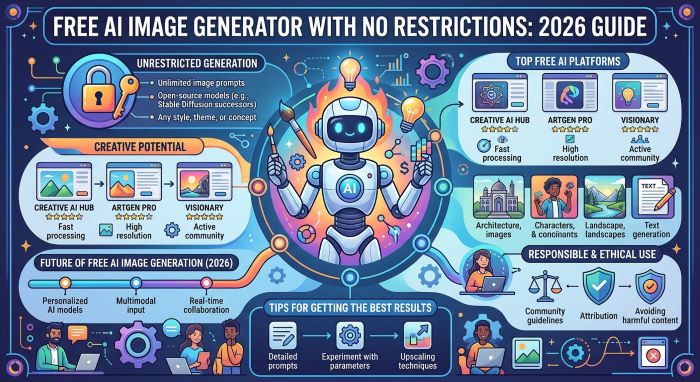
What Does “No Restrictions” Actually Mean?
When people search for a free AI image generator with no restrictions, they usually mean one or more of these things:
- No signup: You can start generating without creating an account.
- No watermark: Images come out clean, ready to use.
- No daily limit: You can create as many images as you want.
- No paywall: Core features don’t require a subscription.
- Fewer creative limits: More control over styles, settings, and output.
Different tools win in different categories. A browser tool might have no signup and no cap but lower quality. A big name tool might offer top quality but limit you to a few images a day. A local model gives you the most freedom but needs a decent computer.
It’s also worth being clear about one thing: every legitimate tool, and the law itself, draws some lines. No reputable service allows sexual content involving minors, non consensual intimate images of real people, or deepfakes designed to deceive or harass. Those limits apply even when you run a model on your own machine, because they’re legal and ethical lines, not just platform rules. Everything in this guide is about creative freedom within those boundaries.
Quick Comparison: Free Tools and Their Limits
Free tier limits change often, and different sources report slightly different numbers. Use these as rough guides and check each tool before relying on them.
| Tool | Signup Needed | Free Limit (Approximate) | Watermark | Best For |
|---|---|---|---|---|
| Perchance | No | Unlimited, no published cap | None reported | Unlimited casual use |
| Craiyon | No | Unlimited | Varies | Quick, simple images |
| DeepAI | Optional | Unlimited at low resolution | Sometimes | Basic experiments |
| Bing Image Creator / Microsoft Designer | Microsoft account | Daily or weekly boosts, slower generation after | Not reported | Easy everyday use |
| Google Gemini (Nano Banana) | Google account | Dozens of images per day, varies | No visible watermark | High quality and editing |
| ChatGPT (GPT Image) | Yes | A few images per day on free plan | Not reported | Top quality and editing |
| Meta AI | Meta account | Generous, region dependent | Visible and invisible labels | Social style images |
| Leonardo.ai | Yes | 150 tokens per day | Sometimes | Many models and styles |
| Ideogram | Yes | Weekly credits | Not reported | Text inside images |
| Recraft | Yes | About 30 credits per day | Not reported | Logos and vector art |
| Adobe Firefly | Adobe ID | 25 credits per month | Varies | Commercially safer images |
| Local FLUX or Stable Diffusion | No | Unlimited on your hardware | None | Maximum control |
The Closest Thing to a Free AI Image Generator With No Restrictions
If you want the most freedom without paying, two paths stand out: no signup browser tools and local open source models.
Option 1: No Signup Browser Tools
Perchance Perchance is one of the most popular answers when people ask for a free AI image generator with no restrictions. You don’t need an account, there’s no published daily cap, and images generally come without a watermark. Quality is decent for casual use, though it can’t match top paid models. It’s great for experimenting, character art, and quick concepts.
Craiyon Formerly known as DALL-E mini, Craiyon is free, simple, and requires no signup. Image quality is lower than modern tools, but it’s quick and easy for playful experiments.
DeepAI DeepAI offers a free image generator with optional login. Free images come at lower resolution, and watermarks may appear on some outputs.
Hugging Face Spaces Hugging Face hosts free community demos of many open source models. Availability depends on queues, and you may wait during busy times, but it’s a free way to try newer models without installing anything.
Option 2: Run an Open Source Model Locally
If you want true control, running a model on your own computer is the closest you’ll get to a free AI image generator with no restrictions. There are no daily caps, no watermarks, no subscriptions, and no content stored on someone else’s server.
Popular open models and tools include:
- FLUX models from Black Forest Labs: Known for strong photorealism. Some versions, like FLUX Schnell, use the permissive Apache 2.0 license, while others use custom licenses that limit commercial use.
- Stable Diffusion models: A huge ecosystem of community models, styles, and add ons.
- Other open weight models: Options like Qwen-Image, HiDream, and Ideogram’s open weights have expanded the field in 2026.
To run these, people typically use interfaces like:
- ComfyUI: A powerful node based interface favored by advanced users.
- Automatic1111 or Forge: Popular web interfaces for Stable Diffusion.
- Fooocus: A beginner friendly option with simple controls.
What you need: A computer with a modern graphics card helps a lot. Many smaller models run on GPUs with around 8 GB of VRAM, while larger models like full FLUX versions benefit from 12 to 24 GB or more. Apple Silicon Macs can run many models too, though more slowly.
The trade off: Setup takes time, and you’re responsible for following each model’s license and the law. But once it’s running, you can generate as many images as your hardware can handle.
The Best AI Art Generator Options in 2026 (Free Tiers)
If you care more about quality than unlimited use, the best AI art generator for you is likely a big name tool with a solid free tier. Here are the standouts among the best free AI art generators 2026 has to offer.
ChatGPT (GPT Image)
OpenAI’s image model inside ChatGPT is one of the highest rated image generators of 2026, especially for following detailed prompts and editing existing images while keeping the rest unchanged. Free users get a small number of images per day, so it’s best for quality over quantity.
Best for: Detailed scenes, precise edits, text in images.
Google Gemini (Nano Banana)
Google’s image models, nicknamed Nano Banana, are fast and consistent, and the Gemini app offers a fairly generous free allowance. They’re especially good for editing photos and keeping characters consistent across images.
Best for: Photo edits, consistent characters, high volume free use.
Microsoft Designer and Bing Image Creator
Free with a Microsoft account. You get a set number of fast generations, then slower ones after that. It’s one of the easiest tools for beginners.
Best for: Simple, quick images without much setup.
Leonardo.ai
Leonardo offers a daily token allowance and access to dozens of models and styles. It’s popular with game artists and illustrators.
Best for: Concept art, game assets, trying different styles.
Ideogram
Ideogram is known for rendering readable text inside images, which many generators struggle with. Free users receive weekly credits.
Best for: Posters, logos with text, social graphics.
Recraft
Recraft stands out for vector graphics, making it great for logos, icons, and illustrations you can scale without losing quality.
Best for: Brand assets and clean illustrations.
Adobe Firefly
Firefly’s free plan is small, but Adobe says its models are trained on licensed content, which makes it a safer choice for commercial projects.
Best for: Business use where licensing matters.
Canva
Canva’s AI image tools are built into its design editor, so you can generate and use images in social posts and presentations right away. Free AI use is limited.
Best for: Marketing graphics and quick designs.
Midjourney
Midjourney is still a favorite for artistic style and rich textures, but it doesn’t currently offer a free tier. It’s worth knowing about if you’re willing to pay.
Best AI Art Tools by Use Case
Choosing among the best AI art tools depends on what you’re making:
| Use Case | Top Free Pick | Why |
|---|---|---|
| Unlimited casual images | Perchance | No signup, no cap |
| Highest quality | ChatGPT or Gemini | Leading image models |
| Photo editing | Gemini (Nano Banana) | Strong edit consistency |
| Text in images | Ideogram | Clear, readable text |
| Logos and vectors | Recraft | Vector output |
| Commercial safety | Adobe Firefly | Licensed training data |
| Social graphics | Canva | Built in design tools |
| Total control | Local FLUX or Stable Diffusion | No caps or watermarks |
How to Get More From Free Tiers
Free limits can feel tight, but a few habits help you stretch them:
- Write better prompts. Clear, detailed prompts reduce wasted generations.
- Use multiple tools. Combine daily allowances from several services.
- Plan your sessions. Some tools reset daily, others weekly, so time your work.
- Upscale separately. Generate at standard size, then use a free upscaler.
- Edit instead of regenerating. Tools like Gemini and ChatGPT can tweak an image rather than starting over.
- Save good seeds and prompts. Reusing what works saves credits.
Prompt Tips for Better Results
Great prompts make any free tool feel more powerful:
- Describe the subject clearly. “A golden retriever puppy in a field of sunflowers.”
- Add style. “Watercolor painting,” “cinematic photo,” or “3D render.”
- Set the mood and lighting. “Soft morning light,” “neon glow,” or “dramatic shadows.”
- Mention composition. “Close up,” “wide angle,” or “top down view.”
- Include details. Colors, textures, and background elements.
Example prompt: “A cozy reading nook by a rainy window, warm lamp light, stack of old books, steaming mug of tea, soft watercolor style.”
Red Flags: Fake “No Restrictions” Generators
Be careful when a site promises a completely free AI image generator with no restrictions. Watch for:
- Requests for payment details on a “free” tool
- Pop ups and redirects to unrelated sites
- Downloads of unknown software or browser extensions
- Vague privacy policies or none at all
- Promises to create illegal or abusive content, which signals an untrustworthy site
Stick with known tools or well documented open source projects from trusted sources like Hugging Face and GitHub.
Responsible Use: The Lines That Always Apply
Even the most open tools come with responsibilities:
- Don’t create images of real people without consent, especially intimate or misleading images.
- Never create content involving minors in sexual contexts. This is illegal everywhere.
- Respect copyright and trademarks. Avoid copying specific artists’ work or brand logos for commercial use.
- Label AI images when sharing them in contexts where people might assume they’re real.
- Check licenses before using images commercially, especially with open source models.
Many countries have passed or are considering laws around deepfakes and AI generated content, so these lines carry real legal weight.
Commercial Use: Can You Sell Free AI Images?
It depends on the tool:
- Adobe Firefly is designed with commercial use in mind.
- ChatGPT and Gemini generally let you use your images, but check their current terms.
- Open source models vary. Apache 2.0 models like FLUX Schnell are permissive, while others require a commercial license.
- Free tiers of some tools restrict commercial use or require attribution.
Always read the terms of service before using AI images in products, ads, or client work.
Getting Started With a Local Model
If the idea of a self hosted, free AI image generator with no restrictions on daily use appeals to you, here’s a simple path to get started:
- Check your hardware. Look up your graphics card and how much VRAM it has.
- Pick a beginner interface. Fooocus is easy for first timers, while ComfyUI offers more power once you’re comfortable.
- Download a model from a trusted source. Hugging Face and the official GitHub pages for each project are the safest places to start.
- Read the license. Note whether commercial use is allowed.
- Start with simple prompts. Learn how settings like steps, guidance, and resolution affect your images.
- Explore add ons. Community made styles, upscalers, and control tools let you fine tune results.
Expect a learning curve, but plenty of free tutorials and community forums can help.
Free vs. Paid: When Should You Upgrade?
Free tools are great for learning and casual projects, but paid plans make sense when:
- You need lots of images daily, such as for a business or content channel.
- You want the highest resolution and fastest generation.
- You need clear commercial rights for client work or products.
- You want premium features like advanced editing, style references, or team tools.
Many people use free tiers to experiment, then pay for one tool that fits their workflow best.
Frequently Asked Questions
Is there a truly unlimited free AI image generator? Perchance and Craiyon come close, with no signup and no published cap. Running an open source model locally is the only way to get truly unlimited generation, limited only by your hardware.
Which free tool has the best quality? ChatGPT and Google Gemini currently lead on quality among free options, though both have daily limits.
Do free AI image generators add watermarks? Some do. Perchance and local models typically don’t, while some free tiers and labeled tools like Meta AI add visible or invisible markers.
Is it legal to use a free AI image generator with no restrictions? Using the tools is legal, but what you create must still follow the law. Non consensual images of real people, sexual content involving minors, and copyright violations are illegal or harmful no matter which tool you use.
What About AI Video?
If you want to go beyond still images, AI video tools have improved rapidly. Check out our roundup of the Best Free AI Video Generators 2026 for free options, or compare premium tools in our list of the Top 10 AI Video Generators.
Final Thoughts
There’s no magic free AI image generator with no restrictions of any kind, but you can get remarkably close. For unlimited casual use without an account, Perchance is a strong pick. For top quality on a free plan, ChatGPT and Gemini lead the pack. And for complete control with no caps or watermarks, running FLUX or Stable Diffusion locally is the best route. Pick the best AI art generator for your goals, use it responsibly, and you’ll have more creative freedom than ever.
Key Takeaways
- No tool is completely free with zero limits, but several remove the restrictions that matter most, like signups, watermarks, or daily caps.
- Perchance and Craiyon offer free image generation with no signup, while DeepAI and Hugging Face Spaces provide other free options.
- Running open source models like FLUX or Stable Diffusion locally gives you unlimited, watermark free images, but needs a capable computer.
- The best free AI art generators 2026 has to offer for quality include ChatGPT (GPT Image) and Google Gemini (Nano Banana), with daily limits.
- Ideogram excels at text in images, Recraft at vector graphics, and Adobe Firefly at commercially safer output.
- Free limits change often, so check each tool’s current allowance before planning big projects.
- Legal and ethical lines still apply: no non consensual images of real people, no sexual content involving minors, and respect for copyright.