Best Security System for Home: 10 Top Picks for Every Budget and Home Type
A home security system does more than sound an alarm. It can alert you when a door opens, call emergency services when smoke is detected, let you see who is at the door, and give you peace of mind when you travel. Visible alarm signs and cameras can deter burglars, and many insurers offer discounts for monitored systems.
The market has changed a lot in recent years. You no longer need a long contract or a professional installer. Many systems now ship to your door, set up in under an hour, and let you cancel monitoring anytime. This guide lists 10 specific systems, compares them in a table, and explains how to choose the best security system for home based on your budget, home type, and comfort with technology.
What a Home Security System Includes
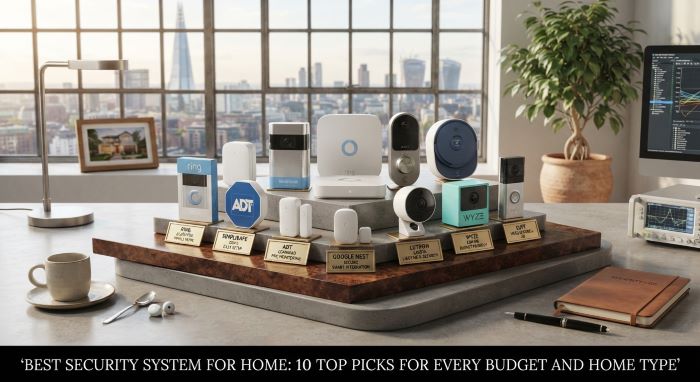
Most systems start with a few core parts:
- Base station or hub: The brain of the system. It connects sensors, sounds the siren, and communicates with the monitoring center.
- Keypad or app: Used to arm and disarm the system.
- Entry sensors: Detect when doors and windows open.
- Motion sensors: Detect movement inside the home.
- Cameras and video doorbells: Let you see and record activity.
- Environmental sensors: Detect smoke, carbon monoxide, water leaks, and freezing temperatures.
- Glass break sensors and panic buttons: Add extra layers of protection.
Professional Monitoring vs. Self-Monitoring
Professional monitoring means trained agents watch your system 24/7. When an alarm triggers, they verify it and dispatch police, fire, or medical help. Plans usually cost $20 to $60 per month.
Self-monitoring means you get alerts on your phone and decide what to do. It costs little or nothing each month, but nobody responds if you miss an alert because you are asleep, on a flight, or out of cell range.
Many people choose professional monitoring for the main alarm and use self-monitored cameras for extra coverage.
DIY vs. Professional Installation
DIY systems arrive pre-programmed. You stick sensors on doors and windows, plug in the base station, and follow an app. They suit renters and anyone comfortable with simple tech.
Professionally installed systems include an on-site technician who designs and installs the system. They suit large homes, complex setups, and people who prefer not to do it themselves. They often come with longer contracts.
Comparison Table: Best Security System for Home
| System | Equipment Starts At | Pro Monitoring From | Contract | Installation | Best For |
|---|---|---|---|---|---|
| SimpliSafe | around $251 | $22.99 per month | Month-to-month | DIY or pro | Best overall, easy setup |
| ADT (pro install) | varies by package | around $25 to $50 per month | Often multi-year | Professional | Full-service monitoring |
| ADT Blu (DIY line) | around $249 | $24.99 per month | Month-to-month | DIY | ADT monitoring without a contract |
| Ring Alarm | around $245 | $19.99 per month | Month-to-month | DIY | Ring camera and Alexa users |
| Cove | around $110 | $22.99 per month | Month-to-month | DIY or pro | Budget-friendly monitored system |
| Abode | around $150 | $26.99 per month | Month-to-month | DIY | Smart home integration |
| Vivint | custom quote | around $30 to $50 per month | Varies, often multi-year | Professional | Premium smart home automation |
| Frontpoint | varies by package | around $50 per month | Varies | DIY | Customer service and customization |
| eufy Security Alarm Kit | around $160 to $200 | Optional | None | DIY | No monthly fee setups |
| Wyze Home Monitoring | under $100 | around $10 per month | Month-to-month | DIY | Lowest cost monitoring |
Prices and plans change often, and many brands run frequent sales. Check each company’s current offers before you buy.
1. SimpliSafe
SimpliSafe is one of the most popular home security brands for good reason. Setup is simple, equipment is reliable, and there are no long-term contracts. Packages start at around $251, and professional monitoring starts at $22.99 per month.
Higher-tier plans add features like live guard protection, where agents can view and speak through indoor cameras during an alarm. You can self-install in under an hour or pay for professional installation. For most households, SimpliSafe is the best security system for home thanks to its balance of price, ease, and protection.
2. ADT (Professional Installation)
ADT is the best-known name in home security, with a history going back more than a century. Its professionally installed systems include a technician visit, custom design, and multiple monitoring centers for backup. ADT integrates with Google Nest cameras and doorbells.
It usually costs more than DIY options and often requires a multi-year contract. It suits homeowners who want full-service installation and a long-established provider.
3. ADT Blu
ADT Blu is ADT’s do-it-yourself line. Equipment starts at around $249, monitoring starts at $24.99 per month, and plans are month-to-month. You get ADT’s monitoring network without a long contract.
It is a good pick for people who trust the ADT name but want flexibility.
4. Ring Alarm
Ring Alarm works seamlessly with Ring doorbells, cameras, and Amazon Alexa. Equipment kits start at around $245, and professional monitoring starts at about $19.99 per month. The Ring Alarm Pro base station includes a built-in eero Wi-Fi 6 router and can provide backup internet during outages with the right plan.
If you already own Ring cameras, Ring Alarm ties everything into one app.
5. Cove
Cove offers one of the most affordable monitored systems. Equipment starts at around $110, and monitoring starts at $22.99 per month. Its touchscreen panel is easy to use, and setup takes minutes.
Cove is a strong choice for budget-conscious homeowners and renters who want professional monitoring without a contract.
6. Abode
Abode is built for smart home enthusiasts. It works with Apple HomeKit, Amazon Alexa, and Google Home, and it supports Z-Wave and Zigbee devices. Equipment starts at around $150, and monitoring starts at $26.99 per month.
Abode also offers on-demand monitoring, so you can turn on professional monitoring only when you need it, like during a vacation.
7. Vivint
Vivint is a premium, professionally installed system with advanced smart home automation. Its cameras include smart deterrent features that detect lurkers and sound a tone or light to warn them off. A central touchscreen hub and polished app control locks, lights, thermostats, and garage doors.
Vivint costs more, and equipment is often financed over time. It suits homeowners who want a fully integrated smart home.
8. Frontpoint
Frontpoint is known for strong customer service and customizable DIY packages. Monitoring plans cost more than some competitors, but they include advanced features like smart home control and video monitoring. It is a good pick for people who want guidance and support without a technician visit.
9. eufy Security Alarm Kit
eufy’s alarm kits include a HomeBase, keypad, motion sensor, and entry sensors. You can self-monitor through the app for free, and professional monitoring is optional. eufy stores video locally, so you avoid cloud fees.
It is a great choice for people who want to avoid monthly costs.
10. Wyze Home Monitoring
Wyze offers one of the lowest-cost monitored systems available. The starter kit often costs under $100, and professional monitoring is about $10 per month. It lacks some advanced features, such as cellular backup on certain plans, but it delivers basic protection at a very low price.
How to Choose the Right System
Home size: Larger homes need more sensors and may benefit from professional design.
Renting vs. owning: Renters should choose wireless, DIY systems with no contracts that can move with them.
Budget: Consider both upfront equipment costs and monthly fees over several years.
Smart home platform: Choose a system that works with your voice assistant and devices.
Internet and cellular backup: Systems with cellular backup keep working when Wi-Fi goes down.
Battery backup: A base station with battery backup keeps the system running during power outages.
When comparing options, the best security system for home is the one you will actually use every day. A complicated system that stays disarmed protects no one.
Adding Cameras to Your System
Cameras add visual evidence and let you check on your home in real time. Most security brands sell matching cameras, but you can also add standalone models. For recommendations across brands, see this guide to the best security cameras for home, which covers indoor, outdoor, and doorbell cameras.
If you want to avoid cloud fees, many cameras record locally. This list of the best outdoor security cameras without subscription covers models with microSD or hub storage that pair well with a monitored alarm system.
Sensor Placement Tips
- Put entry sensors on every ground-floor door and accessible window.
- Place motion sensors in main hallways and living areas, about six to eight feet high.
- Install glass break sensors in rooms with large windows or sliding doors.
- Put smoke and carbon monoxide detectors on every level and near bedrooms.
- Place water leak sensors near water heaters, washing machines, and under sinks.
- Mount the keypad near your main entry, out of view from windows.
Understanding Contracts and Fees
Read the fine print before you sign. Check the contract length, early termination fee, equipment ownership, and whether prices increase after the first year. Ask about moving policies if you might relocate. Month-to-month plans cost a little more upfront but offer far more flexibility.
Some cities require alarm permits and charge fines for repeated false alarms. Check your local rules after installing a monitored system.
Reducing False Alarms
False alarms waste emergency resources and can lead to fines. Reduce them by:
- Training everyone in the home to arm and disarm the system.
- Using entry delays that give you time to disarm.
- Choosing pet-friendly motion sensors if you have animals.
- Keeping sensors clean and replacing batteries promptly.
- Updating your emergency contact list.
Home Insurance Discounts
Many insurers offer discounts of roughly 5 to 20 percent for homes with professionally monitored security systems, especially those with fire and water monitoring. Ask your insurer what certificate or documentation they need. Over time, the discount can offset part of the monitoring cost.
Best Picks by Home Type
- Apartments and rentals: SimpliSafe, Cove, and Ring Alarm install without drilling and move easily.
- Single-family homes: SimpliSafe, ADT Blu, and Abode scale well with extra sensors and cameras.
- Large homes: ADT and Vivint offer professional design and installation for complex layouts.
- Smart homes: Abode and Vivint offer the deepest automation features.
- Vacation homes: Systems with cellular backup, environmental sensors, and remote access are essential.
- Tight budgets: Wyze, Cove, and eufy keep costs low.
Renters and owners have different priorities, so the best security system for home use in a studio apartment may look very different from one for a four-bedroom house.
Cellular, Wi-Fi, and Landline Connections
Security systems communicate with monitoring centers in different ways. Wi-Fi systems rely on your home internet. Cellular systems use a built-in cellular radio, which keeps working if your internet goes down or a burglar cuts the cable line. Many modern systems use Wi-Fi with cellular backup, which is the most reliable setup. Landline-based systems are now rare.
Ask whether cellular backup is included in your plan or costs extra. For most households, the best security system for home protection includes both battery and cellular backup.
Smart Home Features Worth Having
Modern systems do much more than detect intruders. Smart locks let you lock and unlock doors remotely and give temporary codes to guests. Smart lights can turn on when a sensor trips. Smart thermostats save energy when the system is armed in away mode. Geofencing can remind you to arm the system when you leave home. Voice assistants let you arm the system with a spoken command.
Useful automation makes it easier to use your system every day, which is ultimately what keeps your home safe.
Privacy and Data Security
Security systems collect sensitive information, including video of your home. Choose brands that offer two-factor authentication and encryption. Use a strong, unique password. Review privacy settings for cameras, and use privacy shutters or schedules for indoor cameras. Read the company’s privacy policy to understand how video is stored and shared. A trustworthy approach to data is part of what makes the best security system for home worth choosing.
Testing and Maintaining Your System
A security system only helps if it works when you need it. Test your system once a month using the test mode in the app or on the keypad, so you do not trigger a real dispatch. Replace sensor batteries when the app warns you, usually every one to three years depending on the device. Clean camera lenses and check that motion sensors have a clear view. Update the app and base station firmware when prompted. Review your emergency contacts and verbal password once or twice a year, and make sure every family member knows how to arm, disarm, and cancel a false alarm.
What Happens During an Alarm
Knowing the process helps you stay calm. When a sensor trips while the system is armed, an entry delay gives you time to disarm. If the system is not disarmed, the siren sounds and a signal goes to the monitoring center. An agent tries to reach you by phone or through the app to confirm the emergency. If you confirm, or if no one answers, the agent requests dispatch of police, fire, or medical services. Some systems use video or audio verification, which can lead to faster police response in certain areas.
Layered Security Beyond the Alarm
A security system works best alongside basic home protection:
- Install solid deadbolts and reinforce door frames.
- Use motion-activated outdoor lighting.
- Trim shrubs near windows and doors.
- Lock windows and garage doors.
- Do not advertise vacations on social media.
- Use timers or smart lights when away.
- Get to know your neighbors.
Choosing Your System
For most people, SimpliSafe offers the best mix of ease, price, and protection. For full-service installation, ADT and Vivint lead the way. For Amazon households, Ring Alarm fits naturally. For tight budgets, Cove and Wyze deliver monitored protection for less. For no monthly fees, eufy is a strong option.
The best security system for home fits your space, budget, and daily routine. Compare total costs over three years, check contract terms, and choose a system you will arm every time you leave. With the best security system for home in place, you can travel, work, and sleep with greater peace of mind.
Key Takeaways
- SimpliSafe is a top overall pick with easy DIY setup, no contracts, and monitoring from $22.99 per month.
- ADT and Vivint offer professional installation and full-service monitoring, often with longer contracts.
- Ring Alarm suits homes with Ring cameras and Alexa, and Abode suits smart home enthusiasts.
- Cove and Wyze provide budget-friendly professional monitoring.
- eufy alarm kits work without monthly fees through self-monitoring and local storage.
- Compare equipment costs, monthly fees, contract terms, and cellular backup before buying.
- Monitored systems can earn home insurance discounts and work best with good locks and lighting.