Best Security Cameras for Home: 10 Top Picks for Indoor and Outdoor Protection
A good security camera lets you check on your home from anywhere. You can see who is at the door, watch packages arrive, keep an eye on pets, and get alerts the moment something unusual happens. Cameras also deter break-ins, since most burglars avoid homes where they know they are being recorded.
The market is crowded, though. Prices range from $30 to $250 per camera, and many brands charge monthly fees for video storage and smart features. This guide lists 10 specific cameras, explains which situation each one fits, and covers the features and costs you should understand before buying the best security cameras for home.
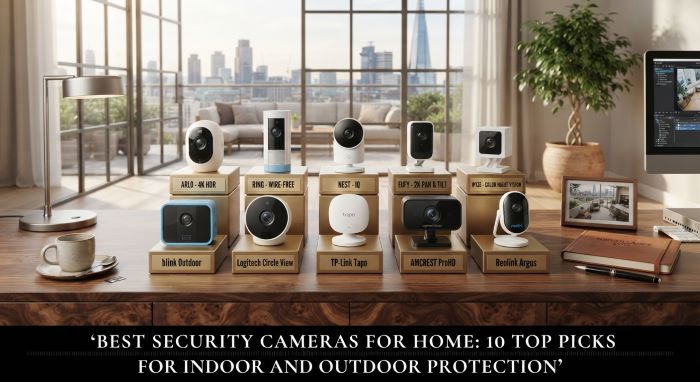
Indoor vs. Outdoor Cameras
The first decision is where you need coverage.
Indoor cameras watch entryways, living rooms, and nurseries. They are usually smaller, cheaper, and plug into an outlet. Many include privacy shutters that physically block the lens when you are home.
Outdoor cameras watch doors, driveways, yards, and garages. They need weatherproofing, stronger night vision, and often a wider field of view. Many include spotlights or floodlights and sirens to scare off intruders.
Most homes benefit from a mix. A common setup includes a video doorbell or front door camera, one or two outdoor cameras covering the driveway and back door, and an indoor camera near the main entry.
Features That Matter Most
Resolution: 1080p is the minimum for clear footage. 2K and 2.5K cameras show more detail, which helps when identifying faces or license plates.
Field of view: A wider angle covers more area with fewer cameras. Look for 130 degrees or more for outdoor use.
Night vision: Infrared night vision shows black-and-white footage in darkness. Color night vision, often powered by a spotlight, gives more useful detail.
Smart detection: Person, package, vehicle, and animal detection cut down on false alerts from swaying trees or passing cars.
Power source: Wired cameras never need charging. Battery cameras are easier to install but need recharging every few months.
Storage: Cloud storage requires a subscription. Local storage on a microSD card or base station avoids monthly fees.
1. Ring Spotlight Cam Pro
The Ring Spotlight Cam Pro is a top outdoor pick for most homes. It has built-in LED spotlights, a loud siren, 1080p HDR video, and 3D motion detection that uses radar to track exactly where motion happens.
It starts at about $149.99. Ring’s Protect plan costs about $4.99 per month for cloud recording on one camera. It integrates with Ring doorbells and Alexa devices, which makes it one of the best security cameras for home ecosystems built around Amazon.
2. Google Nest Cam Indoor
The Nest Cam Indoor records sharp 2K video with a wide field of view and strong low-light performance. Its smart alerts can tell the difference between people, animals, and vehicles.
It costs about $99.99. It works seamlessly with Google Home and Nest devices. Facial recognition requires a Nest Aware subscription, which starts at about $10 per month. It is a great choice for Google Home households.
3. Arlo Pro 5S
The Arlo Pro 5S is a premium wireless camera with 2K HDR video, color night vision, an integrated spotlight, and dual-band Wi-Fi for a more reliable connection. It works on battery or with a solar panel add-on.
It costs about $249.99. Arlo’s Secure plan is required for cloud recording and most smart features. It is ideal for homeowners who want high-end image quality and flexible wireless placement.
4. Wyze Cam v4
The Wyze Cam v4 is the best budget pick by a wide margin. For about $30, it delivers 2.5K video, color night vision, two-way audio, and a small spotlight. It works indoors and outdoors thanks to a weather-resistant design.
It supports local storage on a microSD card, so you do not need a subscription. Wyze also offers optional cloud plans. It is a strong way to cover many areas of your home on a small budget.
5. Wyze Floodlight Pro
The Wyze Floodlight Pro combines a 2.5K camera with a powerful 3,000-lumen floodlight. It lights up driveways and backyards brightly while recording clear video.
It costs about $149.98, which is much less than similar floodlight cameras from premium brands. Subscriptions are optional. It is a great pick for large outdoor areas that need both light and surveillance.
6. Blink Outdoor 4
The Blink Outdoor 4 is known for exceptional battery life, rated for up to two years on a set of AA lithium batteries. It records 1080p video, has infrared night vision, and offers person detection with a subscription.
It starts around $29.99 on sale and higher at regular price. Blink plans start at about $3.99 per month. It is a good pick for renters or anyone who wants a camera they can install anywhere without wiring.
7. eufy Indoor Cam C120
The eufy Indoor Cam C120 is an affordable indoor camera with 2K resolution and local storage support. It works with Apple HomeKit, Alexa, and Google Assistant.
It costs about $34.99. eufy is known for strong local storage options, which let you avoid monthly fees entirely. It is a smart pick for privacy-minded homeowners.
8. Lorex 2K Pan-Tilt Outdoor Camera
The Lorex 2K Pan-Tilt Outdoor Camera can rotate and tilt to cover a much wider area than fixed cameras. It records 2.5K video and supports local storage, so a subscription is optional.
It is a great pick for large yards or wide driveways where a single fixed camera would miss angles.
9. SimpliSafe Wireless Indoor Camera
The SimpliSafe Wireless Indoor Camera works best as part of the SimpliSafe security system. With professional monitoring, trained agents can view live footage during an alarm and speak through the camera to deter intruders.
It starts around $149.99. Full monitoring plans cost about $22.99 per month or more. It suits homeowners who want a professionally monitored system rather than a DIY setup.
10. Arlo Essential Indoor Camera (3rd Gen)
The Arlo Essential Indoor Camera offers 2K video, a physical privacy shield, and a built-in siren for about $39.99. It is compact and easy to set up.
Cloud recording requires an Arlo subscription. It is a budget-friendly way to add indoor coverage if you already use Arlo outdoor cameras.
Subscription Costs: What You Will Really Pay
Many camera brands make their money on subscriptions. Before buying, check what features work without a plan.
- Ring Protect: Starts around $4.99 per month for one camera.
- Blink Subscription: Starts around $3.99 per month.
- Nest Aware: Starts around $10 per month.
- Arlo Secure: Required for most features, priced per camera or for multiple cameras.
- Wyze Cam Plus: Optional, with low monthly pricing.
- SimpliSafe Monitoring: Starts around $22.99 per month for professional monitoring.
If you want to avoid monthly fees, choose cameras with local storage, like Wyze, eufy, and Lorex. The trade-off is that local footage can be lost if a thief takes the camera or storage device.
Where to Place Your Cameras
Good placement matters as much as the camera you buy. Most break-ins happen through the front door, back door, or first-floor windows.
- Front door: Mount a camera or video doorbell at about chest height to capture faces.
- Back door and side gates: These are common entry points because they are less visible from the street.
- Driveway and garage: Capture vehicles and anyone approaching the house.
- Main indoor hallway: Catch anyone who gets inside, since most intruders pass through central areas.
Mount outdoor cameras about 8 to 10 feet high so they are hard to reach but still capture faces. Avoid pointing cameras directly at the sun or bright lights, which washes out footage.
Security When You Work From Home
More people now work from home, and that changes how you think about security. You may be home during the day, but you are often focused on screens with your back to the door. Package theft, porch visitors, and even break-ins can happen while you are on a video call.
Remote work also means expensive equipment in your home, from laptops and monitors to cameras and studio gear. There are good reasons you should not compromise on home security, even if you work from home. Cameras with smart alerts let you see who is at the door without leaving your desk, and they protect your equipment when you step out.
Cameras vs. Full Security Systems
Cameras record what happens, but they do not always stop it. A full security system adds door and window sensors, motion detectors, alarms, and professional monitoring that can dispatch police or fire services.
If you run a home studio or keep valuable equipment on site, a complete system may make sense. It is worth comparing the best home security systems for your graphic studio or home office, since many of them integrate cameras, sensors, and monitoring into one app. Brands like SimpliSafe, Ring Alarm, and ADT combine cameras with sensors for broader protection.
Wired vs. Battery-Powered Cameras
Power source affects installation, reliability, and maintenance.
Wired cameras connect to an outlet or run on Power over Ethernet. They never need charging, and many support continuous recording rather than recording only when motion is detected. The downside is that installation takes more work, especially outdoors, where you may need an electrician.
Battery cameras install in minutes with a few screws. You can place them almost anywhere, including spots far from outlets. Battery life ranges from a few weeks to two years depending on the model and how often it records. Solar panel add-ons can keep many battery cameras charged indefinitely.
For renters, battery cameras are often the best security cameras for home use since they require no wiring and leave minimal damage when removed. For homeowners planning a long-term setup, wired cameras offer greater reliability.
Video Doorbells: The Best First Camera
If you are only buying one device, consider a video doorbell. The front door is the most common entry point for burglars and the spot where packages get stolen. A doorbell camera shows you who is there, lets you talk to visitors remotely, and records deliveries.
Ring, Nest, Arlo, Wyze, eufy, and Blink all make video doorbells that pair with their cameras. Choose a doorbell from the same brand as your other cameras so everything works in one app.
Best Picks by Situation
Different homes need different setups. Here is a quick guide to matching cameras to your situation.
- Renters: Blink Outdoor 4 and Wyze Cam v4 install without wiring and move easily.
- Tight budgets: Wyze Cam v4 and eufy Indoor Cam C120 offer strong features for under $40.
- Large properties: The Lorex 2K Pan-Tilt and Wyze Floodlight Pro cover wide areas.
- Pet owners: Indoor cameras with two-way audio, like the Nest Cam Indoor, let you check in and talk to pets.
- Families with young kids: Indoor cameras with privacy shutters, like the Arlo Essential Indoor, give peace of mind without constant recording.
- Professional monitoring: SimpliSafe offers agent-verified alarms and live intervention.
The best security cameras for home fit your living situation, not just your budget. Think about who lives in the house, how long you plan to stay, and which areas matter most before committing to a brand.
Legal and Privacy Considerations
Before mounting outdoor cameras, check local laws. In most places, recording public areas like your driveway and front yard is legal. Recording audio can be restricted in some states, since some laws require consent from everyone being recorded. Avoid pointing cameras directly into neighbors’ windows or private backyards.
If you use cameras indoors while a nanny, cleaner, or houseguest is present, let them know. Being open about cameras avoids legal problems and protects trust. Choosing the best security cameras for home also means using them responsibly.
Getting the Most From Motion Alerts
Too many alerts is one of the most common complaints from new camera owners. When your phone buzzes every time a car drives by or a tree branch moves, you start ignoring notifications, which defeats the purpose of having cameras at all.
Fix this by setting activity zones. Most apps let you draw boxes around the areas you want to monitor, like your front porch or driveway, and ignore the street or sidewalk. Adjust motion sensitivity to reduce false triggers. Turn on person or package detection so you only get alerts that matter. Schedule alerts so indoor cameras stay quiet while you are home.
With these settings tuned, the best security cameras for home become far more useful. Instead of dozens of meaningless alerts, you get a handful that actually need your attention. Take a few days after installation to fine-tune your settings, since every home and yard is different. The best security cameras for home only protect you if you trust their alerts enough to check them.
Weather and Temperature Ratings
Outdoor cameras face rain, snow, dust, and heat. Check the IP rating before buying. An IP65 rating means a camera is dust-tight and protected against water jets, which suits most outdoor locations. IP66 and IP67 offer stronger protection for exposed spots. Also check the operating temperature range, since batteries drain faster in freezing weather and some cameras shut down in extreme heat. In very cold climates, wired cameras or models with cold-weather battery designs perform more reliably through winter.
Protecting Your Cameras From Hackers
Security cameras connect to the internet, which means they can be hacked if you do not take basic steps.
- Use a strong, unique password for your camera account.
- Turn on two-factor authentication.
- Keep camera firmware updated.
- Use a secure Wi-Fi network with WPA3 or WPA2 encryption.
- Choose brands that offer end-to-end encryption.
- Use privacy shutters or schedules for indoor cameras when you are home.
Choosing the Right Setup
Start by deciding what you want to watch and how much you want to spend each month. For Amazon households, Ring is a natural fit. For Google households, Nest works best. For tight budgets and no subscriptions, Wyze and eufy lead the way. For premium image quality, Arlo Pro 5S stands out. For professional monitoring, SimpliSafe is worth a look.
The best security cameras for home fit your ecosystem, your budget, and the areas you need to protect most. Even one well-placed camera adds real peace of mind.
Key Takeaways
- The Ring Spotlight Cam Pro is a top outdoor pick with spotlights, a siren, and radar-based motion tracking.
- The Wyze Cam v4 is the best budget option, offering 2.5K video and local storage for about $30.
- The Google Nest Cam Indoor suits Google Home households, while Ring pairs best with Alexa.
- The Arlo Pro 5S delivers premium 2K HDR video and color night vision for about $250.
- Choose cameras with local storage, like Wyze, eufy, or Lorex, if you want to avoid monthly subscription fees.
- Place cameras at the front door, back door, driveway, and main indoor hallway, mounted 8 to 10 feet high outdoors.
- Protect cameras from hackers with strong passwords, two-factor authentication, and regular firmware updates.