5 Best AI Tools to Fix Blurry Vintage Photos Fast
Old family photos are more than just paper and ink. They are memories of people and places that shaped who you are today. Unfortunately, time is not kind to these physical prints. You might find that your favorite pictures of your grandparents are blurry, faded, or covered in dust scratches. In the past, you would need to pay a professional editor a lot of money to fix these issues. Now, you can use an AI Photo Enhancer to do the work in just a few seconds. These tools use smart algorithms to fill in missing details and sharpen edges that have softened over the decades.
Sometimes, when you find old scans online or in digital archives, they come with distracting overlays. You might need to remove watermark from image files before you can truly enjoy the details of the past. Getting rid of these marks helps the AI focus on the actual textures of the photo rather than the text on top of it. Once the image is clean, the restoration process becomes much more effective. You will see faces become clearer and colors look more natural as the software works its magic.
1. EzEnhancer.ai
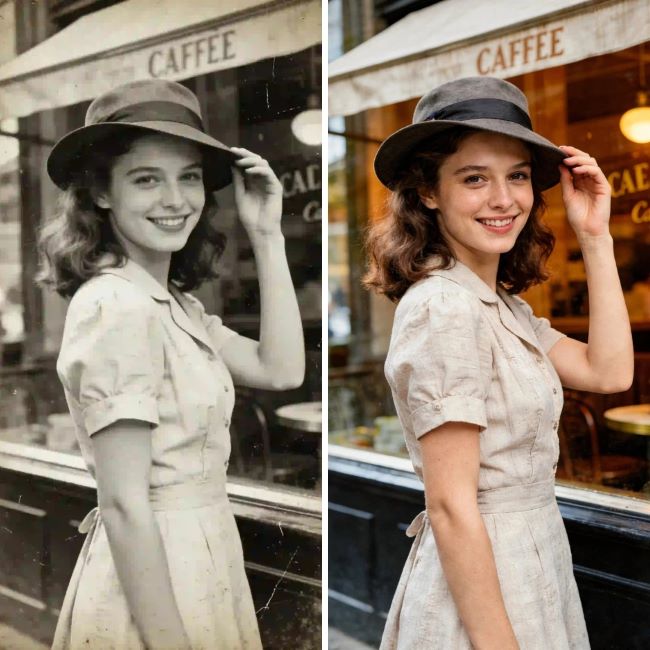
EZ Enhancer is a web based tool designed for people who want high quality results without learning complex software. It focuses on clarity and color restoration, making it a great choice for vintage portraits. The system analyzes the pixels in your old photo and identifies where the blur is most prominent. It then applies a sharpening layer that defines eyes, hair, and clothing textures.
Key Features
The tool offers a one click enhancement mode that handles everything at once. It includes a specific face refinement feature that prevents the skin from looking plastic or fake. You can also use its color correction settings to fix the yellow tint that often affects old black and white prints. The processing happens on their servers, so you do not need a powerful computer to use it.
Pros
The interface is very clean and easy to navigate. You can see a before and after comparison immediately after the upload. It handles heavy blur better than many other free tools available online.
Cons
You need a stable internet connection to upload and download your files. The free version may have limits on how many photos you can process per day.
Best For
People who have a large collection of family portraits and need a fast, reliable way to sharpen them.
2. Remini
Remini became famous on social media for its ability to turn extremely blurry photos into sharp images. It uses a technology called generative AI to recreate facial features that might be completely lost in the original scan. If you have a photo where the person looks like a smudge, Remini can often guess what their eyes and teeth looked like with surprising accuracy.
Key Features
The mobile app version is very popular and allows you to fix photos directly from your phone gallery. It has a dedicated Video Enhancer if you have old home movies that need a boost. The Face Glow feature adds a bit of light to dull images, making them look like they were taken with modern equipment. It also offers a batch upload option for subscribers.
Pros
The level of detail it adds to faces is often unmatched by other tools. It is very convenient for users who do not want to use a desktop computer.
Cons
The free version is heavy on advertisements which can be annoying. Sometimes the AI guesses wrong and makes a person look slightly different than they did in real life.
Best For
Restoring very low resolution photos where the facial details are almost invisible.
3. VanceAI
VanceAI is a comprehensive suite of tools that goes beyond just sharpening. It offers specific modules for different types of photo damage. For example, if your vintage photo has a lot of grain or noise, you can use the Denoise AI before you use the Sharpen AI. This multi step approach often leads to a much cleaner final product.
Key Features
VanceAI provides a dedicated Photo Restorer that specifically targets scratches and tears in old paper. It also has a colorizer that uses deep learning to add realistic colors to black and white images. You can download the software for your Windows PC or use the online version. It supports high resolution exports, which is great if you plan to print the photos later.
Pros
The workflow is very logical and gives you more control over the final look. It produces very professional results that look like they were done by a human editor.
Cons
The credit system can be a bit confusing for new users. The desktop version requires a decent amount of system memory to run smoothly.
Best For
Users who want a professional grade toolkit to handle various types of photo degradation.
4. MyHeritage Photo Enhancer
MyHeritage is primarily a genealogy website, but they released a photo tool that became a global sensation. Their enhancer is specifically tuned for historical photos. Because they have a massive database of historical records, their AI is trained on the types of images you find in the early 20th century.
Key Features
The most famous feature is Deep Nostalgia, which can animate the faces in your old photos. The enhancer itself works by increasing the resolution of the image and sharpening the focus on the subjects. It works seamlessly with their family tree platform, so you can save the restored photos directly to your ancestors profiles.
Pros
It is excellent at handling the specific textures of old film and paper. The animation feature adds a unique emotional layer to your family history research.
Cons
You must create an account to use the tool, which might be a turn off for some. The focus is almost entirely on faces, so the background might remain a bit blurry.
Best For
Genealogists and family historians who want to bring their ancestors to life.
5. Adobe Photoshop (Neural Filters)
Photoshop is the most famous photo editor in the world, and it recently added powerful AI features called Neural Filters. One of these filters is specifically named Photo Restoration. This tool is designed to handle everything from blur to physical cracks in the photo paper.
Key Features
The Photo Restoration filter has sliders for photo enhancement, face enhancement, and scratch reduction. Since it is part of Photoshop, you can use other tools like the Clone Stamp or Healing Brush to fix any small mistakes the AI makes. It allows for non destructive editing, meaning you can always go back to your original photo if you do not like the changes.
Pros
This tool offers the most creative control of any option on this list. The results are high resolution and suitable for professional printing or archives.
Cons
Photoshop requires a monthly subscription fee. It has a steep learning curve for people who are not used to professional design software.
Best For
Serious hobbyists or professionals who want total control over every pixel of the restoration.
Comparison Summary
| Tool | Primary Focus | Platform | Ease of Use |
| EzEnhancer.ai | General Sharpening | Web | Very Easy |
| Remini | Facial Reconstruction | Mobile/Web | Easy |
| VanceAI | Full Suite Restoration | Web/Desktop | Moderate |
| MyHeritage | Historical Portraits | Web | Easy |
| Photoshop | Professional Editing | Desktop | Hard |
Final Recommendation
Choosing the right tool depends on your specific needs and how much time you want to spend. If you are looking for a quick and effective way to fix a batch of photos, EZ Enhancer is the best place to start. It balances speed and quality without requiring you to install anything. If your photos are almost completely destroyed and you need the AI to rebuild faces from scratch, Remini is your best bet.
For those who are deep into family history, MyHeritage offers a unique experience that connects your photos to your family tree. If you want the absolute best results and do not mind a bit of a learning curve, Adobe Photoshop remains the industry leader. No matter which tool you choose, the ability to see a clear image of a loved one from the past is a wonderful gift. Start with one or two photos and see how much detail you can recover today.