Gimkit: The Complete Guide to the Game-Based Learning Platform
Walk past a classroom where students are leaning into their screens, shouting about who has the most cash, and quietly racing to answer review questions, and there is a good chance they are playing Gimkit. The platform turned the tired classroom quiz into something students actually want to win, and it has become one of the most popular learning games in schools. If you are a teacher wondering how to use it, a student trying to get into a game, or a parent curious about what your kid is playing, this guide covers everything you need.
It walks through what the platform is and where it came from, how the game actually works, the many game modes, and clear steps for logging in, hosting a session, and joining one. By the end, you will understand not just how to use it but why it keeps a room engaged in a way a flat worksheet never could.
What Is Gimkit?
Let us start with the basics. What is Gimkit, exactly? It is a web-based, game-based learning platform where students answer quiz questions to earn virtual in-game cash, then spend that cash on power-ups and upgrades that help them climb the leaderboard. Think of it as flashcard review with a strategy economy layered on top, which is what makes it so different from a standard quiz.
The answer gets more interesting when you learn its origin. The platform was created by Josh Feinsilber, a high school student in Seattle, who built it as a project and turned it into an official company in June 2018. What began as a single quiz format has grown into a tool used in classrooms around the world, proving that a good idea can come from anywhere, even a teenager’s school project.
The core appeal is engagement. Because students earn and spend money based on how they answer, the game rewards both knowledge and strategy. A student who answers quickly can buy a multiplier, while one who plays it safe can buy protection. That blend of learning and decision-making keeps players invested, which is the real reason teachers reach for it during review. Understanding Gimkit at this level explains why it spread so fast: it makes practice feel like a game worth playing rather than a chore.
How the Game Works
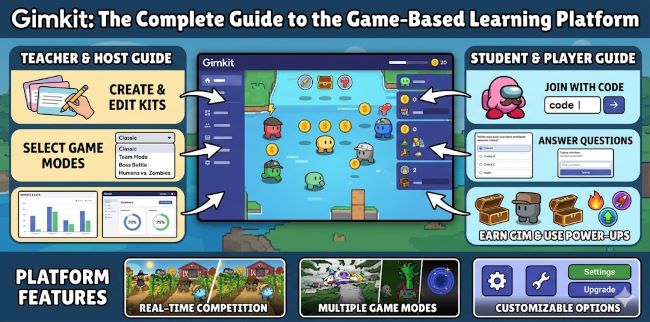
The mechanics are simple to grasp and surprisingly deep in practice. At the heart of every session is a question set, which the platform calls a Kit. A Kit is just a collection of questions and answers on a topic, whether vocabulary, math facts, history dates, or anything else a teacher wants to review.
When a game starts, students answer questions from the Kit. Each correct answer earns virtual cash. Instead of simply racking up points, players visit an in-game shop to spend their earnings on upgrades that increase how much each correct answer is worth, or on power-ups that give them an edge. This economy is the twist that sets the game apart, since success depends on both answering correctly and spending wisely.
Teachers can build their own Kits from scratch, import questions from sources like Quizlet or a spreadsheet, or use one of the many public Kits in the gallery. That flexibility means a teacher can spin up a review game on almost any subject in minutes. Once the Kit is ready, the teacher picks a game mode, sets the rules, and launches the session for students to join. The combination of custom content and game-show energy is what turns ordinary review into something students ask to do again.
The Game Modes
One reason the platform stays fresh is its huge and growing list of game modes, with roughly two dozen available by 2026. Each mode changes how the cash economy and competition play out, so the same Kit can feel completely different depending on the mode chosen.
Here are some of the most popular modes:
- Classic, the original mode where students play individually to earn the most cash, ideal for beginners
- Team Mode, where students work together and pool their earnings, great for collaborative review
- Trust No One, a social deduction mode in the style of a popular impostor game, which adds suspense and fun
- Fishtopia and other 2D modes, where students move an avatar around a map while answering questions
- Don’t Look Down, a climbing-themed 2D mode that rewards steady correct answers
- Creative Mode, which lets users build their own interactive game worlds with doors, keys, enemies, and teleporters
The 2D and Creative modes are a major evolution, turning the platform from a simple quiz tool into something closer to a video game built around learning. Teachers can match the mode to their goal, choosing a calm individual mode for focused review or a chaotic team mode for energy and fun. With so many options, it is worth experimenting to find which modes resonate with a particular class, since every group responds differently.
Getting Started: The Gimkit Login
Before you can host or build anything, you need an account, and the Gimkit login is the starting point for teachers. Head to the official website and sign up or sign in to reach your teacher dashboard, which is the control center for everything you do on the platform.
The teacher dashboard gives access to create and manage Kits, launch live games, set up classes, and review reports after each session. Signing up is free to start, and you can log in with an email or through common single sign-on options like Google, which many schools prefer for simplicity. Once you are in, the dashboard organizes your Kits and recent games so you can jump back in quickly.
Students generally do not need their own account to play a live game, since they can join with just a game code and a nickname, which we will cover shortly. Accounts come into play mainly for teachers and for features like Classes, which let teachers track individual student progress over time. Keeping the login simple for students is part of why the platform is so easy to deploy in a classroom, since there is no barrier to getting everyone playing within a minute or two.
How to Host a Live Game
Running a session is the part teachers do most, and learning to be a Gimkit host takes only a few minutes the first time. The flow is straightforward once you know the steps.
Start by signing in to your dashboard. In Gimkit, pick the Kit you want to use, whether one you built, one imported from Quizlet or a spreadsheet, or a public Kit from the gallery. Click the option to play live, then choose your game mode from the available list. Next comes the options screen, where you set things like the nickname generator, whether students can join late, and the game goal that ends the session, which is usually a cash target or a time limit.
Once your settings look right, continue to open the lobby, where a five or six digit game code appears. As the host, you display this code for students, who use it to enter the lobby. You will see their names pop up as they arrive. When everyone is in, start the game. During play, the host has a control panel to manage music and sound, display the leaderboard, view and remove disruptive players, and end the game early if needed. In 2026, you can even host from a tablet or phone while moving around the room, which makes being a Gimkit host more flexible than ever. After the session, a report shows which questions tripped students up most, turning the game into a useful teaching tool.
Understanding Gimkit Live
The live, real-time format is the heart of the experience, and Gimkit Live refers to hosting a session that students play together at the same time. This is the classic use case, where a teacher projects the game and the whole class competes in real time.
When you run a live game in Gimkit, the lobby is your staging ground while students file in using the game code. The energy of everyone playing at once, watching the leaderboard shift, is what makes the live format so engaging. Because it happens in real time, the teacher can pause to explain a tricky question, drop encouragement, or adjust the pace on the fly, which a self-paced assignment cannot offer.
The platform also supports an assignment style of play, where students complete a game on their own time, useful for homework or absent students. But the live format, with the whole class together, is where the game show atmosphere truly comes alive. For most teachers, the live format is the default and the reason they reach for the tool during review days, since nothing else generates quite the same buzz in the room.
How Students Join a Game
From the student side, getting into a game is refreshingly simple, and the Gimkit join process takes only seconds. There is no account to create and no app to download for a standard live game.
To complete the Gimkit join, students open a browser and go to the join page at the platform’s website, then enter the game code the teacher displays. They can also join by scanning a QR code the host can pull up, or by clicking a shared join link, which is handy when the game code is sent through a tool like Google Classroom. After entering the code, students type a nickname, and once the teacher starts the game, they are in.
A few things make the Gimkit experience smoother in a classroom. The host can turn on a nickname generator that assigns fun preset names, which prevents inappropriate entries and the inevitable silly names. Teachers can also allow late joining, so a student who arrives late or gets bumped off the Wi-Fi can still get into the game. Because the whole join flow is just a code and a nickname, even young students can get into a session quickly, which keeps precious class time focused on learning rather than logistics.
Tips for Teachers
A few habits make sessions run smoother and keep the learning front and center. Turn on the late-join setting for live classes, since students inevitably arrive late or lose their connection, and locking them out kills the momentum. Use the nickname generator to skip the distraction of inappropriate or silly names, especially with younger groups.
Match the mode to your goal. A calm individual mode suits focused review before a test, while a team or social deduction mode brings energy for a fun reward day. Do not feel you must use every power-up or setting at once, since starting simple helps both you and your students learn the flow. Lean on the post-game reports, which show exactly which questions caused the most errors, so you know what to reteach. And remember that the cash economy, not just the questions, is what hooks students, so let them enjoy the strategy of spending and upgrading rather than rushing the game.
Pricing: Free Versus Paid
A common question is what it costs, and the good news is that there is a free version that covers a lot of ground. Teachers can sign up, build Kits, and host live games without paying, which is plenty for many classrooms.
A paid subscription, often called the Pro tier, unlocks additional features such as access to more game modes, advanced reporting, and extra hosting options. Because pricing and the exact features in each tier can change over time, it is worth checking the current plans on the official site before deciding, especially if your school is considering a group or district purchase. Many teachers start with the free version, see how their students respond, and upgrade only if they find themselves wanting the extra modes and tools. The free tier is generous enough that you can fully evaluate whether the platform fits your classroom before spending anything.
How It Compares to Other Tools
The platform sits in a crowded field of game-based learning tools, with the best-known alternatives being Kahoot, Blooket, and Quizizz. Each has its own flavor, and the right choice depends on what a teacher wants.
Kahoot is the most widely recognized, known for its fast, music-driven multiple-choice quizzes and simple setup. Blooket, like Gimkit, leans into game modes and a reward economy, and the two are often compared directly. Quizizz emphasizes self-paced play and a large question library. What sets this platform apart is its money-and-upgrade economy, which adds a layer of strategy the others handle differently, along with its growing 2D and Creative modes that feel more like a full video game.
There is no single best tool, since they each excel in different situations. Many teachers keep two or three in rotation and pick based on the lesson and the mood of the class. The strategy economy and the variety of modes are the features that tend to win this platform its devoted fans, particularly among students who enjoy the competitive, build-your-advantage style of play.
Is It Good for Learning and Safe?
Beyond the fun, teachers and parents reasonably ask whether it actually helps learning and whether it is safe. On the learning side, the format excels at one specific thing: repetitive practice and review. The game-show energy gets students to do far more practice questions than they would on a worksheet, which strengthens recall through repetition.
It is best understood as a review and reinforcement tool rather than a way to teach brand-new material, since the format rewards quick recall over deep first-time learning. Used for what it does well, it is genuinely effective at boosting engagement and retention. On safety, the standard live format keeps things simple, since students join with only a code and a nickname rather than sharing personal information. Teachers can filter nicknames and remove disruptive players, and the platform follows student-data practices that schools can review. As with any classroom tool, a teacher overseeing the session is the best safeguard, and the simple join process keeps the experience contained and age-appropriate.
Frequently Asked Questions
Do students need an account to play? No. For a standard live game, students just go to the join page, enter the game code, and pick a nickname. Accounts are mainly for teachers.
Is it free? There is a capable free version for teachers. A paid Pro tier adds more modes and features, and current pricing is listed on the official site.
What is a Kit? A Kit is a question set, the collection of questions and answers a game is built around. Teachers can create their own or use public ones.
What is the difference between live and assignment play? Live play has the whole class compete in real time, while assignment play lets students complete a game on their own schedule, useful for homework.
Can it be played on phones? Yes. Students can join from any device with a browser, and teachers can even host from a tablet or phone in newer versions.
Is it good for all ages? It works across elementary through high school and beyond, since teachers control the questions and difficulty. The simple join process suits even young students.
How is it different from Kahoot? The biggest difference is the in-game cash economy, where students buy upgrades and power-ups, which adds strategy beyond simply answering fastest.
Key Takeaways
- Gimkit is a web-based, game-based learning platform where students answer quiz questions to earn virtual cash they spend on power-ups and upgrades, which is the core of what is Gimkit.
- It was created by high school student Josh Feinsilber and became a company in June 2018, growing from one quiz format into a tool with roughly two dozen game modes.
- Games are built around Kits, which are question sets teachers create, import, or pull from a public gallery, then play in modes like Classic, Team, Trust No One, and Creative.
- The Gimkit login is the teacher’s starting point, giving access to build Kits, host games, set up classes, and view reports, while students usually need no account.
- To be a Gimkit host, sign in, pick a Kit, choose a mode, set options, and share the game code from the lobby, then manage the session from a control panel.
- Gimkit Live is the real-time format where the whole class competes at once, and it is where the game-show energy that drives engagement truly comes alive.
- The Gimkit join process is simple: students visit the join page, enter the game code or scan a QR code, type a nickname, and play, with no account needed.
- Free for core use, with a paid Pro tier for extra modes and features, so teachers can fully test it before spending, while checking current pricing on the official site.
- It sits alongside alternatives like Kahoot, Blooket, and Quizizz, standing out for its cash-and-upgrade economy and its growing 2D and Creative game modes.
- It works best as an engaging review and reinforcement tool, and the simple code-and-nickname join keeps the experience easy and age-appropriate when a teacher is overseeing it.