How to Find String Position in List Python
You’re working with a Python list, and you need to locate where a specific string sits in that list. Maybe you’re processing user input, organizing data, or just trying to figure out the order of items. Whatever the reason, knowing how to find string position in list Python is a skill that comes up constantly.
The good news? Python makes this surprisingly straightforward. You have several solid approaches depending on what you need to do. Some methods are quick and simple. Others give you more control. We’ll walk through each one so you can pick the right tool for your situation.
The Simplest Approach: Using index()
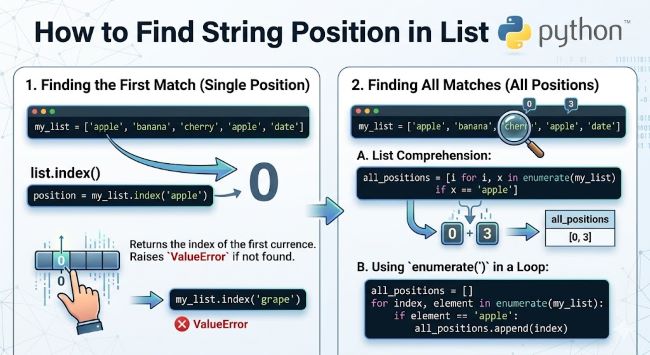
The index() method is your go-to for most situations. It searches through a list and returns the position of the first occurrence of your string. Positions in Python start at zero, so the first item is at index 0, the second at index 1, and so on.
Here’s the basic syntax:
my_list = ["apple", "banana", "cherry", "banana"]
position = my_list.index("banana")
print(position)  # Output: 1
The method returns 1 because “banana” sits at position 1 in the list. Notice that even though “banana” appears twice, index() gives you only the first occurrence.
This approach is clean and readable. Your code tells anyone looking at it exactly what you’re doing. But there’s a catch. If the string doesn’t exist in your list, Python throws a ValueError. You need to handle that:
my_list = ["apple", "banana", "cherry"]

try:
    position = my_list.index("orange")
except ValueError:
    print("String not found in list")
This error handling prevents your program from crashing when you search for something that isn’t there.
Finding All Positions: Using enumerate()
Sometimes you need to find every position where a string appears, not just the first one. The enumerate() function helps here. It loops through your list and gives you both the position and the value at each step.
my_list = ["apple", "banana", "cherry", "banana", "date"]

positions = [index for index, value in enumerate(my_list) if value == "banana"]
print(positions)  # Output: [1, 3]
This code creates a list of all positions where “banana” appears. The list comprehension makes it concise and efficient. You’re building a new list that contains only the indexes where your target string matches.
This approach scales well if you’re searching through large lists. You get exactly the information you need without extra processing.
Counting Occurrences and Finding Positions
What if you want to know how many times a string appears in your list? Use the count() method:
my_list = ["apple", "banana", "cherry", "banana", "date"]
count = my_list.count("banana")
print(count)  # Output: 2
This tells you immediately that “banana” appears twice. You can combine this with enumerate() for a more complete picture:
my_list = ["apple", "banana", "cherry", "banana", "date"]

target = "banana"
count = my_list.count(target)
positions = [index for index, value in enumerate(my_list) if value == target]

print(f"Found '{target}' {count} times at positions {positions}")
# Output: Found 'banana' 2 times at positions [1, 3]
Now you have both the count and every position where the string appears.
Handling Case Sensitivity
Strings in Python are case sensitive by default. “Banana” and “banana” are different. If you need to find a string regardless of its case, convert everything to the same case before comparing:
my_list = ["Apple", "Banana", "Cherry", "banana"]

target = "banana"
lowercase_list = [item.lower() for item in my_list]
positions = [index for index, value in enumerate(lowercase_list) if value == target]

print(positions)  # Output: [1, 3]
This creates a new list with all items converted to lowercase, then searches through it. The original list stays unchanged, and you get the positions you need.
Working with Partial Matches
Sometimes you don’t need an exact match. Maybe you want to find strings that contain certain text rather than match it completely. Use an approach that checks if your search term is inside each list item:
my_list = ["apple pie", "banana split", "cherry tart", "blueberry muffin"]

positions = [index for index, value in enumerate(my_list) if "berry" in value]
print(positions)  # Output: [3]
The in operator checks whether “berry” appears within any of the strings. This is useful when dealing with longer text or when you’re looking for substrings rather than exact matches.
Performance Considerations
For small lists, none of these methods matter much. Python handles them instantly. But if you’re working with thousands or millions of items, efficiency becomes relevant.
The index() method stops searching as soon as it finds the first match. This makes it fast when the item is near the beginning of your list. If you’re looking for something at the end, it has to check everything first.
Using enumerate() with a list comprehension is efficient because it makes a single pass through your list. You get all the information in one go without multiple loops.
If you’re doing repeated searches on the same list, consider converting it to a different data structure. A dictionary or set might be faster for lookups depending on your specific situation. However, these approaches sacrifice the ordering information that lists provide.
Real World Example: Processing User Data
Imagine you’re processing a list of usernames and need to find where a specific username sits:
usernames = ["alice", "bob", "charlie", "diana", "eve"]
search_user = "charlie"

try:
    user_position = usernames.index(search_user)
    print(f"User '{search_user}' is at position {user_position}")
except ValueError:
    print(f"User '{search_user}' not found in the list")
This pattern is reliable and clear. It handles the case where the username doesn’t exist and provides useful feedback.
For a more complex scenario where you need to track multiple users:
users_to_find = ["bob", "diana", "frank"]
user_list = ["alice", "bob", "charlie", "diana", "eve"]

for user in users_to_find:
    if user in user_list:
        position = user_list.index(user)
        print(f"{user}: position {position}")
    else:
        print(f"{user}: not found")
This loops through each user you’re looking for and reports their position or absence.
Key Points to Remember
When you need to find string position in list Python, start with index() for single matches and handle the ValueError exception if needed. Use enumerate() when you want all positions of a string. Remember that Python uses zero-based indexing, so the first item is always at position 0.
Case sensitivity matters. “Banana” and “banana” are different strings. Convert to lowercase if you need flexible matching. For partial matches, the in operator works well within your list comprehension or loop.
Performance rarely matters for typical lists, but be aware that searching through very large lists takes longer. The method you choose should match your specific need rather than adding unnecessary complexity.
Testing your code with edge cases is important. What happens if the string doesn’t exist? What if it appears multiple times? How does your code behave with empty lists? Working through these scenarios prevents surprises later.
Python gives you straightforward tools for this task. Whether you use the simple index() method or combine enumerate() with list comprehensions, you have clean, readable solutions that other developers will understand at a glance.
Start with the simplest approach that solves your problem. You can always adjust if you need more power or flexibility later. That’s the spirit of practical Python programming.
Key Takeaways
- The
index()method finds the first position of a string in a Python list and throws aValueErrorif the string doesn’t exist, so always use try-except for safety. - Python uses zero-based indexing, meaning the first item in a list is at position 0, the second at position 1, and so on.
- Use
enumerate()with a list comprehension to find all positions where a string appears in a list, not just the first occurrence. - String matching in Python is case sensitive by default, so “Banana” and “banana” are treated as different values. Convert to lowercase if you need flexible matching.
- The
count()method tells you how many times a string appears in a list without returning position information. - For partial matches where you want to find strings containing certain text, use the
inoperator within your search logic instead of exact equality checks. - The
index()method stops searching as soon as it finds a match, making it fast for items near the beginning of a list but slower for items at the end. - If you’re doing repeated searches on the same list, consider using a dictionary or set for faster lookups, though you’ll lose the ordering information that lists provide.
Related Resources
Learn more about working with Python data structures by checking out free Photoshop brushes for design inspiration while you code. If you’re building projects that need visual components, exploring design tools can help round out your development skills. For those interested in expanding their programming knowledge, online Python courses offer structured learning paths to deepen your expertise.