How to Cancel Fabletics Membership: Every Method That Works
Learn exactly how to cancel your Fabletics membership by phone, online, or chat. This guide covers every method, the key billing deadline to know, and what happens to your VIP credits after you cancel.
If you have been trying to figure out how to cancel Fabletics membership, you are not alone. Fabletics is one of the most googled subscription cancellations out there, and the reason is straightforward: the VIP membership auto-bills $59.95 each month whether you shop or not, and the cancellation path on the website is not exactly obvious. This guide covers every method available, what to do before you cancel, and what to watch out for so you do not get charged again after you think you are done.
What Is the Fabletics VIP Membership?
The Fabletics VIP membership is a subscription that charges you $59.95 on the 6th of each month. That charge converts into a member credit you can use to buy activewear at discounted VIP prices. If you do not want to be charged in a given month, you need to log in and click “Skip the Month” before the 5th.
The catch is that a lot of people forget to skip, get charged, and then want out. Fabletics customer service will tell you there are no cancellation fees and no lock-in periods. That part is true. You can cancel at any time. The part they do not always emphasize upfront is the 5th-of-the-month billing deadline, which trips up a lot of members.
Before You Cancel: Three Things to Handle First
1. Use Your Credits
Any unused VIP credits you have paid for are still yours after cancellation, but they expire 12 months from the date of purchase. Once you cancel, you lose access to VIP pricing, which means your credits will stretch significantly less far. Spend them on things you actually want before you cancel, while you still have member-level discounts.
2. Check the Billing Date
If you cancel after the 5th of the month, you have already been charged for that cycle. Fabletics does not refund the monthly charge once it hits. You keep the credit, but the cash is gone. If the 5th is coming up, either skip that month first and then cancel, or cancel before the 5th to avoid the charge entirely.
3. Have Your Account Details Ready
Whichever method you use, you will need to verify your identity. Have your account email address and full name ready. If you are calling, have the phone number or last four digits of your billing card available too.
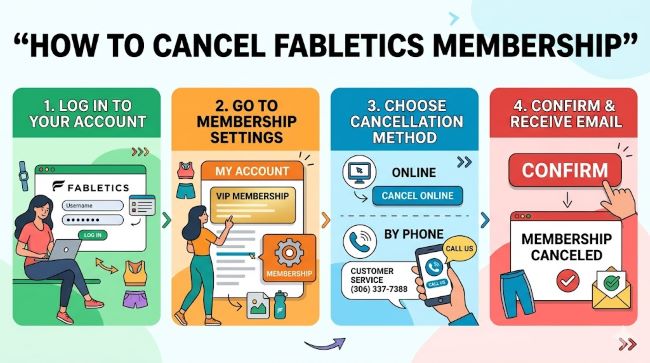
Method 1: Cancel Online Through Your Account
This is the most direct route for people who prefer to handle things without talking to anyone.
- Go to fabletics.com and sign in to your account.
- Click your name or profile icon in the top right corner.
- Select My Account or My VIP from the dropdown.
- Find the VIP Membership section and look for the cancellation link. It is often small text near the bottom of the section.
- Click Cancel Membership.
- Follow the prompts. Fabletics will offer you alternatives like skipping a month or receiving store credit. Click through these without accepting them unless you want to.
- Complete the cancellation and save or screenshot the confirmation page.
One known issue: the cancel button sometimes disappears or the page redirects you in circles. If that happens, clear your browser cache, try a different browser, or move to the live chat method instead.
Method 2: Call Fabletics Customer Service
Calling is the fastest and most reliable method for most people. Fabletics customer service is available 24 hours a day, 7 days a week at 1-844-322-5384.
When you get through:
- Verify your identity with your account email and name.
- State clearly: “I want to cancel my VIP membership permanently.”
- The representative will likely offer you an alternative: store credit, a free month, or a pause. You do not have to accept any of these. Just repeat your cancellation request.
- Ask for a confirmation number or email confirmation before you hang up.
Be firm but polite. Fabletics agents are trained in retention, so the conversation may take a few minutes. Staying clear about what you want moves it along faster.
Method 3: Cancel via Live Chat
The live chat option sits in the bottom corner of the Fabletics website. It is available 7 days a week from 9 AM to 9 PM EST.
- Open the chat widget on fabletics.com.
- Type “Cancel membership” or “I want to cancel my VIP membership.”
- You will likely be connected to a human representative who will process the request.
- Screenshot the full conversation before you close the chat window. Chat transcripts are your proof if there is a billing dispute later.
This method works well if you dislike phone calls. The wait time can vary, but it is typically faster than email.
Method 4: Email Cancellation
Send an email to [email protected] with the following:
- Your full name
- The email address linked to your account
- A clear subject line: “Request to Cancel VIP Membership”
- A statement requesting written confirmation of cancellation
Email cancellations take longer, usually one to two business days. This method is useful if you want a written record but are not in a rush.
Method 5: Facebook Messenger
Go to Fabletics’ official Facebook page, click Message, and send your cancellation request. Include your account email address so they can verify your identity. This works, but it is slower than phone or live chat. Always follow up with an email asking for written confirmation.
What Happens After You Cancel Your Fabletics VIP Membership?
A few things change once your membership is cancelled:
- You can still shop on fabletics.com at regular retail prices.
- Your unused VIP credits remain on your account for up to 12 months from their purchase date. After that, they expire.
- VIP pricing disappears. Items that were discounted as a member will revert to full retail pricing when you shop.
- No further charges will be made to your card if the cancellation was processed correctly.
Check your credit card or bank statement in the following month to confirm no charge appears. If you see a charge after cancellation, contact Fabletics customer service immediately and provide your cancellation confirmation as proof.
What If You Want a Refund?
Fabletics does not offer refunds for the current billing cycle once it has been charged. If you were charged and forgot to skip, Fabletics will keep the charge as a credit on your account. You can use that credit to buy something before the expiry date.
For charges that appeared after you already cancelled, that is a different situation. Contact Fabletics customer service with your cancellation confirmation, and if they do not resolve it, dispute the charge with your bank or credit card provider.
The Skip the Month Alternative
If you want to pause your membership rather than end it, skipping a month is the official alternative. Log in between the 1st and 5th of any month and select Skip the Month. You will not be charged, and your VIP status stays intact.
Some members set a recurring calendar reminder on the 1st of every month specifically for this. If you shop at Fabletics regularly but not every month, skipping is often more practical than cancelling and rejoining.
Can You Use a Fabletics Gift Card or Promo Code After Cancelling?
Yes. A Fabletics gift card can be redeemed on fabletics.com whether you hold a VIP membership or not. If you received a Fabletics gift card as a gift or have one stored in your account, it stays valid after cancellation. Check the balance in your account wallet before you cancel.
A Fabletics promo code, on the other hand, may have terms that limit its use to VIP members or new sign-ups. Check the specific terms of the promo code before assuming it will work post-cancellation.
Managing Subscriptions: The Bigger Picture
Fabletics is not the only subscription that can quietly drain your budget. Keeping track of what you pay for each month matters, and tools that help you monitor expenses and subscriptions make it easier to spot charges you have forgotten about. The same goes for managing your digital account settings across platforms. Whether it is billing preferences, privacy options, or account-level controls like read receipts, knowing where to look saves time and avoids surprises. And if you deal with syncing or account setting issues across cloud-based services, a guide on resolving account sync problems is worth bookmarking.
Key Takeaways
- How to cancel Fabletics membership: Call 1-844-322-5384 (24/7), use live chat (9 AM to 9 PM EST), cancel online through My Account, or email [email protected].
- There is no cancellation fee and no lock-in period.
- Cancel before the 5th of the month to avoid that month’s $59.95 charge. After the 5th, you have already been billed.
- Use your remaining VIP credits before you cancel. After cancellation, you lose VIP pricing, so those credits buy less.
- Always save proof of cancellation: a confirmation email, screenshot of a chat, or a confirmation number from the phone call.
- Unused credits expire 12 months from their purchase date, not 12 months from cancellation.
- Check your card statement the month after cancellation to confirm billing has stopped.