How to Get Voice Chat on Roblox
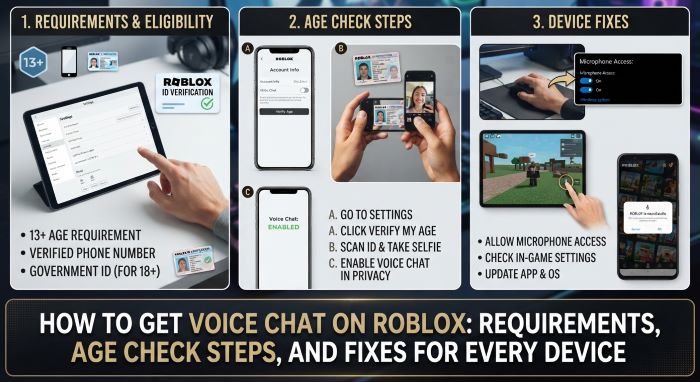
Text chat is fine, but talking is faster. In games that rely on teamwork, roleplay, or simple hanging out, hearing other players changes the whole experience. Roblox supports spatial voice chat, which lets you speak with nearby players through your microphone. It is not turned on by default, though, and the rules for access have changed. If you want to know how to get voice chat on roblox today, you need to be 13 or older and pass an age check with a selfie or a government ID.
This guide covers every step. It explains who can use voice chat, how the age check works, how to switch the feature on for each device, and how to fix the most common problems. It also includes safety advice for players and parents.
Quick Answer
- Make sure your account belongs to someone aged 13 or older.
- Open Settings, then Account Info, then Age Group.
- Complete the age check with a selfie or a photo ID.
- Open Settings, then Privacy and content maturity, then Communication, and turn on the microphone option.
- Join an experience that supports voice chat.
- Select the headphone icon to connect, and use the microphone icon to mute or unmute.
What Is Roblox Voice Chat?
Roblox voice chat is a built-in feature that lets players talk out loud inside supported experiences. It is spatial, which means volume depends on distance. Players close to your avatar sound loud. Players far away fade out. It works much like a conversation in a real room.
Not every game supports it. Each creator decides whether to turn voice on. You will see a headphone or microphone control only in experiences where it is available.
Requirements at a Glance
| Requirement | Details |
|---|---|
| Minimum age | 13 years old |
| Age check | Facial age estimation with a selfie, or government ID verification |
| Phone number | Not enough. Roblox states that phone verification is not a valid way to gain access |
| Region | Voice chat must be available where you live |
| Experience | The game must have voice enabled by its creator |
| Device | A working microphone, with permission granted to Roblox |
| App | An up-to-date version of Roblox |
| Cost | Free |
Roblox’s help center confirms the core rule: users must be at least 13 and must verify their age with ID verification or facial age estimation. Voice chat is not enabled by default.
How the Age Check Works
The age check is the heart of how to get voice chat on roblox. Roblox offers two methods. The options you see can vary by country.
Facial Age Estimation
You take a short selfie video or image in the app. A system estimates your age from it and places your account in an age group. Guides report that Roblox uses the following groups: 5 to 8, 9 to 12, 13 to 15, 16 to 17, 18 to 20, and 21 and over. The process takes a few minutes and does not require an ID document.
ID Verification
You scan a government-issued photo ID, such as a passport, driver’s license, or national ID card, and take a selfie to match it. This method is offered in most countries and is the fallback where facial age estimation is not available or gives a wrong result.
If the age check places you in the wrong group, you can usually correct it with ID verification. Parents can also update a child’s age through parental controls in some cases.
How to Get Voice Chat on Roblox: Step by Step
Step 1: Check Your Account Age
Open Settings and look at Account Info. The birthday on the account must show an age of 13 or more. If the account belongs to a child under 13, voice chat is not available, and no setting will change that.
Step 2: Complete the Age Check
- Open Roblox and go to Settings. On desktop, select the gear icon. On mobile, tap the More button, shown as three dots, then Settings.
- Select Account Info.
- Find the Age Group section.
- Choose “Continue with selfie” for facial age estimation or “Continue with ID” for document verification.
- Follow the prompts. Use good light, remove hats and sunglasses, and hold the camera steady.
- Wait for the result. It often arrives within minutes.
Step 3: Turn On the Microphone Setting
- Go back to Settings.
- Open Privacy and content maturity.
- Select Communication.
- Turn on the option to use your microphone to chat with voice.
Step 4: Join a Voice-Enabled Experience
Launch a game that supports voice. Many social hangout and roleplay experiences do.
Step 5: Connect and Talk
- Select the headphone icon to connect to voice.
- Look for the microphone icon near the top left of the screen or above your avatar.
- Select the icon to unmute. A red slash means you are muted.
- Speak. The icon animates when the game picks up your voice.
That is the full process for how to enable voice chat on roblox on a standard account.
Device-Specific Notes
| Device | What to Know |
|---|---|
| Windows and Mac | Allow microphone access when the system asks. Choose the right input device in your sound settings |
| iPhone and iPad | Allow microphone access in iOS Settings under Roblox |
| Android | Allow microphone permission in the app’s permission settings |
| PlayStation 4 and 5 | Turn voice on through the in-experience settings menu |
| Xbox | Voice works through Roblox on supported setups. Check Roblox’s Xbox help page for current details |
| VR headsets | Supported on Roblox’s VR app with the headset microphone |
The age check itself is easiest on a phone, since it needs a camera. Once it is done, it applies to your account on every device.
How to Use Voice Chat in a Game
- Mute yourself: Select the microphone icon. Mute when you are not speaking.
- Mute another player: Select the speaker icon above their avatar, or open the menu and find them in the player list.
- Leave voice: Select the headphone icon to disconnect while you stay in the game.
- Block a player: Open the menu, find the player, and choose Block.
- Report a player: Open the menu, select Report, choose the player, and pick the reason.
- Adjust volume: Use the game menu or your device’s volume controls.
A headset gives the best results. It cuts echo and keeps game sound out of your microphone.
Who Can You Talk To?
The age check does more than unlock the microphone. Roblox uses your age group to shape who you can communicate with. According to current guides, players are matched by default with others in their own age group and the groups next to it. Rules for chatting with friends are stricter for teens, and contact between adults and teens is limited to people verified as trusted, real-life connections.
These rules aim to keep children and adults apart unless they know each other. They may change, so check Roblox’s help pages for the latest details.
Voice Chat Not Working? Try These Fixes
| Problem | Likely Cause | Fix |
|---|---|---|
| No voice option in settings | Age check not done, or account under 13 | Complete the selfie or ID check. Confirm the birthday on the account |
| Verified by phone only | Phone verification does not unlock voice | Do the age check with a selfie or ID |
| No headphone icon in game | The experience does not support voice | Test in a game known to support it |
| Icon shows, but no one hears you | Microphone muted or blocked | Unmute in game. Grant microphone permission to Roblox |
| Wrong microphone in use | Input device set to another mic | Pick the correct input in system sound settings |
| Voice option missing after an update | Old app version or a new age check request | Update Roblox. Repeat the age check if asked |
| Feature missing entirely | Not available in your region | Check Roblox’s regional notes |
| Echo or feedback | Speakers feeding into the mic | Use a headset and lower the volume |
| Voice stopped working suddenly | Temporary suspension or a service issue | Check your account for moderation notices and Roblox’s status page |
Most people who search for how to get voice chat on roblox after a failed attempt find their answer in the first three rows. If nothing works, test your microphone in another app, restart the device, reinstall Roblox, and then contact Roblox Support.
Why Roblox Requires an Age Check
Roblox has a very young audience. Voice chat carries more risk than text, since it is live and harder to filter. In recent years, Roblox moved from simple phone checks to stronger age checks that use facial age estimation or ID documents. The goal is to keep young children out of voice chat and to limit contact between adults and minors.
For players, this means the old shortcuts no longer work. The fastest honest route is the selfie check.
Do Not Try to Bypass the Rules
Videos and websites often promise tricks to get voice chat under 13 or without any check. Avoid them.
- Lying about your age or using someone else’s ID breaks Roblox’s Terms of Use. It can lead to a ban.
- “Free voice chat” tools, browser extensions, and scripts are common ways to steal accounts.
- No legitimate site needs your Roblox password to unlock voice.
- Buying a “verified” account is against the rules, and sellers often take the account back.
If you are under 13, text chat with filters is the option Roblox provides. Voice will be there when you are old enough.
Safety Tips for Players
- Do not share your full name, address, school, phone number, or social media handles.
- Mute and block anyone who makes you uncomfortable.
- Report harassment, threats, and requests to move to another app.
- Remember that others may record what you say.
- Keep your microphone muted when you are not talking, so background sounds at home stay private.
- Be kind. The Community Standards apply to speech as much as to text.
A Guide for Parents
Voice chat is off by default and unavailable to accounts under 13. For teens, parents still have tools.
- Link your account. Roblox’s parental controls let you view and manage a child’s settings from your own account.
- Review the age and age check status. Make sure the birthday is correct.
- Control communication settings. You can limit or switch off voice and other chat features.
- Talk about it. Explain why personal details stay private and how to mute, block, and report.
- Know about recording. Roblox states that voice may be recorded for safety and moderation. Guides report that recordings are deleted after about seven days when no violation is found.
- Keep devices in shared rooms when younger teens play.
The right choice differs by family. Some parents allow voice only with real-life friends. Others keep it off until a later age.
Voice Chat Rules and Moderation
Roblox’s Community Standards cover voice. Bullying, hate speech, sexual content, threats, and attempts to get personal information are not allowed. Roblox uses player reports and automated detection to act on abuse. Penalties range from a short voice suspension to wider action on the account. Repeat or serious violations can remove voice access for good.
Is Voice Chat Free?
Yes. There is no charge for voice chat, and you do not need Robux or a Premium subscription. You only need to meet the age and verification rules. Any site that asks you to pay for access is not connected to Roblox.
Voice Chat vs. Text Chat
| Feature | Voice Chat | Text Chat |
|---|---|---|
| Minimum age | 13, with an age check | Available to more ages, with filters and age-based limits |
| Speed | Instant | Slower |
| Filtering | Moderated after the fact, with reports and detection | Filtered as you type |
| Range | Spatial, nearby players | Varies by game |
| Equipment | Microphone | Keyboard or touch screen |
| Best for | Teamwork, roleplay, social games | Quick messages, quiet settings |
Frequently Asked Questions
How old do you have to be for Roblox voice chat? At least 13.
Do I need an ID? Not always. Facial age estimation with a selfie is an option in many countries. ID verification is the other method.
Can I use my phone number to verify? No. Roblox states that phone verification does not grant voice access.
Is there a way to learn how to get voice chat on roblox without an age check? No. An age check is required for every account.
Why is there no microphone icon in my game? The experience may not support voice, or your account has not finished the age check.
Does it work on console? Yes, on supported consoles. On PlayStation, you turn it on in the in-experience settings.
Is voice chat recorded? Roblox says voice may be recorded for safety and moderation.
Can I turn it off later? Yes. Disconnect with the headphone icon or switch off the microphone option in Communication settings.
Is the process the same on mobile? Yes. The menus are under More, then Settings.
Where can I find official steps on how to enable voice chat on roblox? Roblox’s help center has a page titled “How do I turn on Voice Chat?”
Final Thoughts
Learning how to get voice chat on roblox comes down to three things: be 13 or older, pass the age check with a selfie or ID, and turn on the microphone setting. After that, join a voice-enabled experience and select the headphone icon.
If the option does not appear, work through the fixes in this guide. Most problems trace back to an unfinished age check, a game without voice support, or a blocked microphone. Stay within the rules, protect your personal details, and use mute, block, and report when you need them. With those habits in place, how to get voice chat on roblox becomes a short setup task, and how to enable voice chat on roblox safely becomes second nature.
Key Takeaways
- The way to learn how to get voice chat on roblox starts with age: you must be 13 or older.
- An age check with facial age estimation or a government ID is required. Phone verification does not count.
- Turn on the microphone option under Privacy and content maturity, then Communication.
- Voice works only in experiences where the creator has enabled it.
- Most problems come from an unfinished age check, missing microphone permission, or a game without voice.
- Voice chat is free. Avoid tools, sites, or sellers that promise access for money or a password.
- Parents can manage voice through parental controls, and players should use mute, block, and report.