How to Make a Gamepass on Roblox
Gamepasses are one of the simplest ways to earn Robux on Roblox. Players buy them once and get a permanent perk in your game, like a speed boost, a VIP room, a special tool, or double coins. They’re also the backbone of donation games like PLS DONATE, where players set up passes so others can tip them.
If you’re wondering how to make a gamepass on Roblox, the good news is that it only takes a few minutes. You’ll use the Roblox Creator Hub to create the pass, set a price, and then add a bit of code in Roblox Studio so the perk actually works.
This guide walks you through every step, from setup to scripting, plus tips for pricing and designing passes players want to buy.
What You Need Before You Start
Before you learn how to make a gamepass on Roblox, make sure you have:
- A Roblox account. Any account can create passes.
- A published experience. Passes belong to a specific game, and that game must be published and accessible on Roblox. If you don’t have one, you can publish a simple baseplate from Roblox Studio.
- An icon image. A square image no larger than 512 by 512 pixels, in .jpg, .png, or .bmp format.
- A desktop browser for the easiest experience. The Creator Hub works best on a computer.
What Is the Roblox Creator Hub?
The Roblox Creator Hub is Roblox’s central dashboard for developers. It’s where you manage experiences, upload assets, track analytics, and handle monetization, including passes and developer products.
You can reach it by going to create.roblox.com or clicking Create at the top of the Roblox website. Many people search for “roblox.com create” when looking for this page. Once you’re in, the Creations tab lists all your experiences.
Some players also search for the direct link, typed as “https //create.roblox.com/dashboard/creations passes,” which points to the dashboard area where you manage your creations and their passes.
How to Make a Gamepass on Roblox: Step by Step
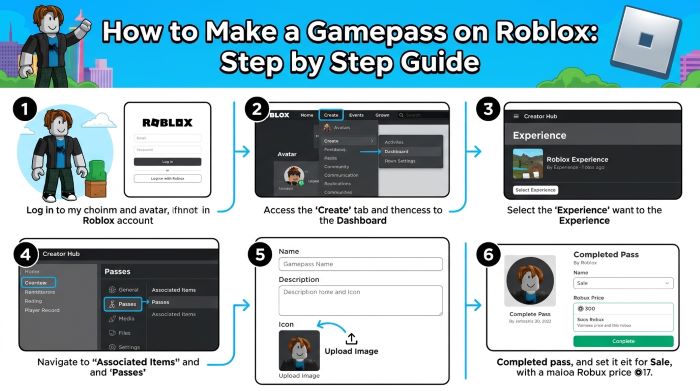
Here’s exactly how to make a gamepass on Roblox using the Creator Hub.
Step 1: Open Your Creations
- Go to create.roblox.com and sign in.
- Click Creations to see your experiences.
- Select the experience you want to add a pass to.
Step 2: Go to Passes
- In the left menu, open Monetization.
- Click Passes.
Step 3: Create the Pass
- Click Create a Pass.
- Upload your icon. Keep important details within the center circle, since Roblox displays pass icons in a round frame.
- Enter a name and description that clearly explain the perk.
- Choose a category if prompted. This helps organize items in your in game shop.
- Click Create Pass to save it.
Step 4: Set a Price and Put It on Sale
A new pass isn’t for sale by default. To sell it:
- Click the pass you just created.
- Open the Sales section in the left menu.
- Turn on the Item for Sale toggle.
- Enter your price in Robux.
- Click Save Changes.
Roblox shows an estimate of how many Robux you’ll earn after its marketplace fee. Creators typically receive about 70% of the sale price.
Step 5: Copy the Pass ID
You’ll need the pass ID to connect the pass to your game’s code.
- Go back to Monetization then Passes.
- Hover over the pass thumbnail and click the three dot button.
- Select Copy Asset ID.
Save this number somewhere, because you’ll use it in your script.
How to Make the Gamepass Work in Your Game
Creating the pass is only half the job when you learn how to make a gamepass on Roblox. You also need to tell your game what the pass does. This happens in Roblox Studio using Luau, Roblox’s scripting language.
Check Ownership When a Player Joins
Add a script to ServerScriptService that checks whether each player owns the pass when they join. Here’s a simple example:
local MarketplaceService = game:GetService("MarketplaceService")
local Players = game:GetService("Players")

local PASS_ID = 0000000 -- replace with your pass ID

Players.PlayerAdded:Connect(function(player)
	local hasPass = false
	local success, result = pcall(function()
		return MarketplaceService:UserOwnsGamePassAsync(player.UserId, PASS_ID)
	end)

	if success then
		hasPass = result
	end

	if hasPass then
		-- Give the perk here, for example extra walk speed
		player.CharacterAdded:Connect(function(character)
			character:WaitForChild("Humanoid").WalkSpeed = 32
		end)
	end
end)
Prompt a Purchase In Game
You can also let players buy the pass from inside your experience using MarketplaceService:PromptGamePassPurchase(player, PASS_ID). Listen for the PromptGamePassPurchaseFinished event, confirm the purchase succeeded, and grant the perk right away.
Always grant perks on the server, not the client, so players can’t cheat their way into paid features.
Gamepass Ideas That Players Love
The best passes feel worth the Robux and fit naturally into your game.
Once you know how to make a gamepass on Roblox, the next question is what to sell. Here are popular options:
| Pass Type | Example | Why It Sells |
|---|---|---|
| Speed or movement | 2x walk speed, double jump | Instantly noticeable |
| VIP access | VIP room, chat tag, special badge | Status and exclusivity |
| Boosts | 2x coins, 2x XP | Saves time grinding |
| Tools and gear | Exclusive sword, gravity coil | Fun new abilities |
| Cosmetics | Trails, auras, pets | Self expression |
| Donations | Tip jars | Supports creators directly |
Pricing Tips
Pricing matters as much as the perk itself. If you type roblox.com create into your browser and open your pass analytics regularly, you’ll spot what sells. Keep these tips in mind:
- Start affordable. Lower priced passes often sell more often, especially in new games.
- Match value to price. A small cosmetic should cost less than a major gameplay boost.
- Offer a range. Give players cheap, mid range, and premium options.
- Check similar games. See what comparable experiences charge.
- Adjust over time. Use the pass analytics in the Creator Hub to see what sells and tweak prices.
Roblox also offers price optimization tools for some creators, which can suggest prices based on player behavior.
Design Tips for Pass Icons
- Keep it simple. Bold shapes and bright colors stand out in small sizes.
- Stay centered. Roblox crops icons into a circle, so keep key details in the middle.
- Use clear labels. Text like “2x” or “VIP” helps players understand the perk at a glance.
- Match your game’s style. Consistent visuals make your shop look polished.
Common Problems and Fixes
| Problem | Likely Cause | Fix |
|---|---|---|
| Can’t find the Passes option | Experience not selected or not published | Publish your game and select it in Creations |
| Pass won’t upload | Image too large or wrong format | Use a .png, .jpg, or .bmp no larger than 512 by 512 |
| Players bought the pass but got nothing | Missing or broken script | Check your script uses the correct pass ID |
| Pass not showing in game | Not set for sale | Turn on Item for Sale in the Sales section |
Roblox has also been updating how passes are sold across different games, including changes that took effect in 2026. Check the official Roblox Creator docs if your pass isn’t appearing where you expect.
Making a Gamepass for PLS DONATE
If you mainly want a gamepass for a donation game like PLS DONATE, the process is the same. Create any experience (even a blank one), add passes with different prices, and put them on sale. PLS DONATE can then display your passes at your booth so other players can buy them as tips.
Becoming a Better Roblox Creator
Learning how to make a gamepass on Roblox is a great first step toward becoming a Roblox creator. From here, you can explore developer products for repeatable purchases, private servers, and in game shops.
If you also play other popular experiences, check out our guide to Forsaken Roblox. To personalize your account, learn How to Change Your Roblox Theme. And if you want to talk with friends while you test your game, here’s How to Get Voice Chat on Roblox.
Final Thoughts
Now you know how to make a gamepass on Roblox: publish your experience, open the Roblox Creator Hub, create the pass, set a price, copy the pass ID, and add a script so the perk works in your game. Start with a few simple passes, watch the analytics, and adjust as you learn what your players value most.
Key Takeaways
- Gamepasses are one time purchases that give players permanent perks in your Roblox experience.
- You need a published experience and a square icon no larger than 512 by 512 pixels in .jpg, .png, or .bmp format.
- Create passes in the Roblox Creator Hub under Creations, then Monetization, then Passes.
- Turn on Item for Sale in the Sales section to set a price. Creators usually earn about 70% of each sale.
- Copy the pass ID and use MarketplaceService in a server script to check ownership and grant perks.
- Popular passes include speed boosts, VIP access, 2x boosts, exclusive tools, and cosmetics.
- Start with affordable prices, offer a range, and use Creator Hub analytics to refine your strategy.