AndroidMentor Mod Game
Mobile games are free to start but often costly to finish. Locked levels, energy timers, ads, and in-app purchases push many players to look for shortcuts. That search leads some of them to the phrase “androidmentor mod game” and to websites that promise unlimited coins, unlocked premium features, and paid games for free.
It sounds like a good deal. The catch is that modified game files come with real risks to your phone, your accounts, and sometimes your wallet. This guide explains what AndroidMentor is, how modded games work, what can go wrong, and how to get more from mobile games without those risks.
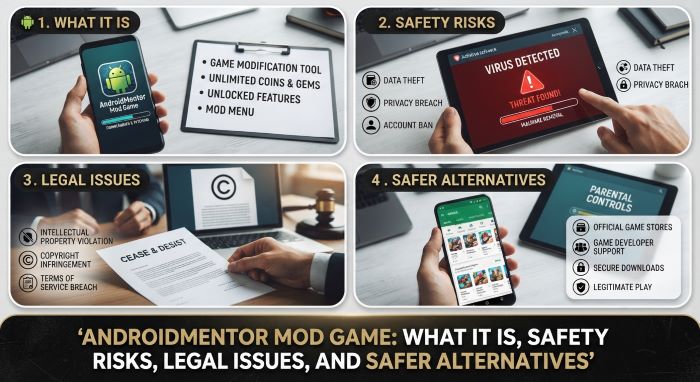
What Is AndroidMentor?
AndroidMentor is a website that lists modified Android apps and games, known as MOD APKs. Its pages describe “premium features” unlocked at no cost. The catalog covers game types such as action, role-playing, strategy, racing, puzzle, and casual titles, along with apps for tools, photos, music, and social media. The site runs in several languages, including English, Spanish, Indonesian, Portuguese, Russian, and Vietnamese.
The site says its files are free of malware and viruses. No independent party confirms that claim. The site does not name an owner, and it is not connected to Google or to the companies that make the games it lists. Popular commercial titles and paid apps appear on its pages in modified form.
What Is a Mod Game?
An Android app is packaged as a file called an APK. A mod, short for modification, is a copy of that file that someone has changed. The person who alters it is usually not the developer.
Common changes include:
- Unlimited coins, gems, or other in-game currency
- Unlocked characters, skins, or levels
- Removed ads
- Paid features turned on without payment
- Cheats such as extra damage or no cooldowns
- A paid game offered at no charge
To make these changes, the modder must take the app apart, edit its code or data, rebuild it, and sign it with a new key. That last step matters. The file no longer carries the original developer’s signature, so nothing proves what is inside.
How the Site Works
An androidmentor mod game page usually shows the game’s name, a version number, a file size, and a short list of the changes made. Visitors download the file outside of Google Play and install it by hand, a process called sideloading. Sites of this type commonly earn money from ads, pop-ups, and redirects, so a visit can bring those too.
This article does not give download or install steps. The goal is to help you understand the risks and choose safer options.
Official Game vs. MOD APK
| Factor | Official Version From Google Play | MOD APK From a Third-Party Site |
|---|---|---|
| Source | Developer, checked by Google | Unknown modder |
| Digital signature | Developer’s own | Replaced by someone else |
| Malware scanning | Play Protect and store review | None you can verify |
| Updates | Automatic | Manual, often late or missing |
| Online play | Supported | Often blocked or leads to bans |
| Cloud saves | Supported | Often broken |
| Support and refunds | Available | None |
| Legal status | Licensed | Often breaks copyright and terms of service |
| Cost | Free or paid, with optional purchases | Free, with hidden risks |
Is It Safe?
No one outside the site can vouch for the files. Security researchers have warned for years that modified apps from unofficial sources are one of the main ways malware reaches Android phones. A file can look and play like the real game while it runs extra code in the background.
The site’s own promise that its files are clean is not proof. With an androidmentor mod game file, you rely on an unknown person who has already changed the app’s code. You cannot easily see what else they changed.
The Main Security Risks
- Malware. Modified apps can carry trojans, spyware, adware, or tools that mine cryptocurrency on your phone.
- Data theft. Hidden code can read contacts, messages, photos, or saved logins if you grant the permissions it requests.
- Banking fraud. Some Android malware places fake login screens over real banking apps or reads one-time codes sent by text.
- Excess permissions. A simple puzzle game has no need for your texts, microphone, or accessibility services. A mod that asks for them is a serious warning sign.
- Aggressive ads. Full-screen ads, browser redirects, and unwanted notifications are common.
- Fake files. Some downloads are not the game at all. They install something else.
- No updates. Mods rarely get security patches, so known flaws stay open.
- Unsafe download pages. The path to the file may run through pop-ups and redirect chains that push other unwanted apps.
Risks to Your Game Accounts
Game companies watch for cheating. Online games check purchases, currency balances, and game data on their own servers. When the numbers on your device do not match the server, the account is flagged.
Possible results include:
- A temporary suspension
- A permanent ban
- Loss of all progress and past purchases
- A ban on your device, not only the account
- Removal from leaderboards and events
Many online games store currency on the server, so “unlimited gems” mods often do not work at all. You take the risk and get nothing for it.
Legal and Ethical Issues
Laws differ by country, and this section is general information, not legal advice. A few points apply in most places.
- Copyright. Games are protected works. Sharing or downloading altered copies of paid games without permission can infringe copyright.
- Terms of service. Nearly every game forbids modified clients and cheating tools. Using them breaks your agreement with the publisher.
- Circumvention. Some laws bar the bypassing of technical protections, such as license checks.
- Enforcement. Legal action usually targets those who distribute mods. Players most often face bans, though the legal risk is not zero.
There is also a question of fairness. Free games pay their developers through ads and purchases. Small studios in particular depend on that income. In multiplayer games, cheats also spoil matches for other people.
Why People Still Look for Modded Games
The reasons are easy to understand.
- Games feel expensive, and purchases add up.
- Progress is slow without paying.
- Ads interrupt play.
- Some games are not sold in certain countries.
- Players want to try a paid game before they buy.
- Some people enjoy tinkering.
All of these needs have safer answers, covered below.
Legal Ways to Get More for Less
| Option | What You Get | Cost |
|---|---|---|
| Google Play Pass | A catalog of games and apps with no ads or in-app purchases | Monthly or yearly fee |
| Google Play Points | Points on purchases that you can redeem for credit and items | Free to join |
| Google Opinion Rewards | Play credit for short surveys | Free |
| Play Store sales | Deep discounts on paid games during seasonal sales | Varies |
| Netflix Games | Full mobile games with no ads or purchases | Included with a Netflix plan |
| Free offers from the Epic Games Store on mobile | Free games on a rotating basis in supported regions | Free |
| One-time premium games | Pay once, with no ads or timers | Often a few dollars |
| In-game events and daily rewards | Free currency and items | Free |
| Official promo codes | Rewards shared by developers on their social channels | Free |
| Open-source games on F-Droid | Free games with public source code | Free |
Availability and pricing vary by country, so check what is offered where you live.
Legitimate Mods Do Exist
Not all modding is shady. Many developers welcome it.
- Official mod support. Some games include tools or marketplaces for player-made content. Minecraft add-ons are a well-known example.
- Single-player PC mods. Platforms such as Steam Workshop host mods with developer approval.
- Open-source games. Anyone may study, change, and share the code under the license terms.
- Private or creative modes. Many games offer sandbox modes with unlimited resources built in.
The difference is permission. An approved mod works with the developer’s rules. A cracked copy of a paid game does not.
How to Protect Your Android Phone
Whatever you decide, these habits lower your risk.
- Keep Google Play Protect turned on. Find it in the Play Store under your profile icon.
- Leave the “install unknown apps” permission off for your browser and file manager.
- Keep Android and your apps up to date.
- Review app permissions in Settings, and remove any that an app does not need.
- Be very careful with apps that ask for accessibility access or device admin rights.
- Use a strong screen lock.
- Turn on two-factor authentication for your Google account and your game accounts.
- Use a reputable mobile security app if you want a second layer of scanning.
- Never sign in to your main Google, bank, or payment accounts inside an app you do not trust.
- Back up your photos and files regularly.
Warning Signs That Your Phone May Be Infected
- The battery drains much faster than before.
- The phone runs hot when idle.
- Mobile data use jumps.
- Ads appear on the home screen or lock screen.
- Apps you did not install show up.
- The phone slows down or crashes often.
- You see charges or subscriptions you did not approve.
- Friends receive strange messages from your accounts.
- Settings change by themselves.
What to Do if You Already Installed a Modded Game
- Turn on airplane mode to cut the app off from the internet.
- Uninstall the app in Settings under Apps. If it will not uninstall, restart in safe mode and try again.
- Check Settings for device admin apps and accessibility services, and remove anything you do not recognize.
- Run a Play Protect scan, and scan with a reputable security app.
- From a different, trusted device, change the passwords for your Google account, email, banking, and games.
- Turn on two-factor authentication.
- Review your Google account’s security page for unknown devices and sign them out.
- Check bank, card, and carrier statements for unknown charges.
- Install the official version of the game from Google Play if you still want to play.
- If problems continue, back up your personal files and perform a factory reset.
Advice for Parents
Children and teens are frequent visitors to mod sites, since they want free gems and skins and often cannot make purchases.
- Talk openly about why “free” premium items can be a trap.
- Use Google Family Link to approve app installs and block unknown sources.
- Set a purchase approval rule and a small monthly budget for games.
- Consider Play Pass or gift cards as a safe way to give access.
- Check the installed apps on your child’s device now and then.
- Keep your own payment details off a child’s device.
How to Judge Any App Site
Apply these questions to any site that offers Android apps outside Google Play.
- Does it name the company or people who run it?
- Does it distribute original, unmodified files from developers, or altered ones?
- Does it explain how files are checked, with proof?
- Does it offer paid apps for free? That is a red flag by itself.
- Is the page crowded with pop-ups, fake download buttons, and redirects?
- Do independent security sources speak well of it?
- Does the developer of the app link to it as an official source?
An androidmentor mod game listing fails several of these tests, since the files are modified and the operator is not named.
Myths and Facts
| Myth | Fact |
|---|---|
| “The site says it is virus free, so it is.” | A site’s own claim is not independent proof. |
| “My antivirus found nothing, so it is safe.” | Scanners miss new or hidden threats. |
| “Mods only harm big companies.” | Small studios lose income too, and players risk their own data. |
| “I cannot be banned in a single-player game.” | Many games still sync data online and check it. |
| “Unlimited gems always work.” | Server-side games ignore values stored on your phone. |
| “Android is unsafe anyway.” | Staying inside Google Play with Play Protect on lowers risk a great deal. |
Frequently Asked Questions
What is AndroidMentor? It is a third-party website that lists modified Android games and apps.
Is it legal to download a modded game? It often breaks copyright law and the game’s terms of service. Rules vary by country.
Can an androidmentor mod game harm my phone? Any modified APK from an unverified source can carry malware or unwanted code. There is no reliable way for a regular user to confirm that a given file is clean.
Will I get banned for using a mod? In online games, it is a real possibility, and bans are often permanent.
Do the mods work? Some do in offline games. Many fail in online games because the server controls currency and progress.
Is it on Google Play? No. Modified versions of other companies’ games are not allowed there.
Does a VPN make it safe? No. A VPN hides your network address. It does not check files for malware.
What is the safest way to get premium games for less? Use Play Pass, Play Points, sales, and subscription services that include games.
How do I remove a modded app? Uninstall it in Settings, scan the phone, and change your passwords from another device.
Final Thoughts
The appeal of an androidmentor mod game is clear: more content, fewer ads, and no bills. The costs are less visible. You install software altered by a stranger, with no signature you can trust, no updates, and no support. You risk malware, stolen data, and banned accounts, and you may break the law or the game’s rules.
Better options exist. Subscriptions, sales, reward programs, and free events give you much of the same value with none of the danger. If you love a game, paying its makers a few dollars also helps keep it alive. Before you tap a download button on any androidmentor mod game page, weigh what you could lose against what you hope to gain.
Key Takeaways
- AndroidMentor is a third-party site that lists modified Android games and apps with unlocked features.
- An androidmentor mod game file is altered by an unknown party and no longer carries the developer’s signature.
- Risks include malware, data theft, intrusive ads, missing updates, and permanent account bans.
- Modded copies of commercial games often break copyright law and always break the game’s terms of service.
- Many “unlimited currency” mods fail in online games because servers control the data.
- Safer choices include Google Play Pass, Play Points, sales, Netflix Games, and official events and promo codes.
- If you installed a mod, uninstall it, scan your phone, and change your passwords from a trusted device.