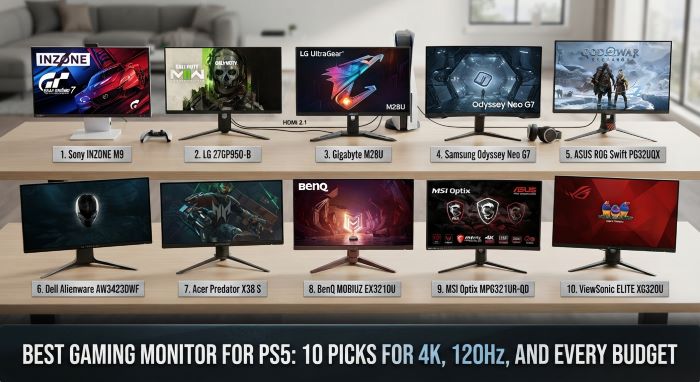
Best Gaming Monitor for PS5: 10 Picks for 4K, 120Hz, and Every Budget
A PS5 can do much more than a basic screen lets it show. The console can send a 4K picture at up to 120 frames per second, with HDR color and variable refresh rate. Plug it into an old 1080p office display, and you leave most of that power on the table. The best gaming monitor for ps5 lets the console run at full strength, with sharp detail, smooth motion, and fast response.
A monitor also makes sense when you play at a desk, share a room, or want lower input lag than many TVs offer. This guide lists 10 specific monitors, compares them in a table, and explains the specs that matter for a PlayStation.
What the PS5 Can Output
Know what the console can do before you shop.
- Resolution: 4K (3840 x 2160), 1440p, and 1080p.
- Refresh rate: Up to 120Hz in games that support it.
- VRR: Variable refresh rate over HDMI 2.1, in a range of 48 to 120Hz.
- HDR: HDR10.
- Port: HDMI only. The PS5 has no DisplayPort output.
Two facts follow from this list. First, the PS5 cannot use more than 120Hz, so a 240Hz panel adds nothing for the console alone. Second, you need an HDMI 2.1 port on the monitor to get 4K at 120Hz with VRR.
Specs That Matter Most
- HDMI 2.1: The key feature. Without it, a 4K monitor is limited to 60Hz from a PS5.
- Resolution: 4K gives the sharpest picture. 1440p costs less and still looks good at 27 inches.
- Refresh rate: 120Hz or higher. A 144Hz panel runs PS5 games at 120Hz without trouble.
- VRR: Removes screen tearing when the frame rate dips.
- Panel type: OLED gives perfect blacks and the fastest response. IPS gives good color and wide angles. VA gives deep contrast at a lower price.
- HDR: Real HDR needs high brightness or OLED. Cheap “HDR400” labels add little.
- Size: 27 inches suits a desk. 32 inches suits a deeper desk or a slightly longer view.
- Speakers or headphone jack: Many monitors have weak speakers. Plan on a headset.
Comparison Table: 10 Monitors for PS5
| Monitor | Size | Resolution | Refresh Rate | Panel | HDMI 2.1 | Best For |
|---|---|---|---|---|---|---|
| Alienware AW3225QF | 32 in | 4K | 240Hz | QD-OLED | Yes | Best overall |
| Sony Inzone M9 II | 27 in | 4K | 160Hz | IPS | Yes | Best made for PS5 |
| Gigabyte M32UC | 32 in | 4K | 144Hz | VA, curved | Yes | Best value 32 inch |
| LG UltraGear 27GR93U | 27 in | 4K | 144Hz | IPS | Yes | Best 27 inch 4K |
| Gigabyte M27U | 27 in | 4K | 160Hz | IPS | Yes | Best mid-priced 4K |
| Samsung Odyssey OLED G8 (G81SF) | 27 in | 4K | 240Hz | QD-OLED | Confirm before buying | Best premium 27 inch |
| Sony Inzone M10S II | 26.5 in | 1440p | 540Hz | OLED | Yes | Best 1440p, esports |
| Gigabyte M27Q | 27 in | 1440p | 170Hz | IPS | No | Best budget 1440p |
| Asus TUF Gaming VG289Q | 28 in | 4K | 60Hz | IPS | No | Best budget 4K |
| LG UltraGear 32GS95UE | 32 in | 4K | 240Hz | OLED | Yes | Best for PS5 and PC |
Specs come from maker listings and reviews. Models get revised, so confirm the ports on the exact version you buy.
1. Alienware AW3225QF
This 32-inch QD-OLED is the top pick in TechRadar’s PS5 monitor guide. It pairs 4K detail with OLED contrast, so dark scenes look deep and bright effects stand out. It has two HDMI 2.1 ports. Response time is near instant.
The downsides are price, at around $1,000, and a set of HDR modes that can confuse new owners. A PS5 will use only half of its 240Hz range. If you also own a gaming PC, this is the one screen that serves both. Many reviewers call it the best gaming monitor for ps5 if money is no object.
2. Sony Inzone M9 II
Sony built the Inzone line with the PlayStation in mind. The M9 II is a 27-inch 4K IPS panel with a 160Hz refresh rate and full-array local dimming, which lifts HDR well above most IPS screens. It supports Auto HDR Tone Mapping, so the PS5 sets its HDR levels for the monitor without manual work. It also switches picture modes on its own for games and films.
3. Gigabyte M32UC
The M32UC is a 32-inch curved VA panel with 4K resolution and a 144Hz refresh rate. It has HDMI 2.1 and a built-in KVM switch. Contrast is strong, which helps in dark games. The speakers are weak, and the picture gains from a few tweaks out of the box. For the size and spec, it is one of the best values around.
4. LG UltraGear 27GR93U
This 27-inch 4K IPS monitor runs at 144Hz and has HDMI 2.1 ports. Color is accurate, motion is clean, and the stand adjusts well. It is a safe, balanced choice for a desk setup.
5. Gigabyte M27U
The M27U offers 4K at up to 160Hz on a 27-inch IPS panel, with HDMI 2.1 and a KVM switch. It often sells for less than rival 4K high refresh screens. HDR is modest, but the core picture is sharp and quick.
6. Samsung Odyssey OLED G8 (G81SF)
This 27-inch 4K QD-OLED delivers stunning color and motion in a slim design. It carries a premium price. TechRadar’s review notes limits in its ports, so check the HDMI version on the exact listing before you buy it for a console.
7. Sony Inzone M10S II
Sony’s esports OLED runs at 1440p and an extreme 540Hz. The PS5 will use 120Hz of that, so the headline number matters only if you also play on a PC. What you do get on PS5 is OLED response, strong brightness for an OLED, and a compact stand that leaves room for a controller or keyboard. It suits serious shooter players.
8. Gigabyte M27Q
The PS5 supports 1440p, and that opens the door to cheaper screens. The M27Q is a 27-inch 1440p IPS panel that has long been a budget favorite. Over HDMI 2.0, a PS5 can run 1440p at 120Hz. You may lose VRR without HDMI 2.1, but you get a smooth, sharp picture for far less money.
9. Asus TUF Gaming VG289Q
This is the budget 4K pick. It is a 28-inch IPS panel with good color and an adjustable stand, at a price near $300. It tops out at 60Hz, and its HDR is basic. Choose it if you play slower single-player games and care more about detail than frame rate.
10. LG UltraGear 32GS95UE
LG’s 32-inch OLED offers 4K at 240Hz, plus a mode that switches to 1080p at 480Hz for PC esports. It has HDMI 2.1 and excellent HDR. Like the Alienware, it is more than a PS5 needs on its own, but it is a superb shared screen for console and PC.
4K vs. 1440p for PS5
| Factor | 4K | 1440p |
|---|---|---|
| Sharpness | Best | Good at 27 inches |
| Price | Higher | Lower |
| PS5 support | Native | Supported since 2022 |
| 120Hz | Needs HDMI 2.1 | Works over HDMI 2.0 |
| Best size | 27 to 32 inches | 24 to 27 inches |
Most PS5 games render near 4K in quality mode and at lower resolutions in performance mode. A 4K monitor shows more detail in the first case. A 1440p monitor is a smart budget choice, and the gap is small at normal desk distance.
Do You Need HDMI 2.1?
For the full PS5 feature set, yes. HDMI 2.1 carries 4K at 120Hz with HDR and VRR. An HDMI 2.0 port limits you to 4K at 60Hz, or to 1440p or 1080p at 120Hz.
If you buy a 4K monitor above 60Hz, make sure it has true HDMI 2.1. Use the cable that came with the PS5 or another Ultra High Speed HDMI cable.
OLED vs. IPS vs. VA
OLED: Each pixel makes its own light. Blacks are perfect, and response is the fastest. HDR looks excellent. Costs are high, and static images carry a small burn-in risk over years.
IPS: Good color and wide viewing angles. Blacks look gray in a dark room. This is the most common type in the mid-range.
VA: Deeper contrast than IPS at similar prices. Some VA panels smear a little in dark, fast scenes.
How to Set Up a Monitor for PS5
- Plug the PS5 into the monitor’s HDMI 2.1 port. Not every HDMI port on a monitor is the same.
- In the monitor menu, turn on VRR or FreeSync.
- On the PS5, open Settings, then Screen and Video, then Video Output.
- Set Resolution to Automatic or 2160p.
- Set 120Hz Output to Automatic.
- Set VRR to Automatic.
- Run Adjust HDR and follow the steps.
- In each game, pick performance or 120Hz mode if it offers one.
- Turn on the monitor’s game mode for the lowest lag.
Monitor or TV for PS5?
| Factor | Monitor | TV |
|---|---|---|
| Size | 24 to 32 inches | 42 inches and up |
| Input lag | Very low | Low in game mode |
| HDR | Good on OLED, mixed on LCD | Often brighter |
| Sound | Weak or none | Built in |
| Best for | Desk play, small rooms | Couch play |
A TV can beat even the best gaming monitor for ps5 on size and HDR punch. Choose a monitor if you sit close, share a living room TV, or also use a PC. Choose a TV for couch play and a larger HDR picture.
What About the PS5 Pro?
The PS5 Pro has a stronger graphics chip and uses upscaling to hold higher frame rates at sharper resolutions. It makes a 4K 120Hz monitor more worthwhile, since more games reach high frame rates. The port needs are the same: HDMI 2.1 for 4K at 120Hz with VRR.
Sound Options
Most monitors have thin speakers or none. Plan for one of these.
- A headset plugged into the DualSense controller
- A wireless headset with a USB dongle in the PS5
- Speakers connected to the monitor’s headphone jack
- A small soundbar
The PS5’s 3D audio works with any stereo headset.
Using One Monitor for Work and Play
A gaming monitor can also be your work screen. A KVM switch, found on several Gigabyte models, lets one keyboard and mouse control two devices. Connect the PS5 by HDMI and a laptop by USB-C or DisplayPort, then switch inputs. If your main need is a low-cost screen for office tasks, with only light gaming on the side, see this guide to the best budget monitors for work from home.
How Much Should You Spend?
- Under $350: 1440p at high refresh over HDMI 2.0, or 4K at 60Hz.
- $400 to $700: 4K at 144Hz or more with HDMI 2.1 on IPS or VA. This is the sweet spot for most PS5 owners.
- $800 and up: 4K OLED or mini LED with strong HDR.
For most players, the best gaming monitor for ps5 sits in the middle tier. It delivers every feature the console supports without the cost of OLED.
Best Picks by Type of Player
Your games should guide your choice. The best gaming monitor for ps5 for a shooter fan is not the same as the right one for a fan of slow, story-driven games.
- Competitive shooters: Pick 120Hz, low input lag, and VRR first. A 27-inch screen keeps the whole picture in view. The Sony Inzone M10S II and Gigabyte M27U fit well.
- Story and open world games: Pick 4K and strong HDR. A 32-inch OLED such as the Alienware AW3225QF shows these games at their best.
- Sports and racing: Smooth motion matters. A 4K 144Hz IPS panel such as the LG 27GR93U handles fast pans well.
- Casual and family play: A budget 1440p or 4K 60Hz screen is enough.
- PS5 plus PC: Choose a monitor with both HDMI 2.1 and DisplayPort, and a KVM switch if you can.
Burn-In and OLED Care
OLED monitors can hold a faint ghost of a static image after long use. Modern panels fight this with pixel shifting and cleaning cycles that run when the screen is off. A few habits help.
- Let the monitor run its pixel refresh when it asks.
- Turn the screen off when you step away.
- Vary your games, so the same HUD is not on screen for hundreds of hours.
- Lower the brightness for desktop work.
Check the warranty too. Several makers now cover burn-in for two or three years.
Common Mistakes to Avoid
- Buying a 4K high refresh monitor that lacks HDMI 2.1.
- Paying extra for 240Hz when you only own a PS5.
- Trusting an “HDR” label on a dim panel.
- Using an old HDMI cable.
- Plugging into the wrong HDMI port.
- Forgetting about sound.
- Choosing an ultrawide. The PS5 does not support 21:9, so the picture shows black bars.
Frequently Asked Questions
Does the PS5 support 1440p? Yes. Sony added 1440p output in 2022.
Does the PS5 support 144Hz? No. It tops out at 120Hz. A 144Hz monitor works fine at 120Hz.
Does the PS5 support ultrawide monitors? No. It outputs a 16:9 picture.
Can I use DisplayPort? No. The PS5 has only HDMI.
Is a 240Hz monitor wasted on PS5? The extra refresh rate is, but a 240Hz OLED still gives great picture quality.
Is 27 or 32 inches better? At a desk about two feet away, 27 inches is easy to take in. At three feet, 32 inches feels more immersive.
What is the best gaming monitor for ps5 on a budget? A 27-inch 1440p IPS panel such as the Gigabyte M27Q, or the Asus TUF VG289Q if you prefer 4K at 60Hz.
Will a monitor have less lag than a TV? Often, yes. Most gaming monitors have very low input lag.
Final Thoughts
The best gaming monitor for ps5 has three things: 4K resolution, at least 120Hz, and an HDMI 2.1 port with VRR. The Alienware AW3225QF leads on picture quality. The Sony Inzone M9 II is the best fit for PlayStation features. The Gigabyte M32UC and M27U give the most for the money.
Set a budget, check the ports, and match the size to your desk. Then turn on 120Hz, VRR, and HDR in the console settings. With the right screen, your games will look sharper and feel smoother than before. Whichever model you choose as your best gaming monitor for ps5, confirm the HDMI version before you click buy.
Key Takeaways
- The PS5 outputs up to 4K at 120Hz with HDR10 and VRR, through HDMI only.
- The best gaming monitor for ps5 has 4K resolution, 120Hz or more, and a true HDMI 2.1 port.
- The Alienware AW3225QF is the top overall pick, and the Sony Inzone M9 II is the best match for PS5 features.
- 1440p monitors cost less and can run 120Hz from a PS5 over HDMI 2.0.
- Refresh rates above 120Hz help only if you also play on a PC.
- OLED gives the best picture, IPS the best balance, and VA the best contrast for the price.
- Avoid ultrawide screens, weak HDR labels, and old HDMI cables.