How to Reset Schlage Keypad Lock Without Programming Code
Losing or forgetting your Schlage keypad lock’s programming code is a genuinely common problem, particularly for locks that have changed hands (a new homeowner, a rental property transition) or simply haven’t needed reprogramming in long enough that the original code was forgotten entirely. The good news is that Schlage locks generally include a hardware-based factory reset method that doesn’t require knowing your existing programming code, though the exact process varies somewhat depending on your specific lock model.
Understanding Schlage’s Reset Options
Schlage keypad locks generally fall into a few different product lines (including the Connect, Encode, and various standalone keypad deadbolt models), and while the specific reset button location and process can vary slightly between models, most Schlage keypad locks share a similar fundamental approach: a physical reset button, typically located on the interior side of the lock, that initiates a factory reset returning the lock to its default programming code and clearing any previously set user codes.
How to Perform a Factory Reset on Most Schlage Keypad Locks
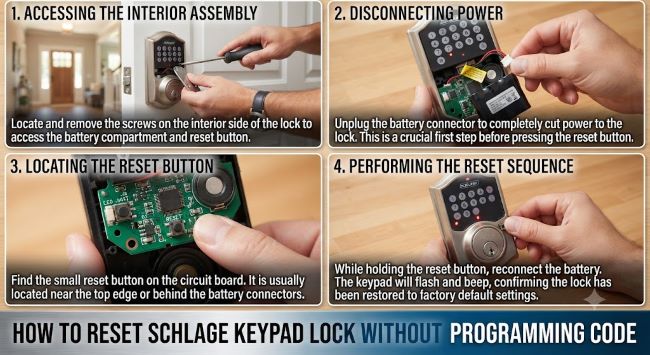
Step 1: Remove the battery cover on the interior side of the lock, typically secured with a simple latch or screw mechanism depending on your specific model.
Step 2: Locate the small reset button, generally found near the battery compartment, often requiring a small pointed tool (a paperclip or similar) to press, since it’s typically recessed to prevent accidental triggering during normal use.
Step 3: Press and hold the reset button for the duration specified for your specific model, generally somewhere in the range of a few seconds, until you hear an audible tone or see a light indicator confirming the reset has been initiated.
Step 4: Release the button and wait for the lock to complete its reset cycle, generally indicated by a series of beeps or light flashes confirming the process has finished.
Step 5: Test the lock using the manufacturer’s default programming code, typically listed in your lock’s original documentation or available through Schlage’s official support resources, since after a factory reset the lock returns to this default code rather than retaining any previously customized code.
Step 6: Immediately set a new programming code once you’ve confirmed the reset was successful and you can access the lock using the default code, since leaving a lock on its default factory code represents an obvious and significant security vulnerability that should be addressed immediately rather than left for later.
Finding Your Specific Model’s Default Code and Exact Reset Steps
Since the exact reset button location, hold duration, and default programming code vary somewhat between different Schlage keypad lock models, checking the specific documentation for your exact model is genuinely important rather than assuming a generic process applies universally across the entire product line.
Check Schlage’s official website support section, where you can typically search by your specific model number (found on the lock’s interior faceplate or in any original packaging or documentation you may still have) to access model-specific reset instructions and default codes.
Look for the model number on the lock itself, generally printed on the interior backplate, which is the most reliable way to confirm exactly which Schlage product line and specific model you’re working with if you no longer have the original packaging or documentation.
Contact Schlage customer support directly if you can’t locate model-specific information through their website search, since their support team can typically help identify your specific model and provide the correct reset procedure based on details you can provide about the lock’s appearance and features.
If the Standard Reset Doesn’t Work
Check that the lock has adequate battery power. A lock with critically low batteries can sometimes fail to properly execute reset commands, behaving erratically or not responding to the reset sequence at all, making a battery check and replacement a reasonable first troubleshooting step if the standard reset process doesn’t produce expected results.
For Schlage Connect and Encode models with smart home or app connectivity, some reset processes for these more advanced, connected lock models may differ from standalone keypad-only models, sometimes involving a reset process that interacts with the associated mobile app or smart home hub rather than purely the physical lock hardware, making it worth checking the specific connected-model documentation if your lock includes this additional smart functionality.
If you’ve attempted the reset process multiple times without success, and you’re confident you’re following the correct model-specific steps, contacting Schlage customer support directly for further troubleshooting assistance is the appropriate next step, since persistent reset failures sometimes indicate a hardware issue beyond what standard user-level troubleshooting can resolve.
When “Programming” Means Something Different
It’s worth noting that “programming” in the context of a Schlage keypad lock refers specifically to setting and managing user access codes, a completely different concept from software or app programming despite the shared terminology. If you found this page while actually researching software development topics rather than smart lock troubleshooting, you may have been looking for resources on coding and programming tools instead. For those interested in building software or apps without traditional coding, list of drag and drop programming tools: 50 best no-code builders covers accessible no-code development platforms. And for anyone exploring software programming specifically within game development, programming languages you need to know for a career in game design covers that entirely separate field, worth knowing about if your search led you here by way of the shared word “programming” rather than smart lock troubleshooting specifically.
Preventing Future Lockout Situations
Document your programming code securely once you’ve successfully reset and reprogrammed your lock, storing it somewhere genuinely secure but accessible (a password manager, a secure physical document) rather than relying purely on memory, particularly for locks on properties you don’t access daily where the code might otherwise be easy to forget over time.
Consider keeping a spare physical key if your specific lock model includes a key override option, many Schlage keypad deadbolts include a traditional key cylinder as a backup access method alongside the keypad, providing an alternative entry method if you’re ever locked out due to a forgotten code or a malfunctioning keypad.
For shared or rental properties specifically, establish a clear process for documenting and transferring programming code information whenever property access changes hands, preventing the kind of forgotten-code situation that often arises specifically from incomplete handoff between previous and new occupants or owners.
Key Takeaways
- Most Schlage keypad locks include a physical reset button, typically located near the battery compartment on the interior side, that performs a factory reset without requiring your existing programming code
- The factory reset process generally involves pressing and holding the reset button for several seconds until an audible or visual confirmation indicates the reset is complete, returning the lock to its manufacturer default code
- Exact reset button location, hold duration, and default codes vary by specific Schlage model, making it important to check your exact model number against Schlage’s official support documentation rather than assuming a universal process
- Immediately set a new programming code after a successful reset, since leaving the lock on its default factory code represents a significant, easily exploitable security vulnerability
- Check battery power if the standard reset doesn’t work, since critically low batteries can cause locks to behave erratically or fail to properly execute reset commands
- Schlage Connect and Encode models with smart home connectivity may have somewhat different reset processes compared to standalone keypad-only models, worth checking model-specific documentation
- Document your programming code securely after resetting, and consider whether your specific lock model includes a backup key override option to prevent future lockout situations