Virtual Meeting Etiquette: A Practical Guide for Remote Work
Remote and hybrid work turned video calls into one of the most common ways people communicate at work, yet most people never got a manual for how to behave on them. You learned office etiquette by watching coworkers for years. Video call habits got picked up in a few chaotic months in 2020 and many of those habits stuck, for better or worse.
Good virtual meeting etiquette is not about being stiff or overly formal. It is about making meetings run smoothly, respecting everyone’s time, and avoiding the small habits that quietly annoy coworkers without anyone saying anything. This guide covers the practical side of video calls, from before the meeting starts to after it ends.
Why Virtual Meeting Etiquette Matters
A bad in-person meeting wastes time. A bad virtual meeting wastes time and adds friction, because technical issues, awkward silences, and unclear turn-taking all get amplified on a screen. Body language that would naturally guide a conversation in a room gets flattened into a small video tile, so people rely more heavily on explicit cues, and those cues only work if everyone follows similar norms.
Following good virtual meeting etiquette also shapes how people perceive you professionally. Someone who shows up prepared, on camera, with a clean background and good audio reads as organized and present. Someone who joins late from a moving car with bad audio reads differently, even if their actual contribution is just as valuable.
Before the Meeting: Preparation Habits
Most virtual meeting etiquette problems start before the call even begins.
Test your setup ahead of time. If you are using a new platform, joining from a new device, or presenting something important, do a quick test beforehand. Check that your camera, microphone, and any screen sharing work. Nothing burns the first five minutes of a meeting like troubleshooting audio while everyone else waits.
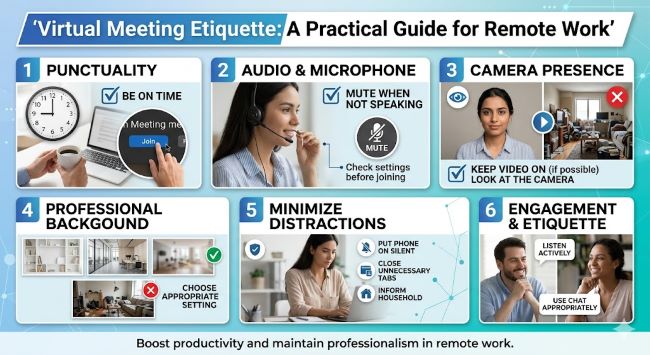
Join on time, or a minute early. Joining exactly on time or slightly early gives you a moment to settle in, check your camera angle, and mute yourself before things start. Joining late means everyone hears the notification sound, watches you fumble with settings, and waits while you catch up.
Read the agenda if there is one. If the meeting includes an agenda or pre-read material, look at it beforehand. Showing up unprepared to a meeting that included prep materials puts the burden on everyone else to either wait for you or repeat information.
Pick a quiet, well-lit spot. You do not need a home studio, but a spot with reasonable lighting and minimal background noise makes a real difference. Facing a window or lamp works better than having the light source behind you, which leaves your face in shadow.
Have water nearby, but keep food for breaks. Eating on camera during a meeting, especially anything crunchy, is one of the more common video call habits people complain about quietly. Save meals for breaks between meetings when possible.
Camera Habits
Whether to keep your camera on is one of the more debated parts of meeting etiquette, and the right answer depends on the meeting type and your company’s culture. For more on lighting and framing specifics, these video conference tips cover the setup side in detail. A few general principles help regardless of the specific norm:
- Match the room. If most people have their cameras on, turning yours on too helps the meeting feel like a conversation rather than a presentation to blank tiles. If it is a large all-hands with cameras mostly off, you do not need to be the exception.
- Cameras on for small, interactive meetings. One-on-ones, small team discussions, and brainstorming sessions tend to work better with cameras on, since visual cues help with turn-taking and engagement.
- It is fine to turn cameras off for valid reasons. Bad internet connection, back-to-back meetings without a break, or simply needing a moment away from being on screen are all reasonable. If you turn your camera off, a quick note in chat (“hopping off camera, still listening”) avoids ambiguity about whether you are paying attention.
- Frame yourself reasonably. Centered in the frame, with some space above your head and your eyes roughly at the upper third of the screen, looks more natural than a tight close-up or a distant shot where you are a small figure in the corner.
- Look at the camera occasionally, not just the screen. Looking at the camera lens approximates eye contact for the people on the other end. You do not need to stare at it constantly, but glancing at it when you are speaking, especially during important points, helps.
Microphone and Audio Habits
Audio problems disrupt meetings more than almost anything else, which makes microphone habits one of the most important parts of virtual meeting etiquette.
Mute when you are not speaking, especially in larger meetings. Background noise from one unmuted microphone, whether it is typing, a dog barking, or a door closing, is distracting for everyone else. In meetings with more than a handful of people, default to muted and unmute when you want to talk.
Unmute before you start talking, not mid-sentence. A common pattern is someone starting to speak while still muted, realizing it, and then repeating themselves once unmuted. Get in the habit of unmuting first, then beginning.
Use headphones if you can. Headphones reduce echo, background noise pickup, and the chance of audio feedback, especially in shared spaces or open offices. They also tend to improve your own audio quality since the microphone is closer to your mouth.
Address audio issues quickly and move on. If someone’s audio is cutting out or there is an echo, flag it once, try a quick fix like asking them to rejoin or check their connection, and if it cannot be resolved fast, suggest they switch to chat or follow up after the meeting rather than letting the whole group sit through repeated “can you hear me now” exchanges.
Joining, Leaving, and Timing
How you enter and exit a meeting says more than people realize.
Announce yourself when joining a meeting in progress. A short “hi, sorry I’m a bit late” lets people know you are there without derailing the conversation. Trying to sneak in silently can be confusing if someone references something and is unsure who heard it.
Do not interrupt active discussions when you join late. Wait for a natural pause before speaking, unless you are joining specifically because something urgent needs immediate attention.
Leaving early is sometimes necessary, but say so. If you need to drop off before a meeting ends, a quick note like “I have to jump to another call, will catch up on notes” is more considerate than just disappearing from the call.
Respect the scheduled end time. Meetings that consistently run over create a domino effect on everyone’s schedule for the rest of the day. If a meeting is genuinely running long and needs more time, it is better to schedule a follow-up than to keep people who have other commitments.
Screen Sharing and Presentation Etiquette
Sharing your screen brings its own set of considerations.
Close unrelated tabs and notifications before sharing. Nobody needs to see your unread email count or a personal message notification pop up mid-presentation. A quick check before sharing avoids this entirely.
Share only the relevant window, not your full desktop, when possible. Sharing a specific application or tab keeps the focus on what matters and reduces the chance of accidentally exposing something you did not mean to show.
Narrate what you are doing. If you are scrolling, switching tabs, or pulling something up, a brief verbal note like “let me pull up the doc” helps people follow along, especially since screen share quality can lag and people may be looking away momentarily.
Check that people can actually see what you intend. Font sizes that look fine on your screen can be unreadable on someone else’s, especially if they are on a smaller device. Asking “can everyone read this okay?” before diving into details saves time later.
Chat and Reactions
Most platforms include a chat function and reaction emojis, and using them well is part of modern virtual meeting etiquette.
Use chat for side notes, links, and questions that do not need to interrupt the flow. Dropping a relevant link or a quick clarifying question in chat lets the speaker continue without a verbal interruption, and others can address it when there is a natural pause.
Do not have side conversations in chat that exclude others from context. If something in chat becomes relevant to the discussion, it is worth voicing it out loud so everyone is following the same conversation.
Reactions are a lightweight way to signal agreement or acknowledgment. A thumbs up or similar reaction can answer a quick yes-or-no question without anyone needing to unmute, which keeps things efficient in larger meetings.
Handling Multitasking
This is one of the trickiest areas of virtual meeting etiquette because multitasking during meetings is extremely common and largely invisible, which is exactly the problem.
Doing email or messaging during a meeting that does not require your full attention is a judgment call many people make, but it comes with risks. Being asked a direct question while visibly distracted, or giving an answer that makes clear you were not following the conversation, undermines trust more than people often realize.
If a meeting genuinely does not need your full participation, it might be worth questioning whether you need to attend at all, or whether you can contribute asynchronously instead. If you do need to multitask, keeping your camera off and being upfront about it (“I’ll have my camera off, juggling something else, but listening”) is more honest than appearing engaged on camera while clearly doing something else.
Scheduling Considerations
Good virtual meeting etiquette starts even before anyone joins a call, at the scheduling stage.
Default to shorter meetings. Many meetings scheduled for an hour could be 30 minutes, and many scheduled for 30 minutes could be 15. Shorter defaults force more focused agendas and leave buffer time between calls.
Include an agenda for anything beyond a quick check-in. Even a few bullet points sent beforehand help attendees prepare and keep the meeting on track.
Be mindful of time zones. For distributed teams, scheduling tools that show multiple time zones prevent the awkward situation of someone joining at an inconvenient hour because a meeting time looked reasonable from only one perspective.
Only invite people who need to be there. Large invite lists for meetings that only need a few key people waste time for everyone else and tend to make meetings less productive, since more people often means less open discussion.
After the Meeting
Virtual meeting etiquette extends past the call itself.
Send notes or action items if you took them. A short recap with decisions made and next steps keeps everyone aligned, especially for anyone who could not attend.
Follow up on anything you committed to. If you said you would send a document or follow up with someone, doing it promptly reinforces that meetings lead to actual outcomes rather than just discussion.
Give feedback on recurring meetings that are not working. If a regular meeting consistently runs long, lacks focus, or includes people who rarely need to be there, raising that with whoever organizes it benefits everyone, even if it feels awkward to bring up.
Common Mistakes That Undermine Good Etiquette
Even people who follow most of the habits above can fall into a few patterns that quietly damage how they come across.
Talking over people on a delay. Video calls have small audio delays that make natural conversational overlap awkward. Two people starting to speak at the same time happens more often on video than in person, and both ending up talking over each other for a few seconds is normal. The fix is simple: pause briefly after someone finishes, and if you both start at once, one person yields quickly rather than both talking louder.
Treating video calls like a stage rather than a conversation. Some people unconsciously perform for the camera, speaking in a more formal register or over-explaining points that would normally be a quick comment in a room. This makes meetings feel longer and more exhausting than they need to be.
Forgetting that recordings exist. Many meetings get recorded for those who could not attend. Comments made assuming only the live attendees will hear them can resurface later in ways that feel surprising. A quick mental check before saying something off-hand, “would I be fine with this in a recording,” avoids most issues here.
Defaulting to video for things that do not need it. Not every conversation needs a meeting. A quick question that could be a chat message or email sometimes ends up as a 15-minute call out of habit. Part of good etiquette is recognizing when a meeting is not actually the right format.
Key Takeaways
- Good virtual meeting etiquette starts before the call: test your setup, join on time, and pick a quiet, well-lit spot.
- Camera habits should match the meeting type and team culture, with cameras generally on for small interactive meetings and off being acceptable with a quick note when needed.
- Mute when not speaking, unmute before talking, and use headphones to reduce background noise and echo.
- Announce yourself when joining late, avoid interrupting active discussions, and respect the scheduled end time.
- When screen sharing, close unrelated tabs, share only the relevant window, and narrate what you are doing.
- Use chat and reactions for side notes and quick acknowledgments without interrupting the main conversation.
- Be honest about multitasking, since appearing engaged while clearly distracted damages trust more than simply saying you are juggling other tasks.
- Good scheduling habits, including shorter defaults, clear agendas, and mindful time zones, prevent many etiquette problems before they start.
- Send notes and follow up on commitments after the meeting to keep everyone aligned.