Video Conference Tips: How to Look Professional and Run Better Meetings
Your webcam is your handshake now. Your microphone is your voice in the room. Ten years ago, most meetings happened around a table. Today a large share of professional communication runs through a screen, and how you show up on that screen shapes how people perceive your reliability, your competence, and your attention to detail. The right video conference tips do not just make you look good. They help you communicate better, respect other people’s time, and get more out of every call you join.
The frustrating part is that most people learned to use these tools by trial and error, often during a period when everyone was figuring it out at once. The result is a lot of bad habits that have quietly stuck around. Poor audio, harsh lighting, cluttered backgrounds, and talking over each other all send a quiet signal that you did not prepare. The good news is that fixing these things is straightforward once you know what actually matters. This guide walks through the video conference tips that make the biggest difference, organized so you can fix the easy things first and work toward the details that separate a competent caller from a polished one.
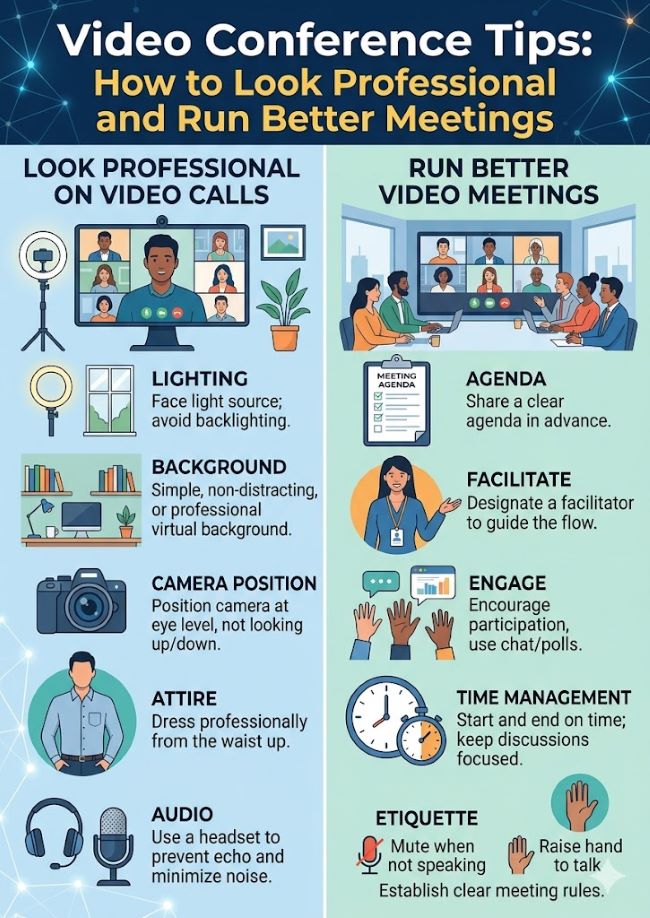
Why Your Setup Sends a Message Before You Speak
People notice everything in your frame, even when they pretend not to. A tidy, well-lit space tells the other person you take the meeting seriously. A dark room with a frozen image and tunnel-sounding audio tells them the opposite, often before you have said a single word.
This matters more than people like to admit. If you are pitching a product, interviewing for a job, or presenting to leadership during a video conference, your visual and audio presence is doing work the entire time. The strongest argument loses power if the person delivering it sounds muffled and looks like they are sitting in a cave. That is why the foundational video conference tips focus on environment and equipment before anything else. Get those right and everything you say afterward lands cleaner.
The encouraging news is that you do not need expensive gear. A few deliberate adjustments to lighting, camera position, and audio will put you ahead of most people on any call.
Lighting: The Single Biggest Visual Upgrade
Bad lighting makes even an expensive webcam look terrible. Good lighting makes a cheap one look surprisingly good. This is the highest-leverage change you can make.
The rule is simple: light should face you, not sit behind you. Position yourself facing a window so natural light hits your face directly. Natural light is the best free tool you have. Never sit with a window behind you, because the camera will expose for the bright background and turn you into a silhouette.
When natural light is not available, use a ring light or a soft front light placed slightly above eye level. Avoid harsh overhead lighting, which casts unflattering shadows under your eyes and nose. Aim for soft, even light coming from in front of you. A single ring light costs very little and transforms how clear and professional you appear on camera.
A quick test: turn your camera on before any call and look at your own image. If you can see your face clearly and evenly lit, you are set. If you look dim or shadowed, adjust before the meeting starts, not during it.
Camera Position and Framing
Keep your camera at eye level. This single adjustment fixes one of the most common mistakes people make. A laptop sitting flat on a desk points its camera up at your chin and ceiling, which is unflattering and makes you look like you are looming over the conversation. Raising the laptop on a stand or a stack of books until the camera sits at eye level fixes this instantly.
Frame yourself so your head and the top of your shoulders fill the frame, similar to how a news anchor appears. Leave a small amount of space above your head. Too far back and you look distant and disengaged. Too close and you fill the entire screen uncomfortably. The goal is the natural distance you would sit from someone across a small table.
Look at the camera lens when you speak, not at the faces on your screen. This is hard at first because your instinct is to look at the person you are talking to, but on camera that reads as looking down or away. Glancing at the lens periodically creates the impression of eye contact, which builds connection and trust.
Audio Quality Matters More Than Video
Here is a truth that surprises people: audio matters more than video. Participants will tolerate a slightly grainy image far longer than they will tolerate audio they have to strain to understand. And most people will not ask you to repeat yourself if you mumble or sound unclear. They will simply tune out and miss your point.
You can speak as clearly as you want, but a poor microphone undermines you. Your laptop’s built-in mic is usually the weakest link in your setup because it picks up keyboard clicks, room echo, and background noise. If you present regularly or lead calls, a dedicated USB microphone or a decent headset makes a dramatic difference for a modest cost.
Beyond the hardware, manage your environment. Close windows to cut street noise. Turn off fans and noisy appliances. If you live with others, a quick note before an important call prevents interruptions. The quieter your space, the clearer your voice comes through, and the more your words actually register with the people listening.
Wired connections beat wireless for audio reliability. If your audio cuts out or sounds robotic, connect your headset directly rather than relying on Bluetooth, which can introduce lag and dropouts.
The Human Side: Showing Up Well
Technology is only half the equation. How you behave on a call speaks just as loudly as how you look. These video conference tips focus on the human side, because a perfect setup with poor presence still falls flat.
Join a Few Minutes Early
Joining two to three minutes early signals respect and gives you a buffer to handle any last-minute technical issues without holding the group up. You get a moment to confirm your audio, video, and screen sharing all work, check your lighting, and settle in mentally before the conversation starts. Showing up exactly on time, then spending the first two minutes troubleshooting your microphone, wastes everyone’s time and starts you on the back foot.
Give the Call Your Full Attention
Checking your phone, typing on an unrelated document, or eating during a call all register clearly on camera. People notice, even when they say nothing. Treat a video call with the same focus you would give an in-person meeting. The discipline you bring to a video conference is what separates someone who is present from someone who is merely connected. If you need to take notes, mention it to the group so your downward glances read as engagement rather than distraction.
One small trick: hide your own video tile during the call. Watching yourself is distracting and pulls your attention away from the people you are actually talking with. Most platforms let you hide your self-view while remaining visible to everyone else.
Mute When You Are Not Speaking
This is basic courtesy, but it gets ignored constantly. Background noise from one unmuted participant disrupts the entire group. Mute yourself when you are not speaking, and unmute when you want to contribute. The brief pause while you unmute is far better than broadcasting your dog, your typing, or your kitchen to a dozen colleagues.
Virtual Meeting Etiquette That Builds Trust
Strong virtual meeting etiquette keeps a team focused, present, and connected. It is the set of behaviors that make remote conversations feel professional rather than chaotic. Good etiquette is not about rigid rules. It is about respecting the shared experience so the meeting actually accomplishes something.
The core of virtual meeting etiquette comes down to a few habits. Be punctual. Stay focused. Let people finish their thoughts before you jump in, since on a call the natural cues that signal someone is wrapping up are harder to read. When you do want to speak in a larger group, use the raise hand feature so the conversation stays orderly rather than turning into a series of people talking over each other.
Some organizations turn their etiquette expectations into a simple one-page document that new hires read during onboarding. It is a small step that pays off in fewer frustrating meetings and a more consistent experience across the team. Whether or not you formalize it, modeling good virtual meeting etiquette yourself sets the tone for everyone else on the call.
Deciding whether your camera should be on is part of this too. For team check-ins, presentations, and client calls, camera on shows engagement and builds trust. For large all-hands sessions, webinars, or passive listening, staying off-camera is generally acceptable unless someone asks otherwise. Read the context and match it.
Preparing for the Meeting Itself
The best video conference tips extend beyond your camera and into how the meeting is structured. A well-run virtual meeting feels different from a poorly run one, and most of that difference is set before anyone joins.
Send a clear agenda ahead of time. People show up more prepared and the conversation stays on track when everyone knows what the meeting is for. An agenda also gives you a tool to redirect when discussion drifts, since you can point back to the planned topics.
Test your tools before anything important. If you plan to share your screen, present slides, or use a collaborative whiteboard, run through it beforehand. Fumbling with screen sharing in front of a client is the kind of small failure that undermines confidence in everything else you are presenting.
Keep meetings focused and as short as the topic allows. A tight 25-minute meeting that accomplishes its goal respects everyone more than a meandering hour that could have been an email. When you do need the full time, build in moments for participation so people stay engaged rather than passively watching.
Managing Engagement and Participation
One of the hardest parts of any virtual meeting is keeping people actually present. It is far easier to drift on a call than in a room, and the format makes it tempting for quieter participants to disappear entirely.
Balanced participation is one of the biggest drivers of a productive call. As a host, invite specific people into the conversation by name rather than asking the whole group an open question that nobody answers. Pause after sharing something to let questions surface. Use the chat feature to gather input from people who are less comfortable speaking up.
Screen sharing, used well, deepens understanding and speeds up decisions. When you share, present specific applications rather than your entire desktop, use readable font sizes, and pause for questions instead of racing through. Sharing relevant context before the call gives people time to absorb it, so the live time gets spent on discussion rather than reading.
For larger calls, features built into modern platforms help maintain order and reduce fatigue. Live captions help people follow along in any environment. Grouped or shared-space view modes reduce the visual exhaustion of staring at a grid of faces. The raise hand function keeps even big groups orderly.
Handling Hybrid Meetings
Hybrid meetings, where some people sit together in a physical space and others join remotely, have become the norm. They bring their own challenges, and the remote participants almost always get the worse experience unless someone actively manages it.
The people in the conference room often forget that remote attendees cannot see side conversations, body language, or anything written on a whiteboard out of camera view. If you are in the room, speak up so remote people can hear, face the camera when you talk, and read out anything you write down. If you are remote, do not hesitate to say when you cannot hear or see the room clearly. In-room participants genuinely do not realize the gap unless you tell them.
A good conference room setup makes hybrid meetings far smoother. A wide-angle camera that captures the whole table, a quality microphone array that picks up everyone in the room, and a screen large enough for remote faces to be visible all help bridge the divide. Many teams underinvest in conference room equipment and then wonder why hybrid calls feel awkward. The fix is treating the remote experience as equal to the in-room one, both in equipment and in behavior.
When a conference room is set up well, the line between in-person and remote participants nearly disappears, and that is the goal. Everyone should be able to contribute equally regardless of where they are sitting.
Choosing and Using Your Tools Well
Modern video conferencing technology has matured to the point where the platform is rarely the limiting factor. The major tools all handle the basics reliably. What matters more is knowing the features of whatever platform your team uses and applying them consistently.
Spend an hour learning the platform you use most. Know how to share your screen, mute and unmute quickly, use the chat, raise your hand, and switch view modes. Knowing how to record a session, with everyone’s permission, is useful for sharing with people who could not attend. The people who look smoothest on calls are usually just the ones who know their tools well, not the ones with the most expensive gear.
Video conferencing technology keeps adding features designed to reduce friction, from AI-powered noise suppression to automatic framing that keeps you centered when you move. Many platforms now include automatic transcription and meeting summaries, which cut down on note-taking and let you stay present in the conversation. These features are worth exploring, since the right video conferencing technology used well removes small annoyances that otherwise add up across dozens of meetings a week.
A solid technical foundation underpins all of it: a stable internet connection, standard reliable hardware including a good webcam and clear audio setup, and familiarity with whatever collaborative software your team relies on. Get those basics solid and the technology fades into the background, which is exactly where it should be.
Dressing and Presenting Yourself
Dress as you would for an in-person version of the same meeting. A client pitch deserves more polish than an internal standup, and the standard does not change just because you are at home. What you wear affects how others perceive you and, often, how you carry yourself during the conversation.
Solid colors generally read better on camera than busy patterns, which can shimmer or distract on video. Maintain good posture. Slouching reads as disengagement even when you are paying close attention. Sitting up straight, facing the camera, and keeping your hands visible all contribute to an impression of confidence and presence.
Your background is part of how you present too. A clean wall, a tidy bookshelf, or simple decor works best. A cluttered or chaotic background pulls attention away from what you are saying. If your real space is not presentable, a simple professional virtual background works fine, but avoid flashy or animated ones that distract from you.
Troubleshooting Common Problems
Even with a great setup, things go wrong. Having a plan keeps small problems from derailing your call.
If your connection drops, have a backup ready. A mobile hotspot lets you rejoin quickly from your phone if your home internet fails. Tell the group what is happening rather than disappearing silently, and rejoin as fast as you can.
If someone is being disruptive, handle it calmly. As a host you can use muting controls to manage background noise, and you can redirect the discussion professionally rather than letting one person derail it. Solve individual problems privately through a direct message where possible rather than calling someone out in front of the group.
If your audio sounds bad mid-call, the fastest fix is usually switching audio sources, moving closer to your microphone, or reconnecting a wired headset. Often a quick “give me one second, my audio is acting up” followed by a fix is all it takes, and people appreciate the honesty over a struggle they have to sit through.
Building These Habits for the Long Term
The best approach is to turn these video conference tips into defaults you do not have to think about. Set up your lighting once and leave it. Keep your good microphone plugged in. Develop the reflex of joining early, hiding your self-view, and muting when you are not speaking. Once these become automatic, you stop spending mental energy on the mechanics of the call and can focus entirely on the conversation.
Strong virtual communication is no longer optional in most professional roles. The people who treat it as a skill worth developing stand out, not because they are doing anything dramatic, but because they consistently show up clear, prepared, and present while many others do not. That consistency compounds. Over hundreds of calls, the difference between a polished presence and a sloppy one shapes how colleagues, clients, and leaders perceive your reliability.
None of this requires being a technical expert. It requires a bit of intention applied to the same details every time. Get the lighting facing you, the camera at eye level, the audio clear, and your attention fully on the people you are meeting with. The rest follows from there.
Key Takeaways
- The most effective video conference tips start with environment and equipment, since your visual and audio presence shapes how people perceive you before you say a word.
- Lighting is the single biggest visual upgrade. Face a window or a front-facing light source, and never sit with a bright window behind you.
- Keep your camera at eye level and frame your head and shoulders like a news anchor. Look at the lens, not the screen, to create the impression of eye contact.
- Audio matters more than video. Most people will tune out rather than ask you to repeat yourself, so invest in a dedicated microphone or headset and quiet your space.
- Join calls two to three minutes early, give the meeting your full attention, hide your own video tile, and mute yourself whenever you are not speaking.
- Strong virtual meeting etiquette, including punctuality, letting people finish, and using the raise hand feature, keeps any virtual meeting focused and professional.
- Decide whether your camera should be on based on context. Camera on for check-ins, presentations, and client calls; off is acceptable for large passive sessions.
- Send an agenda ahead of time, test your tools before important meetings, and keep calls as short as the topic allows to protect everyone’s time.
- In hybrid meetings, actively manage the remote experience. A good conference room setup with a wide camera and quality microphone helps remote attendees participate equally.
- Learn the features of your video conferencing technology, since the right video conferencing technology used well removes small recurring annoyances and the people who look smoothest are usually just the ones who know their tools.
- Dress as you would in person, maintain good posture, and keep your background clean and simple so nothing distracts from your message during a video conference.
- Turn these video conference tips into automatic defaults so you can focus on the conversation rather than the mechanics of the call.