Netflix “This Title Is Not Available to Watch Instantly”: What It Means and What to Do
The message “this title is not available to watch instantly” on Netflix is one of the more frustrating things you can encounter when you’ve found something you want to watch. It appears in situations that aren’t always obvious: the title exists on Netflix’s database, might even appear in search results, but can’t actually be played right now. This guide explains every reason this message appears and what you can do about it.
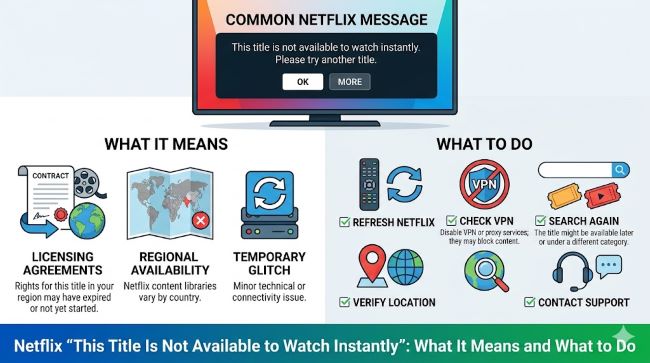
What “This Title Is Not Available to Watch Instantly” Means
The phrase comes from Netflix’s older messaging system and essentially communicates one of several things:
The title is not available in your region. Netflix content licenses are geographic. A show or movie that’s available in the US may not be available in Canada, the UK, Germany, or Japan, and vice versa. If you’re traveling internationally and your account is based in a different country, you may see this message for content available at home but not where you currently are.
The title exists in the database but isn’t licensed for streaming. Some content appears in Netflix search results because Netflix has it in their catalog database but has allowed the streaming license to expire. The title is technically “known” to Netflix but can’t be played.
The title is available on DVD only (legacy US accounts). Netflix’s original service included DVD-by-mail. Some older accounts or searches surface titles that were part of the DVD library but were never made available for streaming or whose streaming rights have expired. Netflix discontinued its DVD service in September 2023, so this specific cause is now historical.
There’s a technical error or account issue. Occasionally the message appears due to a temporary technical problem rather than a genuine licensing or geographic restriction.
Checking Whether the Issue Is Geographic
If you’re outside your home country, a VPN connected to your home country’s server can sometimes allow access to content licensed for your home region. However, Netflix actively detects and blocks VPNs as part of their licensing compliance: using a VPN to circumvent geographic restrictions violates Netflix’s terms of service and may result in account action, though enforcement has historically been inconsistent rather than automatic.
The more legitimate approach is simply accepting that some content is geo-restricted and using the workarounds below to find it through other means.
What to Do When You See This Message
Step 1: Confirm the title genuinely exists on Netflix in your region. Go to Netflix.com and search for the title. If it appears with a play button, the issue may be a temporary technical glitch. If it appears without a play button or with the not-available message, the restriction is real.
Step 2: Check if it’s a streaming license issue vs. complete unavailability. Search for the title on JustWatch (justwatch.com), a streaming aggregator that shows which services currently carry any specific title. If the title appears on other streaming services but not Netflix, the license has moved. If it doesn’t appear anywhere for streaming, it may not be licensed for streaming currently.
Step 3: Look for the content on alternative streaming platforms. JustWatch is the most useful tool here. It shows every streaming platform (Netflix, Hulu, Prime Video, Max, Peacock, Paramount+, Apple TV+, Disney+, etc.) that currently carries a specific title, and whether it’s included in subscription or available to rent/purchase.
Step 4: Rent or purchase digitally. Amazon Prime Video, Apple TV, Vudu, Google Play/YouTube Movies, and Microsoft Movies & TV all offer rental and purchase options for most titles, including many that aren’t on any subscription service. Rentals typically run $3-$6, purchases $10-$20. This is the most reliable way to access any specific title regardless of streaming availability.
Step 5: Check your local library. Many public libraries offer free streaming access through Kanopy or Hoopla, which carry films and documentaries not on commercial streaming platforms. Library digital card access to these services costs nothing beyond a library card.
Why Netflix Shows Titles That Can’t Be Played
Netflix’s content rights situation is complex and constantly changing. Licensing deals expire and are renegotiated. Some rights are exclusive to specific regions. Some content moves between services when licensing windows change. Netflix’s database sometimes lags behind the actual licensing status, causing titles to appear in results even when they can’t currently be streamed.
For original Netflix content, unavailability in a specific region is usually a licensing or regulatory issue in that region rather than the content being unavailable on Netflix globally.
Clearing the Cache and App Troubleshooting
If you believe the content should be available and you’re in the correct region, technical troubleshooting can eliminate a device or app issue:
Clear the Netflix app cache. On Android: Settings > Apps > Netflix > Storage > Clear Cache. On iOS: delete and reinstall the app. On smart TVs: similar cache clearing through the TV settings menu.
Sign out and sign back in. A fresh authentication sometimes resolves content availability display issues.
Try a different device. If the content plays on your phone but not your TV (or vice versa), the issue is device-specific rather than account or licensing.
Check Netflix’s status page. If there’s a broader service outage, status.netflix.com will show it.
Why Netflix Streaming Rights Are More Complex Than People Realize
The “not available” message reveals a fundamental reality about how streaming works that casual users often don’t appreciate: no streaming service owns most of its content outright. Netflix, like every streaming platform, licenses content from studios, production companies, and distributors under agreements that have geographic boundaries, time limits, and exclusivity windows.
When a studio licenses a film to Netflix for US streaming, that license doesn’t automatically extend to all 190+ countries where Netflix operates. Each country may have a separate rights holder who licensed the same content to a local service. This is why the same show can be on Netflix in one country and not on Netflix in another, even though both countries have full Netflix access.
Licensing windows also expire. A film that appeared on Netflix in 2022 may have been removed in 2024 when the license wasn’t renewed, and may reappear if Netflix renegotiates. This is why many users report that content “disappeared” from Netflix: the license simply ran its course.
This complexity also explains why Netflix has invested so heavily in original content. Netflix Originals are content Netflix commissions and owns outright, meaning the rights are global and perpetual: they can stream them anywhere without geographic restrictions and without the license expiring. When Netflix says a series is “a Netflix Original,” it’s a business strategy as much as a creative label.
Key Takeaways
- “This title is not available to watch instantly” on Netflix typically means the content is geo-restricted to other regions, the streaming license has expired, or there’s a temporary technical issue
- Use JustWatch.com to find which streaming service currently carries any specific title: it aggregates availability across all major platforms
- If the content has moved to another service, check Amazon, Hulu, Max, Peacock, Apple TV+, and Paramount+ for subscription access
- Digital rental ($3-$6) or purchase ($10-$20) through Amazon, Apple TV, Vudu, or Google Play is the most reliable way to access any specific title when streaming availability is uncertain
- Public library cards often provide free access to Kanopy and Hoopla, which carry content not on commercial streaming platforms
- Clear the Netflix app cache and try signing out and back in if you believe the content should be available in your region — technical issues occasionally produce false availability messages