27″ ViewSonic VX2758-C-MH: Complete Monitor Review and Guide
You need a new monitor. You’re looking at options. The 27″ ViewSonic VX2758-C-MH catches your attention. It’s affordable. It has curved design. But you don’t know if it’s actually good or just another cheap display.
The 27″ ViewSonic VX2758-C-MH is a gaming-focused curved monitor at a reasonable price. Understanding what it delivers helps you decide if it fits your needs and budget.
Let’s talk about what this monitor actually is, how it performs, and whether it’s a solid purchase.
What You’re Getting
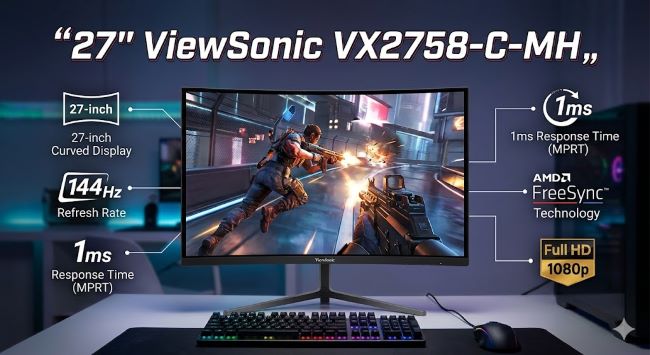
The ViewSonic VX2758-C-MH is a 27-inch curved gaming monitor positioned in the budget-to-mid-range market.
The monitor features a 1500R curve. This means the display curves toward you with a radius of 1500 millimeters. The curve wraps content around your viewing angle, creating an immersive experience.
The curved design is distinctive. It looks modern. It feels gaming-oriented. The curve isn’t as aggressive as some gaming monitors, but it’s noticeable and functional.
The monitor includes a height-adjustable stand. You can tilt, adjust height, and swivel the display. Ergonomic setup is possible, which matters for extended use.
The build quality feels solid without being premium. The plastic construction is sturdy. The stand is stable. Nothing feels cheap or fragile, but it doesn’t feel luxurious either.
ViewSonic is a known monitor manufacturer. The brand has reputation and warranty support. You’re not buying from an unknown company.
Display Specifications
Understanding the specs explains what you’re getting.
The resolution is 1920×1080 (Full HD). This is standard for 27-inch gaming monitors at this price point. Sharper monitors use 1440p or 4K, but those cost more.
The panel type is VA (Vertical Alignment). VA panels offer better contrast than IPS panels. Black levels are deeper. The trade-off is slower response times and less consistent colors from side angles.
The refresh rate is 165Hz. This means the display refreshes 165 times per second. For gaming, higher refresh rates feel smoother. 165Hz is solid for gaming without being premium.
The response time is 4ms (gray-to-gray). This is fast enough for gaming. You won’t notice ghosting in fast-paced games.
The brightness is 300 nits. This is adequate for gaming in normal room lighting. Not exceptionally bright, but sufficient.
The color gamut is 98% sRGB. For gaming, this is good. For professional photo or video work, it’s not ideal, but gamers don’t typically need perfect color accuracy.
The contrast ratio is 3000:1 (typical for VA panels). The deep blacks are a VA panel advantage.
Gaming Performance
The monitor is marketed as a gaming display. How does it perform?
The 165Hz refresh rate is a genuine gaming advantage. Competitive shooters benefit from high frame rates. Smooth motion is noticeable when moving the mouse or turning the camera.
The 4ms response time is fast enough for gaming. You won’t see obvious ghosting or trails behind moving objects.
The 1500R curve contributes to immersion. Curved displays create a wider field of view without requiring neck movement. For gaming, this is more engaging than flat displays.
The VA panel’s deep blacks help in games with dark scenes. Visibility in shadowy areas is good.
The 1920×1080 resolution at 27 inches is standard. The pixel density is moderate. Text and sharp details aren’t as crisp as 1440p, but gaming visuals are fine.
For competitive gaming, this monitor performs well. For single-player immersion, the curve and contrast enhance the experience.
Color and Image Quality
The monitor handles color reasonably for gaming.
The 98% sRGB coverage is good. Colors are vibrant. The VA panel’s saturation is strong.
Color accuracy is acceptable but not professional-grade. Small color shifts exist at angles. For gaming, this doesn’t matter. For photo editing, professional monitors are preferable.
Brightness consistency is good across the screen. The 300 nits peak brightness is adequate for gaming in normal indoor lighting. Outdoor use or very bright rooms might benefit from more brightness.
The contrast is excellent. The 3000:1 ratio creates impressive black depth. Shadows in games show detail well.
Overall image quality is good for gaming. For professional work or critical color work, better monitors exist. For gaming and general use, the quality is solid.
Connectivity
The monitor includes standard connections.
HDMI ports provide basic connectivity. Two HDMI ports mean you can connect multiple devices without swapping cables.
DisplayPort is included. For gaming at high refresh rates, DisplayPort is preferable to HDMI.
A USB hub is built in. The monitor includes USB-A ports for connecting peripherals. This reduces cable clutter on your desk.
Audio output is present. A 3.5mm headphone jack allows audio connection. Built-in speakers also exist, though they’re small and adequate for alerts or low-volume content only.
Connectivity is comprehensive for a monitor at this price point. You have multiple options for connecting devices.
Stand and Ergonomics
The monitor’s stand determines whether you can position it comfortably.
The stand supports height adjustment. You can raise or lower the monitor 5 inches. This lets you position the top of the display at eye level, which is ideal for posture.
Tilt adjustment is included. You can tilt the screen backward up to 20 degrees. This helps reduce glare and find a comfortable angle.
Swivel adjustment is supported. The monitor rotates about 30 degrees both directions. This helps share the display or adjust for your seating position.
Pivot (portrait mode) rotation is not supported. The monitor stays in landscape orientation.
The stand is stable. It doesn’t wobble when you touch the screen. The curved design adds stability.
Overall ergonomics are good. You can position the monitor comfortably for extended work or gaming sessions.
Audio Quality
The monitor includes built-in speakers.
The speakers are small, as expected in a monitor. They’re adequate for alerts, game audio, or video, but not impressive for serious listening.
The sound is tinny and lacks bass depth. If audio matters, external speakers or headphones are better.
The audio is useful as a backup or for casual listening. For gaming where immersion matters, headphones are preferable.
Performance in Different Settings
Real-world use shows how the monitor performs.
For gaming, the 165Hz refresh rate, 4ms response time, and curved design create a good experience. Competitive shooters feel responsive. Immersive games feel engaging. The curve is noticeable and enhances presence.
For office work, the monitor works fine. The 1920×1080 resolution is adequate for spreadsheets, documents, and browsing. The height adjustment helps posture.
For content creation, the monitor is acceptable but not ideal. The color accuracy is decent for casual editing. Professional work requires better color accuracy.
For movie watching, the curved design enhances immersion. The 16:9 aspect ratio matches most content. The contrast makes dark scenes impressive.
For programming, the resolution is adequate. Some developers prefer higher resolution for more screen real estate, but 1920×1080 is workable.
Comparison to Competitors
Several monitors compete in the same space.
The ASUS VP28UQG is a similar gaming monitor with similar specs but a flatter design. The ViewSonic’s curve is an advantage for immersion.
The Dell S2421HGF offers 144Hz refresh rate and 1ms response time. It’s faster but less immersive without the curve.
The LG 27GP850 offers 1440p resolution and 144Hz. It’s sharper but more expensive.
The BenQ EW2780U is a 4K monitor at higher price. It’s sharper for detailed work.
The ViewSonic competes well on price. On features, it’s middle-of-the-road. On curved gaming design, it’s distinctive at its price point.
Potential Drawbacks
Understanding limitations helps you make an informed decision.
The 1920×1080 resolution on a 27-inch screen results in moderate pixel density. If you sit close and want sharp text or details, 1440p would be better.
The VA panel has slower response times than IPS. Professional color work isn’t ideal on VA panels.
The curved design is less versatile than flat. If you need a monitor for professional color-critical work, flat is preferable.
The built-in audio is weak. Relying on monitor speakers for entertainment is not ideal.
The monitor has no USB-C connection. Modern connectivity would be nice but isn’t critical for gaming.
The brightness could be higher for very bright rooms.
These limitations are minor for the target gaming audience but worth considering.
Who Should Buy This
The monitor suits specific users.
Gamers on a budget benefit from the gaming features at reasonable cost. The 165Hz and curve are genuine advantages for gaming.
People who want curved display at budget price. Curves are trendy but expensive on premium monitors. This offers curve affordability.
Office workers who want good ergonomics and decent display quality. The stand adjustments and image quality work well for everyday use.
People who value immersion in single-player games. The curve enhances presence in immersive experiences.
Multi-monitor enthusiasts looking for additional gaming displays. The price lets you build multi-monitor setups.
Who Should Look Elsewhere
Some users should consider alternatives.
Professional color workers need better color accuracy. 1440p or 4K displays with better color gamut are necessary.
High-end competitive gamers might want 240Hz+ refresh rates for maximum responsiveness. This monitor caps at 165Hz.
People who want ultra-sharp images need 1440p or 4K. The 1920×1080 resolution is limiting for clarity.
People with very bright rooms need higher brightness. 300 nits is adequate for normal rooms but not bright environments.
People who want USB-C connectivity for modern devices. This monitor lacks USB-C.
Verdict
The 27″ ViewSonic VX2758-C-MH is a solid budget gaming monitor that delivers what it promises.
It’s not the best gaming monitor available. It’s not the most feature-rich. It’s not the sharpest.
But it offers 165Hz gaming refresh rate, 4ms response time, curved immersive design, good ergonomics, and solid build quality at a reasonable price.
For budget gaming, the ViewSonic performs well. It handles competitive gaming responsively. It delivers immersive single-player experiences through its curve.
If you want gaming features without premium pricing, this monitor delivers.
Key Takeaways
- The 27″ ViewSonic VX2758-C-MH is a curved gaming monitor in the budget-to-mid-range market.
- The 165Hz refresh rate and 4ms response time are good for gaming.
- The 1500R curve creates immersion without being too aggressive.
- The 1920×1080 resolution is standard for 27-inch gaming monitors at this price.
- The VA panel offers excellent contrast and deep blacks.
- The ergonomic stand supports height, tilt, and swivel adjustment.
- The 98% sRGB color gamut is good for gaming but not professional color work.
- Connectivity includes HDMI, DisplayPort, and USB hub features.
- Build quality is solid without feeling premium.
- The curved gaming design is distinctive at the budget price point.
- The monitor suits gamers, casual users, and office workers.
- Professional color workers should consider monitors with better color accuracy.
- The resolution limits sharpness compared to 1440p or 4K monitors.
- Built-in audio is weak and suitable only for alerts or casual listening.
- The monitor represents good value for gaming on a budget.
- If you want gaming performance at reasonable cost, the ViewSonic VX2758-C-MH is worth considering.