What Is a JPG vs PNG: Complete Image Format Comparison Guide
You’re working on a project and need to save an image. You see options for JPG and PNG. You’re not sure which one to choose. The choice matters because different formats work better for different situations. Understanding what is a jpg vs png helps you make the right decision for your specific needs.
These two formats dominate image files on the internet and in digital projects. Almost every image you encounter online uses one of these formats. Yet most people don’t understand the differences between them. Learning these differences takes just a few minutes and improves your work.
The Basic Difference
Let’s start with the fundamental distinction. JPG vs PNG represent different approaches to storing images.
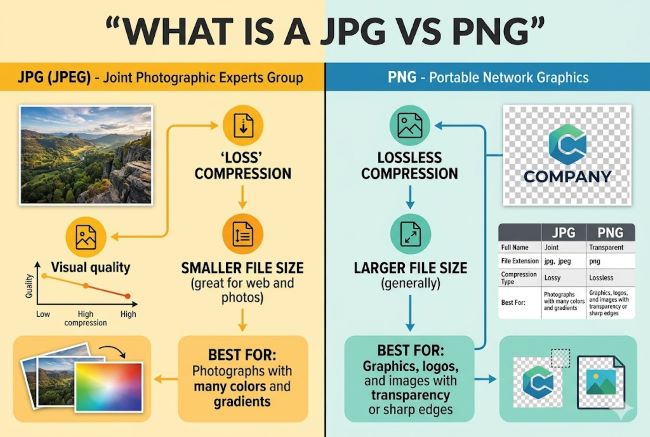
JPG uses lossy compression. This means the format removes some image data to reduce file size. When you compress an image this way, you lose information. The image still looks good to human eyes, but the lost data is gone permanently.
PNG uses lossless compression. This format removes file size without losing image data. You can compress PNG files smaller, but all original image information remains intact. Decompress the file and you get back exactly what you started with.
This difference in compression shapes everything about how these formats work and when you should use each one.
Understanding JPG Format
JPG meaning refers to “Joint Photographic Experts Group,” the standards committee that created the format. The format itself is technically called JPEG, though JPG and JPEG refer to the same thing.
JPG files work through lossy compression. The algorithm analyzes the image and removes data it deems less important to human vision. This approach works well for photographs and complex images with many colors.
When you save a JPG file, you choose a quality level. Higher quality means less compression and larger file size. Lower quality means more compression and smaller file size. Finding the right balance matters.
A photograph saved as JPG at 80% quality looks nearly identical to the original to human eyes. The file size is significantly smaller. This balance makes JPG ideal for photographs on the web.
Understanding PNG Format
What is PNG? PNG stands for “Portable Network Graphics.” The format was created to address limitations in older image formats.
PNG vs JPG: PNG uses lossless compression, preserving all image data. You can open and save a PNG file repeatedly without quality loss. This makes PNG ideal for images you plan to edit further.
PNG also supports transparency. You can save images with transparent backgrounds using PNG. JPG cannot represent transparency without background color showing through.
PNG works well for graphics, logos, illustrations, and other images where clarity and transparency matter. The format preserves sharp edges and clear colors.
File Size Comparison
JPG vs JPEG is not a real distinction since they’re the same format with different extensions. The real comparison involves JPG versus PNG file sizes.
JPG files typically compress to smaller sizes than PNG files for the same image. A photograph saved as JPG might be 200 KB while the same image as PNG reaches 800 KB.
However, PNG files with simple graphics might be smaller than JPG versions of the same image. The format’s efficiency depends on image content. Complex photographs compress smaller as JPG. Simple graphics compress smaller as PNG.
This size difference matters for websites and email. Smaller files load faster and use less bandwidth. For web use, JPG typically wins for photographs due to smaller file sizes.
Quality Considerations
JPG meaning quality loss happens invisibly. The compression removes data you can’t see. At high quality settings, the difference between JPG and original image is imperceptible.
Lower quality settings become visible as artifacts appear. You see blocky areas, color shifts, and softness around edges. These artifacts indicate excessive compression.
PNG maintains perfect quality regardless of compression level. No artifacts appear because no data is lost. This makes PNG ideal for images where quality must remain perfect.
For photographs, JPG at 75-85% quality provides good balance between size and appearance. For graphics and images you plan to edit, PNG preserves quality better.
Transparency and Background
One major difference: PNG vs JPEG regarding transparency. PNG supports transparent backgrounds. JPEG does not.
In PNG, you can make the background transparent. The transparent areas show as checkerboard pattern in editing software. When placed on a website, the page background shows through the transparent areas.
JPEG always has a background color. Transparent areas don’t exist in JPEG. If you need transparency, PNG is your only option between these two formats.
This matters for logos, icons, and graphics that need to sit on various backgrounds. Transparent PNG handles this perfectly. JPG requires choosing a background color.
When to Use JPG
JPG works best in specific situations. Understanding when to choose JPG improves your results.
Photographs: JPG is ideal for photographic images with many colors and gradients. The lossy compression handles photographic content well while keeping file sizes small.
Web Images: For websites prioritizing load speed, JPG photographs compress smaller than PNG. Faster loading benefits user experience and search engine rankings.
Print Photography: Photos saved as JPG for printing work well. Printers don’t distinguish between JPG and PNG. File size matters less in print workflows.
Social Media: Platforms like Facebook and Instagram accept JPG well. JPG photographs upload quickly and display sharply.
Scenarios where transparency isn’t needed: If you don’t need transparent backgrounds, JPG offers advantages in file size for photographs.
When to Use PNG
PNG has its own ideal use cases. Recognizing these situations helps you choose correctly.
Graphics and Logos: PNG preserves sharp edges and clear colors ideal for graphics. The lossless compression maintains quality.
Images Needing Transparency: If you need transparent backgrounds, PNG is essential. JPG cannot provide this.
Screenshots: Screenshots often contain text and UI elements. PNG’s lossless compression preserves clarity better than JPG’s compression artifacts.
Images You’ll Edit Further: Since PNG loses no data, you can edit and resave PNG files repeatedly without quality loss. JPG loses more quality each time you save.
Illustrations and Artwork: Digital artwork benefits from PNG’s quality preservation. Edited artwork saved as PNG maintains perfect quality.
Web Graphics: Buttons, icons, and other web graphics work well as PNG. Transparent backgrounds and sharp edges combine with small file sizes for simple graphics.
Converting Between Formats
Sometimes you need to convert png to jpg or vice versa. Understanding how conversion works prevents quality loss.
PNG to JPG: When converting PNG to JPG, the transparent background becomes a solid color (usually white). You lose transparency but gain file size reduction. The conversion is straightforward but can’t be undone cleanly.
JPG to PNG: Converting JPG to PNG increases file size because you’re switching to lossless compression. The conversion doesn’t restore lost JPG data. The image looks identical visually, but the file is larger.
GIF to PNG: GIF to PNG conversion upgrades the format while preserving image quality and transparency. PNG handles everything GIF does while offering better compression for most images.
Most image editing software converts between formats easily. Right-click an image file and select “Convert” or use “Save As” with different format options.
Other Image Formats Worth Knowing
Beyond JPG and PNG, several other formats exist.
TIFF: What is TIFF? TIFF stands for “Tagged Image File Format.” TIFF uses lossless compression and supports high quality. Professional photographers and print shops often use TIFF. The format supports transparency and layers. TIFF files are very large, making them impractical for web use.
TIF: What is a TIF file? TIF is simply a shortened extension for TIFF files. They’re the same format. Some systems use TIF, others use TIFF. No functional difference exists.
WEBP: A newer format offering better compression than JPG. WEBP files are smaller while maintaining quality. Browser support continues improving, though older browsers don’t recognize WEBP.
SVG: A vector format ideal for logos and illustrations. SVG files scale perfectly to any size without quality loss. However, SVG doesn’t work for photographs.
For most purposes, JPG and PNG cover your needs.
Technical Details You Should Know
Understanding a bit of technical background helps you make better decisions.
Compression Algorithms: JPG uses a mathematical algorithm that identifies and removes information humans perceive as less important. PNG uses ZIP compression similar to file compression software. Different approaches suit different image types.
Color Depth: Both formats support millions of colors. However, PNG can store transparency information alongside colors. JPG cannot.
Metadata: Both formats can store metadata like camera information in photographs. Metadata doesn’t affect image display.
Browser Compatibility: Both JPG and PNG work in all modern browsers on all devices. Older browsers have no compatibility issues with either format.
Making Your Decision
Choosing between JPG vs PNG comes down to your specific situation.
Ask yourself these questions:
Do you need a transparent background? If yes, choose PNG.
Is this a photograph? If yes, JPG typically wins for file size.
Will you edit this image further? If yes, PNG preserves quality better.
Does file size matter? If yes, JPG usually wins for photographs.
Is this a graphic or illustration? If yes, PNG usually wins.
Answering these questions guides you to the right choice.
Common Mistakes to Avoid
Several mistakes cause problems when working with these formats.
Don’t save photographs as PNG unless transparency is essential. The larger file size doesn’t benefit your workflow.
Don’t repeatedly save and resave JPG files. Each save cycle causes additional quality loss. Save your original as PNG if you plan to edit repeatedly, then export as JPG when done.
Don’t assume JPG quality loss is always visible. At high quality settings, JPG looks identical to original photographs to human eyes.
Don’t convert JPG to PNG expecting quality restoration. Conversion doesn’t restore JPG’s lost data. The conversion simply changes the container format.
Don’t use JPG for graphics needing transparency. The lack of transparency support limits JPG’s usefulness for graphics.
File Extension vs Actual Format
One confusion point: JPG vs JPEG versus other extension questions.
JPG and JPEG refer to the same format. Some systems use .JPG, others use .JPEG. They’re functionally identical. Some images might show .JPE extension on older systems, but this is rare.
PNG always uses .PNG extension. You won’t see PNG files with different extensions.
The extension doesn’t determine the format. A file named “image.jpg” might actually contain PNG data if someone renamed it. The file’s actual format is determined by its internal structure, not its extension.
Key Takeaways
- What is a JPG vs PNG: JPG uses lossy compression while PNG uses lossless compression, affecting file size and quality.
- JPG vs PNG choice depends on image type, transparency needs, and whether you’ll edit the image further.
- PNG vs JPG for photographs: JPG typically offers smaller file sizes. PNG offers better quality preservation if you’ll edit further.
- JPG meaning: Joint Photographic Experts Group format, ideal for photographic images with many colors.
- What is PNG: Portable Network Graphics format, ideal for graphics, logos, and images needing transparency.
- PNG vs JPEG: Same consideration as PNG vs JPG since JPEG and JPG are identical formats.
- Convert PNG to JPG when you need to reduce file size. Convert JPG to PNG when you want lossless compression going forward.
- GIF to PNG conversion upgrades the format while maintaining transparency and improving compression.
- TIFF meaning and what is TIFF: Tagged Image File Format, a professional format for high-quality images and print work. What is a TIF file: Same as TIFF, just different extension spelling.
- Transparency is available in PNG but not in JPG. Choose PNG if you need transparent backgrounds.
- Quality loss in JPG happens during compression. PNG preserves all data through lossless compression.
- File size matters for websites and email. JPG typically creates smaller files for photographs.
- Edit your images before exporting. Choose your format based on the final use, not the working version.
- Both formats work in all modern browsers and devices. Compatibility isn’t a deciding factor anymore.
- For most purposes, JPG handles photographs and PNG handles graphics and illustrations.