How to Change Your Number on TextNow: A Complete Step-by-Step Guide
Learn exactly how to change your number on TextNow in a few simple steps. This guide covers the app, TextNow web messaging, what to do before switching, and how to delete your TextNow account if needed.
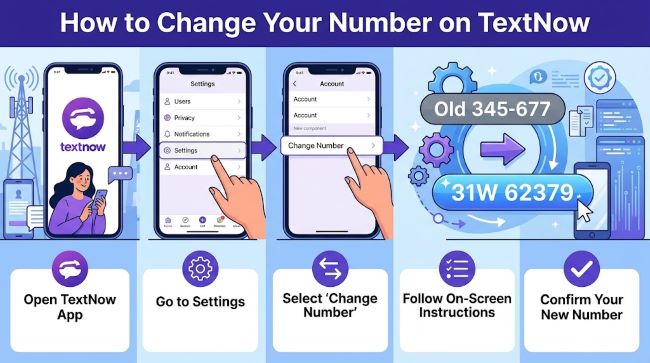
So you want a fresh number on TextNow. Maybe spam calls piled up, you want more privacy, or you simply need a clean start. Whatever the reason, knowing how to change your number on TextNow is one of the most useful things you can do to take control of your communication on the platform.
The good news: the process is straightforward. But there are a few things you need to handle first, or you could lock yourself out of accounts you care about. This guide walks you through everything, from prep to picking your new number.
Why People Change Their TextNow Number
TextNow gives users a free phone number for calls and texts over Wi-Fi. It works across mobile and desktop, and with over 100 million users, it has become one of the more popular free calling apps around.
There are several real reasons someone would want to swap numbers:
- A number has been on too many marketing lists and the spam never stops
- You shared the number publicly somewhere and want to limit who can reach you
- You used the number for a specific purpose, like a short-term project or side hustle, and that chapter is done
- You are concerned about privacy and want a number that is not connected to your current activity
Any of these are solid reasons. The process to change it does not take long, but the preparation matters.
Before You Change Your Number: What to Sort Out First
This is the step most guides skip, and it is the one that causes problems later.
Update your two-factor authentication accounts. If you use your TextNow number for 2FA on any platform, update those before you release the number. Once you release it, you lose it permanently and could be locked out of accounts that send codes to that number.
Save important messages. SMS and MMS messages tied to your old number will not carry over. If there is anything in your TextNow inbox you need, grab it before you make the switch.
Tell your contacts. Your old number goes back into TextNow’s pool and can be reassigned to someone else. Give your important contacts a heads up so they are not texting a stranger.
Check your account status. Make sure your account is in good standing before attempting a number change. If there are any outstanding issues, resolve them first.
How to Change Your Number on TextNow (Mobile App)
Here is the step-by-step process using the TextNow app on your phone:
- Open the TextNow app on your device and make sure you are signed in.
- Tap the menu icon in the top left corner of the screen (three horizontal lines).
- Select Settings from the menu.
- Tap Account.
- Find the option labeled TextNow Number and tap it.
- Tap the three vertical dots in the top right corner of that screen.
- Select Release Number.
- Confirm the release when prompted.
After releasing your old number, TextNow will assign you a new one based on area code availability. You do not get to choose a specific number, but you can choose your area code.
Important: Once you release your number, it is gone. TextNow does not allow you to reclaim it. The platform also limits how often you can change numbers, with a typical waiting period of around 15 days between changes.
How to Change Your TextNow Number on Web (TextNow Web Messaging)
If you use TextNow web messaging through a browser on your computer, the process works similarly:
- Go to textnow.com and complete the TextNow login with your credentials.
- On the left-hand menu, click My Wireless Account (or Account, depending on your plan).
- Find the TextNow Number section.
- Select the option to release your current number.
- Follow the prompts to confirm the release and get a new number assigned.
The TextNow web messaging interface mirrors the app fairly well, so if you are used to the app, the desktop version should feel familiar.
What Happens to Your Old Number?
Once released, your number goes back into TextNow’s pool of available numbers. Another user requesting a number in your old area code could end up with it. This is why updating your 2FA accounts and notifying contacts before you make the change matters so much.
TextNow does offer a paid add-on called Lock In Number for $4.99 per month if you want to keep your number even during periods of inactivity. Without it, TextNow can reclaim your number if the account sits idle for too long.
Can You Change Your Number Without the Current Number?
If you no longer have access to the number tied to your account, you can still get in by using your account login credentials. Head to the TextNow login page, sign in with your email and password, then navigate through account settings. If you run into issues, TextNow’s support team is available daily from 10 AM to 5:30 PM Eastern via their live chat.
Things to Know About TextNow Number Changes
A few practical details worth keeping in mind:
- You can only change your number once every 15 days.
- Number availability depends on your chosen area code.
- You cannot select a specific number, only a general area code.
- Accounts inactive for extended periods may have their number reassigned automatically.
Understanding how mobile apps handle user settings is worth thinking about across any app you rely on regularly. The settings that matter most tend to be the ones tied to identity and account access, like your number.
What If You Want to Delete Your TextNow Account Instead?
If you are not just changing your number but want to walk away from TextNow altogether, the process to delete your TextNow account is different from a number change.
To delete your TextNow account:
- Sign in to your account at textnow.com or through the app.
- Go to Settings, then Account.
- Look for the Delete Account option near the bottom.
- Follow the confirmation steps.
Deleting your account removes your number, messages, and account data permanently. Before you do this, make sure you have exported anything you want to keep and that you have updated all services using that number for authentication. Once the account is gone, there is no recovery.
If you are unsure whether to delete or just change numbers, think about whether you plan to keep using TextNow for anything. A number change gives you a fresh start while keeping the account intact. Deletion closes everything out.
Keeping Your Privacy in Mind
One reason many people use TextNow in the first place is to keep a secondary number separate from their personal line. It works well for privacy when used thoughtfully. Whether you are exploring apps for managing different parts of your digital life or just trying to keep your main number out of places where spam tends to accumulate, having a number you can change when needed is genuinely useful.
As apps become more central to how we manage communication, understanding how to use them to protect your information becomes more relevant. A tool like TextNow gives you that flexibility without a monthly phone bill.
Key Takeaways
- To change your number on TextNow, go to Settings, tap Account, select TextNow Number, and release your current number.
- The same process applies through TextNow web messaging on desktop.
- You can only change your number once every 15 days.
- Always update 2FA settings and notify contacts before releasing your old number.
- If you want to walk away entirely, you can delete your TextNow account through the same account settings area.
- Released numbers go back into the pool and cannot be recovered.
Changing your TextNow number is quick once you are prepared. Take care of the account security steps first, follow the steps above, and you will have a new number without any of the baggage from the old one.