Claude Code Agent Teams: How to Orchestrate AI Subagents for Real Development Work
If you’ve been following what’s happening in AI-assisted development, you’ve probably noticed a shift. It’s no longer about asking one model a question and getting an answer back. The more interesting territory is Claude Code agent teams: multiple AI agents working in parallel, each handling a different part of a complex task, coordinated by an orchestrator that keeps the whole thing moving.
This post explains what Claude Code agent teams are, how the subagent architecture works, what you can realistically use it for, and what the limits look like right now.
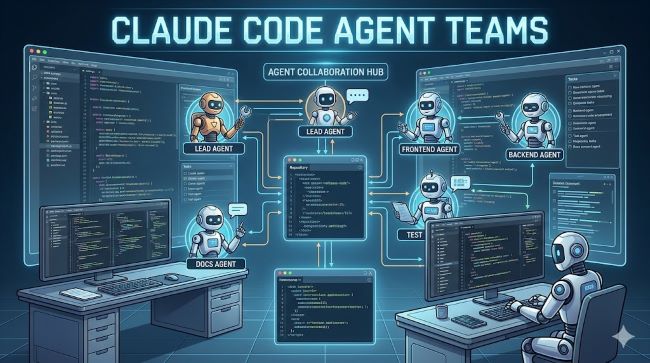
What Are Claude Code Agent Teams?
Claude agent teams refers to a multi-agent setup where Claude Code instances operate as either an orchestrator or a subagent, or both simultaneously, depending on how the system is structured.
Here’s the basic mental model:
- An orchestrator is the top-level Claude instance that receives the overall task, breaks it into components, and delegates each component to a subagent.
- A subagent is a Claude instance that receives a specific instruction, executes it (which might involve writing code, running tests, reading files, calling APIs), and returns the result to the orchestrator.
- The orchestrator synthesizes the subagent outputs and either finalises the task or launches another round of delegation.
This mirrors how human engineering teams actually work. A tech lead doesn’t implement every feature personally. They break the project into workstreams, assign each one, review the outputs, and integrate them. Claude Code subagents are doing the same thing, just at machine speed.
Why This Architecture Matters
The reason agent teams are a meaningful step forward is parallelism and context management.
A single Claude instance working through a large codebase hits limits fast. It can only hold so much in context, and sequential work is slow. When you orchestrate multiple subagents working in parallel, you can run a test suite, generate documentation, refactor a module, and investigate a bug all at the same time. Each subagent gets a focused context, does its job, and reports back.
This is similar in principle to how modern mobile app development has evolved toward modular, parallel workflows. Just as frontend and backend teams work concurrently on different layers, Claude Code subagents tackle different parts of a task without stepping on each other.
The orchestrator is the key. It needs to decompose the task well, write clear instructions for each subagent, and handle the integration of results. If the orchestrator’s instructions are vague, the subagents produce vague outputs. The quality of the decomposition determines the quality of the result.
How Claude Code Subagents Actually Work
When Claude Code runs in agentic mode, it can spawn subagents using the Task tool. Each subagent:
- Receives a specific prompt from the orchestrator
- Has access to the same tools as a standard Claude Code instance (bash, file reading and writing, web search if enabled)
- Operates within its own context window, separate from the orchestrator
- Returns a result when it completes or hits a stopping condition
The orchestrator tracks all active subagents, collects their outputs, and decides what to do next. This can be a single round of parallel delegation, or it can be iterative, where subagent outputs feed into the next round of instructions.
One important concept here is backagent behaviour. In multi-agent architectures, a backagent refers to a background process or secondary agent that runs support tasks behind the main workflow, things like monitoring output quality, logging intermediate states, or handling retries when a subagent fails. Claude Code’s architecture supports this pattern, though the implementation depends on how you structure your prompts and tooling.
Practical Use Cases for Claude Agent Teams
This isn’t just theoretical. Here are realistic tasks where claude agent teams add genuine value:
Large-scale refactoring. Break a codebase into modules and assign each module to a subagent. One rewrites tests, another updates type definitions, another handles the API layer. The orchestrator integrates the changes and checks for conflicts.
Parallel test generation. For a large function library, assign groups of functions to separate subagents that each generate unit tests. Faster than sequential generation and easier to review in batches.
Multi-file documentation. Assign documentation tasks for different parts of a codebase to separate subagents. Each writes docstrings or markdown docs for its assigned section. The orchestrator assembles and reviews the output.
Research and synthesis tasks. One subagent searches for relevant library options, another evaluates performance benchmarks, a third checks licensing. The orchestrator synthesises the findings into a recommendation.
Bug investigation pipelines. An orchestrator receives a bug report, spawns a subagent to reproduce the issue, another to trace the relevant code path, and a third to propose a fix. This mirrors how a senior developer might delegate an investigation.
Orchestrating Claude Agent Teams: What Good Setup Looks Like
The word orchestrate gets used loosely, but in this context it means a specific set of responsibilities. A well-structured orchestrator does the following:
- Writes subagent instructions that are self-contained. Each subagent should be able to do its job without needing to ask clarifying questions.
- Specifies the expected output format clearly so results are easy to parse and integrate.
- Handles failure gracefully. If a subagent returns an error or incomplete result, the orchestrator should have a fallback path.
- Avoids creating circular dependencies between subagents where agent A is waiting on agent B, which is waiting on agent A.
Getting this right is more of a prompting and system design challenge than a technical one. The tooling handles the mechanics. The hard part is thinking clearly about task decomposition.
For teams already familiar with how AI systems handle structured workflows and decision-making, this will feel familiar. The principles of clear inputs, defined outputs, and explicit evaluation criteria apply just as much to agent orchestration as to any other structured system.
A Note on “EAMS Case Search” and Team Workflows
One question that comes up in enterprise contexts is how Claude Code agent teams fit alongside existing case management and workflow systems. In organisations using systems like EAMS case search (Electronic Adjudication Management System, used in workers’ compensation case tracking), there’s potential for agent teams to handle structured data retrieval and summarisation tasks alongside human case workers.
The pattern would look familiar: an orchestrator receives a case reference, subagents retrieve relevant documents and prior decisions, another subagent drafts a summary. The human reviews and acts on the output. It’s augmentation, not replacement, and the value is in compressing research time.
Can You Schedule Agent Tasks Like You Schedule a Teams Message?
A question that comes up for developers setting up automated pipelines: can you schedule a teams message or trigger agent tasks on a schedule? In Microsoft Teams, you can schedule messages using the scheduled send feature in the compose box. For Claude Code agent teams, scheduled triggers depend on your infrastructure. You can wrap Claude Code in a cron job, a CI/CD pipeline step, or a webhook handler to fire agent tasks on a schedule or in response to events.
This is how most teams are deploying agent workflows in practice: not as interactive sessions but as automated jobs that run on commits, on a schedule, or in response to system events.
Current Limits Worth Knowing
Claude Code agent teams are powerful but not unlimited. A few practical constraints:
- Context window per subagent. Each subagent has its own context window. Large tasks that require reading extensive codebases may hit limits within a single subagent and require further decomposition.
- Cost scales with parallelism. Running 10 subagents in parallel costs roughly 10x as much as running one sequentially. Worth it for the right tasks, less so for small ones.
- Coordination overhead. Poorly structured orchestrator prompts create more problems than they solve. The system doesn’t self-correct bad decomposition.
- Tool access. Subagents inherit the tool permissions of the parent session, but file system scope should be managed carefully to avoid subagents overwriting each other’s work.
As always with AI development tools, understanding where AI genuinely improves workflow versus where it adds friction is the critical judgment call. Agent teams solve real problems at scale. They’re not the right tool for every task.
Key Takeaways
- Claude Code agent teams use an orchestrator-subagent architecture to run multiple AI agents in parallel on complex tasks.
- Claude Code subagents each get a focused context and a specific instruction, then return results to the orchestrator.
- To orchestrate well, write self-contained subagent instructions with clear output formats and handle failures explicitly.
- Backagent patterns support background monitoring and retry logic within multi-agent pipelines.
- Scheduling agent tasks requires external infrastructure like cron jobs or CI/CD triggers, similar to how you might schedule a Teams message for a future time.
- Cost, context limits, and coordination quality are the main practical constraints to manage.
If you’re already using Claude Code for development tasks, the agent team architecture is the natural next step for anything too large or complex to handle in a single session. Start with a well-defined, parallelisable task, keep the orchestrator instructions tight, and build from there.