How to Change Battery in Key Fob: Step-by-Step Guide for Every Common Fob Design
A key fob that only works when you stand next to the car is telling you something. In most cases, the coin battery inside is running low. A dealer can swap it, but you can do it yourself in about five minutes with a small screwdriver and a battery that costs a few dollars. Knowing how to change battery in key fob remotes saves money and keeps you from getting stuck in a parking lot.
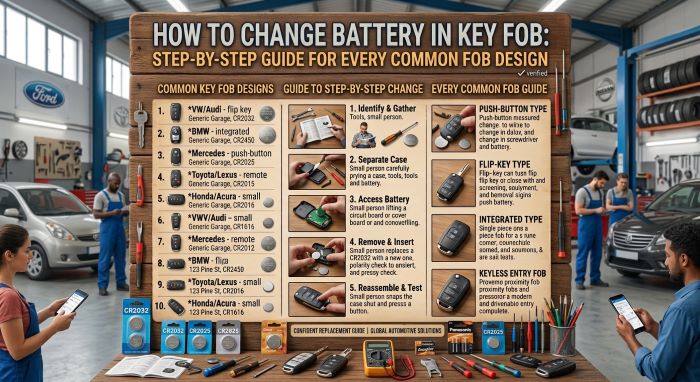
This guide covers the warning signs, the tools, the common battery sizes, and general steps for the four main fob designs: the flip key, the smart key with a hidden emergency key, the rectangular fob with a seam, and the screw-down case. It also has brand notes for Toyota, Honda, Ford, Chevrolet and GM, Nissan, Hyundai, Kia, Subaru, BMW, Mercedes-Benz, Volkswagen, and Tesla, plus what to do when the fob dies, how to keep coin batteries away from children, and how to recycle the old cell. The brand notes are based on owner’s manuals, brand support pages, dealer service pages, and repair guides, not hands-on testing of every key.
Signs Your Key Fob Battery Is Weak
Fob batteries rarely die without warning. Watch for these signs.
| Sign | What You Notice |
|---|---|
| Shorter range | You have to walk closer to the car before the lock or unlock button works |
| Buttons work only some of the time | You press two or three times before the car responds |
| Dashboard or screen warning | Many cars show a message such as “Key Battery Low” on the instrument panel or touchscreen |
| No light on the fob | Some fobs, including many Honda remotes, have a small indicator that should light when you press a button. Honda’s manuals say to replace the battery if it does not come on |
| Push-button start fails to find the key | The car says no key is detected, even with the fob in your pocket |
| Nothing works at all | The battery is likely fully drained |
Nissan’s owner’s manuals say plainly that when the “Key Battery Low” warning appears, you should replace the battery with a new one. Tesla shows a low-battery message on the touchscreen or instrument panel.
How Long a Fob Battery Lasts
Battery life depends on how often you use the fob and on the fob itself. A general range for a typical fob is about two to five years. Some last much less. Tesla, for example, says its fob battery lasts up to about a year with normal use, depending on the fob version and vehicle settings.
Tools You Need
The tool list for how to change battery in key fob cases is short. You may already have everything in a kitchen drawer.
| Item | Why You Need It |
|---|---|
| Replacement coin battery | Must match the code on the old one, such as CR2032 |
| Small flathead screwdriver | Pries the two halves apart at the seam or slot |
| Soft cloth or tape | Wrap the screwdriver tip so it does not scratch the case. Honda and Nissan manuals both suggest this |
| Plastic pry tool, optional | Gentler than metal on soft plastic |
| Small Phillips or precision screwdriver | Only for fobs held together with a tiny screw |
| Tweezers, optional | Helps lift out a battery that sits deep in its holder |
| Your phone | Take a photo of the battery’s position before you remove it |
| Soft surface | A towel keeps the fob from sliding and catches small parts |
On many smart keys, the built-in emergency key is the pry tool. You slide it out and use its tip in the slot on the case.
Common Key Fob Battery Types
Most key fobs run on a 3-volt lithium coin cell. The code printed on the cell tells you its size. The first two digits give the diameter in millimeters, and the last two give the thickness in tenths of a millimeter. A CR2032 is 20 mm wide and 3.2 mm thick.
| Battery | Diameter | Thickness | Where It Often Shows Up |
|---|---|---|---|
| CR2032 | 20 mm | 3.2 mm | The most common fob battery. Used in many Toyota, Honda, Nissan, Hyundai, Kia, GM, Ford, and Tesla fobs |
| CR2025 | 20 mm | 2.5 mm | Some Ford remotes and some newer Toyota smart keys |
| CR2016 | 20 mm | 1.6 mm | Older or secondary remotes. Some older GM three-button fobs use two of them |
| CR1632 | 16 mm | 3.2 mm | Certain older or alternate Toyota fobs |
| CR2450 | 24.5 mm | 5.0 mm | Many newer flat, rectangular smart keys, including Ford Intelligent Access keys and some Toyota and Kia smart keys |
Battery types vary by model and year, even within one brand. A shape that looks like your fob is only a starting point. Before you buy, read the code printed on the old battery or check the owner’s manual. A CR2025 may fit in a CR2032 slot, but it is thinner and may not make firm contact. A CR2450 and a CR2032 are not interchangeable.
Name-brand batteries are fine, and so are good generic ones, as long as the code and voltage match. Avoid very cheap, unknown brands, which can have short lives or poor contact. Tesla recommends Panasonic CR2032 cells for its fobs.
Before You Start
- Confirm the battery code. Open the fob first if you are not sure, then buy the battery.
- Work on a towel or table. Small springs, clips, and screws are easy to lose.
- Clean your hands. Tesla says to wipe the new battery and avoid touching its flat faces. Nissan’s manual says touching the contact points can drain the battery’s capacity, so hold it by the edges.
- Note the orientation. Take a photo of the old battery before you remove it. Most fobs have a “+” mark on the holder or case.
- Keep batteries away from children. Set new and old cells out of reach while you work. See the safety section below.
How to Change Battery in Key Fob Designs: General Steps
Most fobs fall into one of four designs. Find yours below. Your owner’s manual has the exact steps for your key, usually in the index under “battery,” “remote,” or “key.”
Flip Key
A flip key has a metal blade that folds into the remote and pops out when you press a button.
- Press the button and flip out the metal blade.
- Look for a small notch or slot along the seam where the two halves of the remote meet. On some GM flip keys, the back cover pops off by hand once the blade is out.
- Insert a small flathead screwdriver, wrapped in cloth, into the notch. Twist gently to separate the halves. Work around the edge rather than forcing one spot.
- Note which side of the battery faces up. On many fobs it is the “+” side.
- Slide out the old battery or lift it with the screwdriver tip.
- Insert the new battery in the same orientation. Press it down so it sits flat.
- Snap the halves together until they click all the way around.
- Fold the blade in and out a few times, then test lock and unlock at the car.
Smart Key With a Hidden Emergency Key
Push-button start cars use a smart key that you keep in a pocket. Most hide a small metal emergency key inside.
- Find the release button or slider, usually on the back or bottom edge. Press it and pull out the emergency key.
- Look into the opening where the key sat. Many smart keys have a slot there, made for prying.
- Insert the tip of the emergency key, or a cloth-wrapped flathead screwdriver, into the slot. Twist to separate the halves.
- Note the orientation of the battery and take a photo.
- Lift out the old battery with a plastic tool or your fingernail.
- Seat the new battery in the same orientation, flush against the contacts.
- Line up the halves and press them together until they click.
- Slide the emergency key back in until it locks.
- Test lock, unlock, and push-button start.
Rectangular Fob With a Seam
Many plain remotes and some newer smart keys are flat rectangles with a visible seam running around the edge.
- Find a notch or small gap along the seam, often at one end or on a corner.
- Insert a cloth-wrapped flathead screwdriver or plastic pry tool and twist gently.
- Move the tool along the seam to release each clip in turn. Do not lever hard on one spot, or the plastic clips may snap.
- Note the battery orientation.
- Push the old battery out of its holder from the side. On some fobs it slides out sideways.
- Insert the new battery the same way.
- Line up the halves and press them closed around the whole edge.
- Test every button.
Screw-Down Case
Some fobs, especially older remotes and some aftermarket shells, are held together by a tiny screw.
- Find the screw on the back of the fob. It may sit under a label or a small rubber plug.
- Remove it with a small Phillips or precision screwdriver. Put it somewhere it cannot roll away.
- Lift off the back cover. If it does not come free, check for a second screw or a clip and pry gently at the seam.
- Note the battery orientation, then remove the old cell.
- Insert the new battery the same way.
- Replace the cover and screw. Snug it down, but do not overtighten, since the threads are in soft plastic.
- Test the fob.
Brand-by-Brand Notes
The table below shows common battery types confirmed from brand manuals, dealer service pages, and repair guides. It is a starting point only. Battery types change by model and year, so always check the old battery or the owner’s manual.
| Brand | Common Batteries | Key Notes |
|---|---|---|
| Toyota | CR2032, CR2450, CR2025, CR2016, CR1632 | Older rounded keys often take CR2032. Many newer rectangular smart keys take CR2450 |
| Honda | CR2032 | Pry at the slot with the key grip, buttons facing down |
| Ford | CR2032, CR2025, CR2450 | Intelligent Access push-button keys commonly take CR2450 |
| Chevrolet and GM | CR2032, CR2016 | Some older three-button fobs hold two CR2016 cells |
| Nissan | CR2032 | Positive side faces the bottom of the case |
| Hyundai | CR2032 for most fobs | Open the fob to confirm before buying |
| Kia | CR2032, CR2450 | Some newer smart keys take CR2450 |
| Subaru | Varies | Check the manual or old battery |
| BMW | Varies | Check the manual or old battery |
| Mercedes-Benz | Varies | Check the manual or old battery |
| Volkswagen | Varies | Check the manual or old battery |
| Tesla fob | CR2032 | Battery lasts up to about one year |
Toyota
Toyota uses several batteries across its lineup. A Toyota dealer’s service guide lists CR2032 for older rounded or oval smart keys and remotes, CR2450 for many newer flat, rectangular smart keys, CR2025 for some newer smart keys, CR2016 for older or secondary remotes, and CR1632 for certain older fobs. As one example, an earlier Camry key uses a CR2032, while the key for the redesigned Camry with a rectangular fob uses a CR2450.
For a smart key, press the release, pull out the emergency key, insert it into the slot it left, and twist to separate the halves. Lift out the old cell with a plastic tool, set the new one in the same orientation, and snap the case closed. For older rounded fobs, pry slowly around the seam with a plastic tool or small screwdriver.
Honda
Honda’s owner’s manuals list a CR2032 for the keyless remote. Remove the built-in key. With the buttons facing down, pry off the upper half of the cover at the slot, using the key grip wrapped in cloth to avoid scratches. Pry the battery out at its edge with a cloth-wrapped flat-tip screwdriver, then insert the new one with the correct polarity. Honda says replacement batteries are sold in stores and at dealers.
Ford
A Ford dealer lists CR2032 for the standard flip key, CR2032 or CR2025 for standard fobs, and CR2450 for Intelligent Access keys used with push-button start. Some older Ford fobs hold two CR2025 cells stacked together with a thin spacer between them. If yours has two, replace both and put the spacer back. On an Intelligent Access key, release and remove the backup key first, then open the fob at the back cover or the seam without breaking the clips. After reassembly, test lock, unlock, the trunk release, and remote start if the car has it.
Chevrolet and GM
Many GM flip keys, including those for some 2010 to 2016 Camaro, Cruze, Equinox, Malibu, Sonic, Spark, and Volt models, take a single CR2032. Flip out the blade, pry off the back cover, swap the battery, and snap the cover on. Many GM keyless entry fobs for trucks and SUVs also use a CR2032 and open with a flathead screwdriver in a slot on the side. Some older three-button fobs from GM brands use two CR2016 cells.
Nissan
Nissan’s owner’s manuals list a CR2032 or equivalent for the Intelligent Key. Remove the mechanical key. Insert a small screwdriver, wrapped in cloth, into the slit at the corner on either side, and twist to separate the halves. Hold the new battery by its edges, with the positive side facing the bottom of the case, and avoid touching the circuit board. Line up the tips of the two halves, press them together until they close, and test the buttons.
Hyundai
Most Hyundai fobs use a CR2032, but open yours to confirm before you buy. On newer smart keys, press the tab and remove the metal key, then use the key to open the fob at the slot. Pry out the old battery with a small screwdriver, insert the new one in the same orientation, and press the halves together until they click.
Kia
A 2022 Kia owner’s manual lists a CR2032 for the smart key. A 2024 Kia manual lists a CR2450 for the smart key and a CR2032 for the folding key. To open a Kia smart key, remove the mechanical key, insert a slim tool into the slot, and gently pry open the cover. Insert the new battery in the correct orientation and reassemble in reverse order. Kia’s manual warns that a swallowed lithium button battery can cause severe or fatal injuries within 2 hours.
Subaru
Subaru has used several key and remote designs over the years. This guide could not confirm a single battery size for Subaru keys from a Subaru source. Use the general steps above for your key’s design, and check the code on the old battery or the battery section of your owner’s manual before you buy.
BMW
BMW has also used several key generations. This guide could not confirm battery sizes or opening steps for BMW keys from a BMW source. Check the owner’s manual for your model and year. If your key has no visible seam, slot, or release button, ask a BMW dealer before you pry at it.
Mercedes-Benz
This guide could not confirm battery sizes or steps for Mercedes-Benz keys from a Mercedes-Benz source. Look for a release that frees the emergency key, since that is often the way into a smart key. Then confirm the battery code from the old cell or the owner’s manual.
Volkswagen
This guide could not confirm battery sizes or steps for Volkswagen keys from a Volkswagen source. Many Volkswagen keys are flip keys, so start with the flip key steps above. Confirm the battery code from the old cell or the owner’s manual.
Tesla Key Card and Fob
Tesla’s key card is a thin card that you scan on a card reader. Tesla’s service pages list a battery replacement only for the key fob, not the key card. On Model 3 cars built before about January 2024, the reader sits behind the cup holders on top of the center console. On cars built from about January 2024, it is on the wireless phone chargers.
The Tesla key fob takes a CR2032. Tesla’s steps for Model Y and Model 3 are simple. Place the fob button side down on a soft surface. Use a small flat tool to release the bottom cover. Lift the old battery out of its clips. Wipe the new battery, insert it with the “+” side up, then line up the cover’s tabs and press until it snaps into place. For the 2012 to 2020 Model S fob, Tesla says to pry off the bottom cover the same way, and it recommends replacing the batteries in all your fobs at the same time.
Do You Need to Reprogram the Fob?
Usually not. A battery swap does not erase the fob’s pairing with the car in most cases. Ford and Toyota dealers both say reprogramming after a battery change is rarely needed. A few models may need a quick re-sync.
Still, confirm it for your car. Look in the owner’s manual under the key or remote section. If the fob does not work after a new battery, check the battery first. If the battery is fresh and seated correctly, and the fob still fails, the fob may have lost its programming or have a damaged circuit board. A dealer or locksmith can tell you which.
How to Start the Car With a Dead Key Fob
A dead fob battery does not have to leave you stranded. Most push-button start cars have a backup plan.
Step 1: Get Inside
Pull the emergency key out of the smart key and use it in the driver’s door lock. If you cannot find the keyhole, the owner’s manual shows where it is on your car.
Step 2: Start the Car
Even with a dead battery, the fob holds a chip that the car can read at very close range. How you use it depends on the car.
| Brand | Backup Method From Brand or Dealer Sources |
|---|---|
| Toyota | Press the brake. Hold the back of the fob, Toyota emblem facing out, against the ENGINE START/STOP button and press the button |
| Nissan | Touch the power or start switch with the Intelligent Key while pressing the brake pedal. A “Hold Key Near Start Button” message may appear |
| Chevrolet and GM | Place the fob in the transmitter pocket. On Chevrolet models, it is typically in the cupholder. On some models, it is inside the armrest |
| Tesla | Scan the key card on the card reader. Use the phone key if it is set up |
| Other brands | Check the owner’s manual section on starting with a low or dead key battery. Many cars use the start button or a marked spot in the console |
Replace the battery as soon as you can after you get the car started.
Coin Battery Safety Around Children
The small batteries in key fobs are dangerous if swallowed. Poison Control’s national guideline warns that a battery stuck in the esophagus can be life-threatening and can cause serious burns in as little as 2 hours. The guideline notes that the 20 mm lithium coin cell is the size most often involved in these injuries. CR2032, CR2025, and CR2016 batteries are all 20 mm wide.
Children’s Hospital of Philadelphia says children under 6 are most at risk. Researchers there report that more than 3,000 button batteries are swallowed each year in the United States. Early symptoms can be mild and look like a cold, with a sore throat, coughing, or drooling.
| If You Think a Child Swallowed a Battery | Details |
|---|---|
| Treat it as an emergency | Go to an emergency room right away. Call 911 if the child is choking or has trouble breathing |
| Call for guidance | Poison Control: 1-800-222-1222. National Battery Ingestion Hotline: 1-800-498-8666 |
| Honey, for ages 1 and older | Poison Control’s guideline says to give 2 teaspoons (10 mL) of honey every 10 minutes, up to 6 doses, if the battery was swallowed within the past 12 hours. Do not let this delay the trip to the hospital |
| No honey under age 1 | Honey is not safe for babies under 1 year |
| Do not induce vomiting | Poison Control’s guideline says not to make the child vomit |
| Bring the package | The battery code helps the hotline and doctors identify the battery |
To prevent an emergency:
- Change fob batteries away from small children, and do not leave cells on a counter.
- Keep spare batteries in their packaging, out of reach.
- Make sure the fob closes fully after a battery change. Tesla says to stop using a fob whose battery cover will not close securely and keep it away from children.
- Store old batteries safely until you recycle them.
Recycling Old Batteries
Do not throw old fob batteries in the trash. The EPA says button cell, coin, and lithium single-use batteries should not go in household trash or curbside recycling bins. A lithium battery can spark and cause a fire if it is damaged or its terminals touch.
- Cover both sides of the old battery with non-conductive tape, such as electrical tape, or put it in its own small plastic bag.
- Store it out of reach of children until drop-off.
- Take it to a battery recycler, a store with a battery takeback program, or a local household hazardous waste collection site.
- To find a drop-off spot, use the location search tools from Call2Recycle or Earth911, which the EPA points to.
Cost: Dealer vs DIY
The savings are the main reason people learn how to change battery in key fob remotes at home.
| Option | Typical Cost | Notes |
|---|---|---|
| DIY battery swap | A few dollars. One guide puts it under $5 | Coin cells are sold at hardware stores, pharmacies, grocery stores, and electronics stores |
| Dealer battery swap | Varies by dealer | Ask for a quote. Coin cells are usually not covered by factory warranties, but some prepaid maintenance plans include them |
| New fob, programmed using your existing fob | About $100 | Estimate from one auto guide |
| New fob with labor, with no spare to copy | Over $350 | Estimate from one auto guide |
| Lost fob with transponder key and programming | Up to a few hundred dollars | Depends on the brand |
A battery swap is one of the cheapest car repairs you can do yourself. Losing or breaking a fob is far more costly, so take care when you open the case.
Common Mistakes
Most problems with how to change battery in key fob cases come from rushing.
- Buying the wrong battery. Read the code on the old cell first. Thin and thick cells look alike.
- Installing it upside down. The fob will not work. Match the photo you took.
- Prying with too much force. Plastic clips snap. Work slowly along the seam.
- Scratching the case. Wrap the screwdriver in cloth or tape.
- Touching the battery’s flat faces. Nissan says touching the contact points can drain the battery. Hold it by the edges.
- Losing the spacer or second battery. Some fobs hold two cells or a paper spacer. Put everything back as you found it.
- Forgetting the spare fob. If one fob died, the other may be close behind. Tesla recommends changing all fobs at once.
- Leaving batteries where kids can reach them.
Troubleshooting
If the fob still fails after a battery swap, work through this table before you call the dealer. Most issues with how to change battery in key fob remotes are simple fixes.
| Problem | Likely Cause | Fix |
|---|---|---|
| Fob still dead | Battery in upside down | Open the fob and flip the battery to match the “+” mark |
| Fob still dead | Wrong battery size, or loose contact | Check the code. Bend nothing, but make sure the cell sits flat and tight |
| Works on and off | Dirty or corroded contacts | Wipe the contacts gently with a dry cloth |
| Fob will not close | Battery or clip out of place | Reseat the battery and line up the halves |
| Buttons feel mushy or stick | Rubber pad shifted during reassembly | Open the fob and reseat the button pad |
| Car does not respond with a new battery | Fob lost its programming, or the board is damaged | Check the manual for a re-sync. If that fails, see a dealer or locksmith |
| Fob works, but the car will not start | Weak 12-volt car battery | Test the car battery |
| Still nothing | Receiver in the car | Rare. A dealer can test it |
Frequently Asked Questions
Is it hard to learn how to change battery in key fob shells? No. Most take about five minutes and a small screwdriver.
What battery does my key fob use? Read the code on the old battery or check the owner’s manual. CR2032 is the most common.
Can I use a CR2025 in place of a CR2032? It may fit, but it is thinner and may lose contact. Use the size listed for your fob.
Will I need to reprogram my fob? Usually not. A few models may need a re-sync, so check your manual.
How long does a key fob battery last? Often two to five years. Some smart keys, such as Tesla’s fob, last about a year.
Can I start my car if the fob battery is dead? Usually yes. Hold the fob to the start button or place it in the marked spot or pocket your manual shows.
Does the Tesla key card need a new battery? Tesla’s service pages list battery replacement only for the key fob, not the key card.
Are generic batteries okay? Yes, if the code and voltage match. Choose a known brand.
What should I do if a child swallows a battery? Go to an emergency room right away and call Poison Control at 1-800-222-1222.
Can I throw old batteries in the trash? No. Tape them and take them to a battery drop-off or household hazardous waste site.
Final Thoughts
Now you know how to change battery in key fob designs of every common type. Find the battery code, open the case at the slot or seam, note the orientation, and swap in a matching cell. Most fobs need no reprogramming. If the fob dies before you get to it, use the emergency key to get in and hold the fob to the start button or place it in the backup pocket.
Keep spare coin batteries sealed and out of reach of children, and recycle the old one at a drop-off site. A five-minute job and a few dollars can save you a dealer visit and a lot of stress.
Key Takeaways
- The basic steps of how to change battery in key fob remotes are to confirm the code, open the case, note the orientation, swap the cell, and test.
- CR2032 is the most common fob battery, but CR2025, CR2016, CR1632, and CR2450 are also used, so check the old battery or the manual.
- Smart keys usually open with the hidden emergency key inserted into a slot in the case.
- Reprogramming is rarely needed after a battery change, but confirm it in your owner’s manual.
- With a dead fob, hold it to the start button or place it in the backup pocket your manual shows.
- Swallowed coin batteries can cause serious burns in as little as 2 hours. Call Poison Control at 1-800-222-1222 and go to the ER.
- Tape old batteries and recycle them. Do not put them in the trash.