What Is a Passwordless Login? A Simple Explanation
If you have ever signed into an app using your fingerprint, a face scan, or a one-time code sent to your phone instead of typing a password, you have already used a passwordless login. The term sounds technical, but the idea behind it is simple: instead of proving who you are by typing something only you should know, you prove it through something you have or something you are.
This guide explains what this term actually means, how it works, the different methods in use today, and why so many companies are moving toward it.
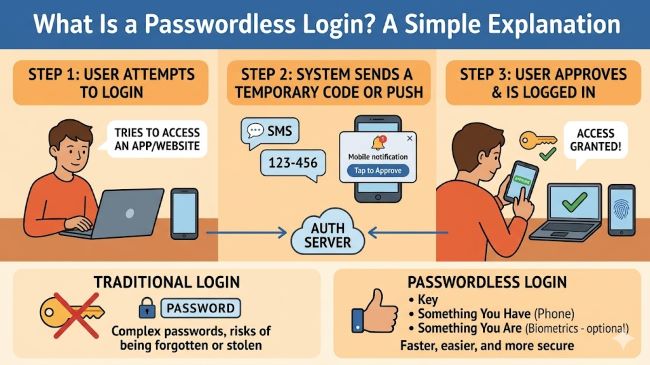
The Basic Idea
Traditional logins rely on something called knowledge-based authentication. You type a username and a password, and the system checks whether the password matches what is stored for that account. The whole system depends on a secret string of characters that only you are supposed to know.
A passwordless login removes that secret string entirely. Instead of asking you to recall and type something, the system verifies your identity through other means. These typically fall into two categories:
- Something you have. A physical device, like your phone, a hardware security key, or a smart card, that proves you are the account owner because you possess it.
- Something you are. A biometric trait, like your fingerprint, face, or voice, that is unique to you and difficult for someone else to replicate.
Some passwordless systems combine both, but the defining feature is that no password ever needs to be typed, stored, or remembered.
Common Types in Use Today
There are several methods that fall under the passwordless umbrella, and most people have already used at least one without necessarily thinking of it that way.
Biometric Authentication
This is probably the most familiar form for most people. Unlocking a smartphone with a fingerprint or face scan, then having that same authentication carry over to apps and websites, is biometric authentication in action.
The biometric data itself typically never leaves the device. The device checks your fingerprint or face against a stored template locally and tells the app that the check passed, without sending the actual biometric data anywhere. There is no password database to steal, and the template stays on the device.
Magic Links
A magic link is a one-time link sent to your email. Instead of typing a password, you enter your email, receive a link, and clicking it logs you in. The link is valid for a short time and can usually only be used once.
Magic links rely on your email account itself being secure, since whoever has access to your email can request and use these links. They are a common option for apps that want a simple setup with nothing extra to install.
One-Time Passcodes (OTPs)
A one-time passcode is a short numeric code sent via text, email, or generated by an authenticator app. Unlike a password, the code changes every time and is not something you choose or memorize. It exists only for a single login attempt and expires quickly.
OTPs are sometimes used on their own, and sometimes as one factor alongside other methods.
Security Keys
A security key is a small physical device, often shaped like a USB drive, that you plug into a computer or tap against a phone to verify your identity. It uses cryptographic methods to prove you have the physical key without transmitting any secret that could be intercepted.
This is widely considered one of the strongest options, since it requires physical possession of the key, making remote attacks significantly harder.
Passkeys
Passkeys are a newer standard adopted across major platforms including Apple, Google, and Microsoft. A passkey is a cryptographic credential stored on your device, often protected by your device’s existing biometric or PIN unlock.
Your device proves your identity to the website using cryptography, without ever sending a password or shared secret over the internet. Passkeys can also sync across your devices, so one set up on your phone can often be used on your laptop too.
How It Actually Works Behind the Scenes
Most of these methods, particularly passkeys and security keys, rely on a technology called public key cryptography.
The simplified version: when you set this up, your device creates two mathematically related keys. The private key never leaves your device and is protected by your fingerprint, face, or PIN. The public key gets sent to the website and stored there.
When you log in, the website sends a challenge, a randomly generated piece of data, to your device. Your device uses the private key to respond in a way that can only be verified using the public key. If the response matches, you are authenticated.
The private key never gets transmitted anywhere. Even if someone intercepted the communication, they would not gain access to the private key itself, which makes this approach resistant to many attacks that target traditional passwords.
Why This Is Becoming More Common
A few reasons explain why so many services now offer passwordless login options.
Passwords are a major security weakness. Many people reuse passwords across multiple accounts, choose easily guessable passwords, or fall for phishing attempts that trick them into typing passwords on fake websites. Passwordless methods remove the password entirely, which closes off these specific attack paths.
Phishing resistance. Traditional passwords can be entered into a fake website that looks like the real one, handing your credentials to an attacker. Passkeys and security keys are tied to the specific website they were created for, so even if someone tricks you into visiting a fake site, your passwordless credential will not work there, because the cryptographic check fails for the wrong website.
No passwords to steal in a data breach. When companies suffer data breaches, stored passwords, even encrypted ones, are a common target. With passwordless systems built on public key cryptography, the information stored on the company’s servers is the public key, which is not useful to an attacker on its own.
Convenience. For most people, a fingerprint scan or a quick tap is faster than typing a password, especially a strong one with a mix of characters. Removing the friction of typing and remembering passwords improves the everyday experience of logging in.
Is It Completely Secure?
No security method is perfect, and this approach is not an exception, though it addresses many common weaknesses of passwords.
The security of biometric methods depends on the device itself being secure. If someone gains access to an unlocked phone, they may be able to use stored passkeys or biometric authentication on that device, so a strong PIN or screen lock remains important.
Magic links and OTPs depend on the security of the email account or phone number they are sent to. If an attacker gains access to your email or intercepts text messages, they could potentially use these methods to access other accounts.
Despite these considerations, passwordless login generally represents a significant improvement over traditional passwords, since they eliminate risks tied to weak, reused, or phished passwords, which remain among the most common causes of account compromise.
Getting Started
Many major platforms now offer this as an option, often alongside traditional passwords rather than as a full replacement. Setting it up usually means going into your account’s security settings and looking for an option related to passkeys, biometric login, or security keys.
Most systems still allow a password as a backup in case the method is unavailable, such as on a new device that has not been set up yet. As passkeys become more widely supported, passwords are likely to become less central to logging in, even if they do not disappear completely soon.
Key Takeaways
- A passwordless login lets you sign into an account without typing a password, using something you have, like a phone or security key, or something you are, like a fingerprint or face scan.
- Common methods include biometric authentication, magic links sent by email, one-time passcodes, physical security keys, and passkeys.
- Passkeys and security keys use public key cryptography, where a private key stays on your device and a public key is stored by the website, with no shared secret ever transmitted.
- Passwordless login is more resistant to phishing because passkeys are tied to the specific website they were created for and will not work on fake lookalike sites.
- Data breaches are less damaging under passwordless systems, since stored public keys are not useful to attackers without the corresponding private keys.
- Magic links and one-time passcodes depend on the security of your email account or phone number, so those accounts still need strong protection.
- Most platforms currently offer passwordless login as an additional option alongside passwords, with passwords often remaining as a backup method.