Blooket: The Complete Guide to the Game-Based Learning Platform
There is a specific kind of noise that fills a classroom when students are racing to buy a defense, steal a rival’s gold, or unlock a rare character, all while quietly answering review questions. More often than not, that sound means a class is playing Blooket. The platform took the ordinary quiz and wrapped it in collectible characters, in-game economies, and a dozen-plus game modes, turning review into something students genuinely want to do. This guide explains the whole thing, from what it is to how to log in, host a game, and join one.
Whether you are a teacher setting up your first session, a student trying to get into a game, or a parent curious about what your kid is playing, here is a clear walkthrough of how everything works, including the game modes, the dashboard, the codes students enter, and the truth about the bots people search for.
What Is Blooket?
Let us begin with the obvious question. What is Blooket, exactly? It is a web-based, game-based learning platform that turns quizzes into competitive multiplayer games. Students answer questions to earn rewards, unlock collectible characters, and climb live leaderboards, which makes review feel like play rather than work.
The answer gets clearer once you see the structure. A teacher picks a set of questions, chooses a game mode, and launches a session. Students then answer the same questions, but the game layered on top, collecting gold, building towers, running a cafe, changes how the competition unfolds. The questions test knowledge while the game keeps everyone hooked, which is the core idea behind the whole experience.
The platform was created by brothers Tom and Ben Stewart and has grown into one of the most popular learning games in schools, with a massive library of user-created question sets. Understanding Blooket at this level explains its appeal: it blends genuine practice with the dopamine loop of a video game, so students do far more review than they ever would on a worksheet. That combination of learning and fun is exactly why teachers keep coming back to it.
How the Game Works
The mechanics are easy to grasp. Every session starts with a question set, which is simply a collection of questions and answers on a topic. Teachers can build their own set, pick from a library of millions of public ones, or import questions to save time.
When a game begins, students answer questions from the set, and each correct answer earns them progress in whatever game mode is running. The clever part is that the game mode, not just the score, drives the competition. In one mode students collect gold and can steal it from each other, in another they build defenses, and in another they run a virtual business.
Two features deepen the experience. Coins, the in-game currency students earn, can be spent in a market to buy Blooks, the collectible characters that represent players, which come in rarity tiers from common all the way up to extremely rare. With hundreds of Blooks to collect, students stay motivated to keep playing and answering. This collecting layer, sitting on top of the quiz, is part of what sets the platform apart from a plain question-and-answer tool and keeps students invested across many sessions.
The Game Modes
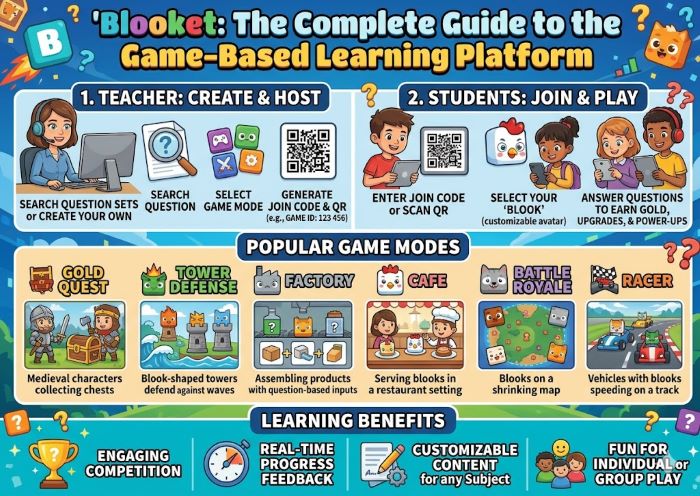
A big reason the platform stays fresh is its wide range of game modes, with well over a dozen available and new ones added regularly. Each mode reframes the same questions into a different kind of competition, so a single set can feel completely new depending on the mode.
Here are some of the most popular modes:
- Gold Quest, where students collect gold and can steal it from rivals, full of last-minute swings
- Tower Defense, where correct answers let students build defenses against waves of enemies
- Crypto Hack, a mode built around earning and stealing virtual currency
- Cafe, where students run a restaurant by answering questions to serve customers
- Battle Royale, a head-to-head mode where players compete directly
- Monster Brawl and Racing, which add their own competitive twists
Newer additions have introduced features like save states in some modes, letting players pause and return to their progress. The variety means a teacher can pick a calm mode for focused review or an energetic one for a fun reward day. With so many options, it is worth trying several to see which click with a particular class, since every group responds differently to the pace and style of each mode.
Getting Started: The Blooket Login
Before hosting or building anything, teachers need an account, and the Blooket login is the starting point. From the menu on the official website, choose the option to log in, then enter your email and password to reach your account. Signing up is free, and you can register with an email or a common single sign-on option, which many schools prefer.
The teacher account gives access to everything that powers a game. Once you are signed in, you can create question sets, launch live games, assign homework, and review how students performed. If you ever forget your password, the login page has a reset option that emails you a link to set a new one. Keeping your account details handy makes it quick to jump back in for the next session.
Students generally do not need their own account to play a live game, since they can join with just a game code and a nickname. An account becomes useful for students mainly if they want to play solo, earn coins, and collect Blooks of their own, which carries their progress between games. For classroom use, though, the simple no-account join is what makes the platform so fast to deploy with a whole class.
Navigating the Blooket Dashboard
After signing in, you land on your control center, and the Blooket dashboard is where teachers manage everything. It organizes your question sets, your game history, and your stats so you can find what you need quickly.
The dashboard typically includes a few key areas. A My Sets section holds the question sets you have created or saved. A Discover area lets you browse the enormous library of public sets made by other teachers, which is a huge time-saver. A Create option opens the tool for building a new set from scratch. From the dashboard, you also reach your game history and performance stats, which show how students did and which questions caused trouble.
Spending a few minutes exploring Blooket pays off, since knowing where things live makes hosting smooth and fast. Most teachers find that once they have built or saved a few sets, launching a game becomes a matter of a couple of clicks. The dashboard is designed to keep the focus on teaching rather than fiddling with settings, so it stays clean and straightforward even as your library of sets grows.
How to Host a Game
Running a session is what teachers do most, and learning to be a Blooket host takes just a few minutes. The flow is simple once you know the steps.
Start by signing in and opening your dashboard. In Blooket, choose a question set, either one you built, one from the public library, or a new one you create. Click the host button on that set, then pick a game mode from the list. Next, customize the settings, adjusting things like the time limit, how the game ends, and whether students can join late. These options let you shape the session to fit your class and your goal.
Once your settings are ready, the platform generates a session, and as the Blooket host you receive a game code along with a join link and a QR code to share. Display the code for your students, watch their names appear as they enter the lobby, and click start when everyone is in. During play, the host can monitor the leaderboard and manage the session, and afterward a report shows how the class performed. The setup is flexible enough that you can run a quick five-minute review or a full class-period tournament.
How Students Join a Game
From the student side, getting in is quick, and the Blooket join process takes well under a minute. There is no app to download and, for a standard live game, no account to create.
To get into a Blooket game, students open a browser and go to the play page, then enter the game code the teacher displays. People also search the reverse phrasing, but the steps are identical whichever you type: go to the play page, type the code, and pick a nickname. Students can also join by scanning a QR code or clicking a direct link the host shares, which is handy when the teacher posts it in an online classroom. To join Blooket this way takes only a moment, which keeps class time focused on the game rather than logistics.
The host controls a few things that make the join smoother. The teacher can allow late joining, so a student who arrives late or loses their connection can still get in, and can turn on random nicknames to prevent inappropriate names. If a student cannot get in, the usual fixes are checking that all digits of the code are correct, refreshing the page, and making sure they are on the official play page rather than a copycat site. Because the whole process is just a code and a nickname, even young students complete the join in seconds.
Game Codes and the Play Page
The game code is the key that connects students to a session, so it is worth understanding how it works. Each time a teacher hosts, the platform generates a fresh Blooket code, usually six digits, that is unique to that session and does not carry over to the next game.
That means a student needs the current Blooket code for the specific game they are joining, not one from a previous session. Teachers display it on the board, share it through a classroom tool, or hand it out as a link or QR code. To play Blooket once you have the code, head to the play page, enter the digits carefully since one wrong character blocks entry, and choose a nickname. The moment the host starts the session, you are in and answering questions.
Blooket play happens in two main ways. The first is live, where the whole class joins the same session at once using the code, which is the classic classroom experience. The second is solo or homework-style play, where students complete a set on their own time, useful for review at home or for students who were absent. Both use the same sets, so a teacher can run a live game one day and assign a solo version the next, getting more mileage out of the same questions.
The Truth About Blooket Bots
A topic that comes up often, especially among students, is bot spam. It is worth understanding what these are and why they cause problems, both so teachers can recognize them and so everyone understands why they are discouraged.
A Blooket bot is an automated tool that joins a game as a fake player, with no real person behind it. People use bot spammers to flood a session with dozens or hundreds of fake players, which clutters the lobby, disrupts the game, and ruins the experience for the real students trying to learn. These tools violate the platform’s terms of service and are a form of abuse rather than legitimate play, so they are not something to encourage or use.
For teachers, the good news is that the disruption is manageable. The most effective defense is to keep your game code private and share it only with your actual class rather than posting it publicly online, since bot spam usually requires someone knowing the code. Turning on settings that limit or screen players, ending and restarting a session with a fresh code if a flood occurs, and removing fake players during the game all help. If a bot attack disrupts a class, simply generating a new code and sharing it only with present students usually solves it. The platform also works to block these tools on its end, so reporting persistent abuse is worthwhile.
Tips for Teachers
A few habits make sessions run better. Keep your game code limited to your real class to avoid disruption, and turn on random nicknames to skip inappropriate or distracting names. Match the mode to your goal, choosing a calmer mode for focused review and a livelier one for an energetic reward day.
Lean on the public library when you are short on time, since there are millions of ready-made sets you can use or adapt. Use the post-game stats to see which questions students missed most, so you know what to reteach. Start simple rather than enabling every setting at once, especially while you and your students learn the flow. And remember that the collecting and competition are what hook students, so let them enjoy the game layer rather than rushing through the questions.
Pricing: Free Versus Paid
A common question is what it costs, and the core platform is free. Teachers can sign up, build sets, host live games, and assign homework without paying, which is enough for many classrooms.
A paid upgrade, often called the Plus plan, adds extra features for teachers, such as more detailed reports, additional hosting options, and the ability to host larger or more customized games. Because pricing and the exact features in each tier can change over time, it is worth checking the current plans on the official site before deciding, especially for a school or district purchase. Many teachers run the free version for a long time and only upgrade if they find themselves wanting the extra tools. The free tier is generous enough to fully test whether the platform fits your classroom before spending anything.
How It Compares to Other Tools
The platform sits in a busy field of game-based learning tools, alongside the best-known names like Kahoot, Gimkit, and Quizizz. Each has its own personality, and the right pick depends on what a teacher wants.
Kahoot is the most widely recognized, built around fast, music-driven multiple-choice quizzes. Gimkit, like this platform, leans into game modes and an in-game economy, and the two are often compared directly. Quizizz emphasizes self-paced play and a large question library. What makes Blooket stand out is the combination of collectible characters, multiple distinct game modes, and the steal-and-strategy dynamics that make modes like Gold Quest so lively. Students who enjoy collecting and competing tend to gravitate toward it.
Many teachers keep two or three in rotation and choose based on the lesson and the energy they want in the room. The variety of game modes and the collectible Blooks are the features that tend to win this platform its most devoted fans, particularly with students who love the game-within-a-quiz approach.
Is It Good for Learning and Safe?
Beyond the fun, teachers and parents reasonably ask whether it helps learning and whether it is safe. On learning, the format excels at repetition and review, since the game energy gets students to answer far more practice questions than they would otherwise.
It works best as a review and reinforcement tool rather than a way to introduce brand-new material, since it rewards quick recall over deep first-time learning. Used well, Blooket play turns review into something students look forward to, and it is genuinely effective at boosting engagement and retention. On safety, the standard live game keeps things simple, since students join with only a code and a nickname rather than personal information. Teachers can screen nicknames, remove disruptive players, and control the session, and the platform follows student-data practices that schools can review. As with any classroom tool, a teacher overseeing the session is the best safeguard, and the simple join keeps the experience contained and age-appropriate.
Frequently Asked Questions
Do students need an account to play? No. For a standard live game, students just go to the play page, enter the game code, and pick a nickname. Accounts are mainly for teachers and for students who want to collect Blooks.
Is it free? There is a capable free version for teachers. A paid Plus plan adds more features, and current pricing is listed on the official site.
What are Blooks? Blooks are collectible characters that represent players, bought with in-game coins and ranging from common to very rare.
Why do students search for bots? Some look for tools to flood games with fake players, which disrupts sessions and violates the rules. Keeping the game code private is the best defense.
How is it different from Kahoot? The biggest differences are the collectible characters and the variety of game modes with their own economies and strategies, which go beyond simply answering fastest.
Key Takeaways
- Blooket is a web-based, game-based learning platform that turns quizzes into multiplayer games where students earn rewards and collect characters, which is the heart of what is Blooket.
- It was created by brothers Tom and Ben Stewart and works by layering game modes over a question set, so the same questions can power many different styles of play.
- Popular modes include Gold Quest, Tower Defense, Crypto Hack, Cafe, and Battle Royale, each reframing the same questions into a different competition.
- The Blooket login is the teacher’s starting point for creating sets, hosting games, and viewing reports, while students usually need no account to join a live game.
- The Blooket dashboard organizes your sets, history, and stats, with My Sets, Discover, and Create areas that make launching a game quick.
- To be a Blooket host, sign in, pick a set, choose a mode, set options, and share the generated code, link, or QR code, then start the session.
- The Blooket join process is simple, and whether you search Blooket join or join Blooket, the steps are the same: go to the play page, enter the code, and pick a nickname.
- Each session uses a fresh Blooket code, so students need the current one, and to play Blooket they enter that code on the play page, with live and solo play both available.
- A Blooket bot is an automated tool that floods games with fake players, which disrupts sessions and breaks the rules, and keeping your code private is the best defense.
- It stands alongside Kahoot, Gimkit, and Quizizz, standing out for its collectible Blooks and varied game modes, and it works best as an engaging review tool with a teacher overseeing it.