DeltaMath
What Is DeltaMath?
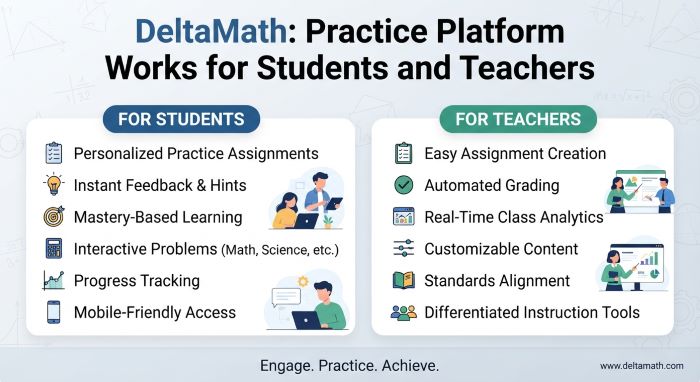
DeltaMath is an online math practice platform for grades 6 to 12. Teachers build assignments from a large bank of problem types. Students solve the problems in a web browser, and the site checks each answer right away. When a student gets one wrong, they can see how to solve it and then try a fresh version of the same kind of problem.
That loop of practice, feedback, and another try is the heart of the platform. Each problem type can produce hundreds of versions with different numbers. Two students sitting side by side get different questions, so copying answers does not work. A student who missed a problem cannot just memorize the answer, because the next one will be new.
The platform is used in many US middle and high schools. Teachers can use the core version for free. Schools and districts can pay for extra tools such as help videos, tests, and reports.
This guide explains how the site works, how to sign in, what you can practice, and what the free and paid plans include. It draws on the company’s own help center and FAQ pages, its terms of service, and published coverage, checked in November 2026. Features and plan details change, so check the site for the latest.
Quick Facts
| Topic | Details |
|---|---|
| Website | deltamath.com |
| Company | DeltaMath Solutions Inc. |
| Founder | Zach Korzyk, a high school math teacher |
| Started | 2009 |
| Grade range | Grades 6 to 12, including calculus |
| Cost for teachers | Free core account; paid PLUS and INTEGRAL plans |
| Cost for students | Free when a teacher assigns work |
| Home option | Paid learner accounts for families |
| Where it runs | A web browser |
| Privacy claims | States compliance with FERPA and COPPA |
Who Created the Platform?
A Teacher Solving a Classroom Problem
Zach Korzyk built the site while he was teaching math. A 2015 Chalkbeat profile says he taught Algebra II and trigonometry at Manhattan Village Academy in New York City. According to the company’s About page, he started in 2009 with a simple program that plugged values into the quadratic formula. His students liked it, so he kept building content for the rest of the school year.
Korzyk told Chalkbeat that one big reason he built it was to stop students from copying each other. Because each student gets different numbers, the work has to be their own. He shared an easier version with other math teachers in September 2010, and it spread quickly.
Growth Over the Years
Korzyk taught himself databases, web servers, and JavaScript, and he worked on the site at night, on weekends, and over summers. The company’s About page shares these growth markers:
| Period | Reported Use |
|---|---|
| First full year as a working site | About 100 teachers and 5,000 students |
| December 2014 | More than 20,000 students and 600 problem types, per Chalkbeat |
| 2019 to 2020 school year | More than 100,000 teachers and 4 million students |
The site has since grown from a one-person project into a company with curriculum leads, math content programmers, and software engineers. Korzyk is listed as founder and CEO.
How the Platform Works
The basic flow is simple, and it works the same way in most classes.
- The teacher builds an assignment. They pick skills from the problem bank, such as solving two-step equations or finding slope.
- The teacher sets the rules. They choose how many correct answers a student needs, whether wrong answers cost points, and the due date.
- Students sign in and work. Each student gets their own randomized version of every problem.
- The site checks every answer. Students learn right away if they got it right.
- Students see the solution. Depending on the teacher’s settings, a worked solution appears after the answer.
- Students try again. A new problem of the same type appears, so students can practice until they reach the goal.
- The teacher reviews the data. The teacher sees every attempt, answer, and timestamp.
The key idea is that students keep practicing a skill until they show they can do it. In the default setup, a student needs 5 correct answers on a skill for full credit.
Main Features of the Platform
| Feature | What It Does | Plan |
|---|---|---|
| Problem bank | Hundreds of auto-graded problem types for grades 6 to 12 | Free |
| Randomized problems | Each student gets different numbers | Free |
| Unlimited assignments | Teachers can create as many as they need | Free |
| Worked solutions | Step-by-step explanations after an answer | Free |
| Progress data | Every attempt, answer, and time spent | Free |
| Help videos | Short videos on how to solve each problem type | PLUS and INTEGRAL |
| Tests | Timed assessments built in the platform | PLUS and INTEGRAL |
| Problem sub-types | Pick a narrow version of a skill | PLUS and INTEGRAL |
| Custom problems | Teachers write their own questions | PLUS and INTEGRAL |
| Test corrections | Extra practice only on the skills a student missed | Linked version on PLUS and INTEGRAL |
| Print to PDF | Printable assignments with answer keys and QR codes | INTEGRAL |
| Student notes | Students upload photos of their written work | INTEGRAL |
| Standards reports | Performance broken down by state standard | INTEGRAL school or district license |
Interactive Math Problems
The problems are not just multiple choice. Many ask students to type an expression, plot points on a graph, or enter an exact answer such as a fraction or a square root. This makes students do the full problem rather than guess between options.
How Students Use the Platform for Math Practice
Most students use the site for homework, classwork, or test prep that their teacher assigns. A typical session looks like this:
- Open the assignment list and pick the one that is due first.
- Choose a skill within that assignment.
- Solve the problem on paper, then enter the answer.
- Read the solution if the answer is wrong, then try the next problem.
- Keep going until the skill shows full credit.
Because the problem keeps changing, students practice the method, not one answer. This is what makes the site useful for building skill over time.
Math Topics You Can Practice
The company’s FAQ says the platform covers grades 6 through 12, including calculus. Every teacher account can reach every grade level. Here is how the content breaks down by area.
Fractions, Decimals, and Percentages
Middle school skills include number operations with fractions and decimals, ratios, rates, and percent problems. These build the base for algebra.
Pre-Algebra and Algebra
This is one of the largest areas. It covers order of operations, combining like terms, the distributive property, linear equations, systems of equations, exponents, polynomials, factoring, and quadratics. Since the site began with a quadratic formula program, algebra is where it has the deepest roots.
Equations and Inequalities
Students solve one-step, two-step, and multi-step equations and inequalities. Later skills include absolute value, rational, radical, and exponential equations.
Graphing and Functions
Students graph lines and curves, find slope and intercepts, read function notation, and work with transformations. Many of these problems use an interactive graph where students plot the answer.
Geometry and Measurement
Geometry skills cover angles, triangles, area, volume, the Pythagorean theorem, similarity, coordinate geometry, and circles.
Trigonometry
Trig skills include right triangle ratios, the unit circle, radians, graphing trig functions, and trig identities. These fit Algebra II and precalculus courses.
Calculus and Advanced Mathematics
At the top end, the bank includes limits, derivatives, and integrals. The 2015 Chalkbeat profile described modules running from middle school Common Core up to AP Calculus.
How to Create a Student Account and Join a Class
Most students do not sign up on their own. They join through a class their teacher created. The help center describes two ways to register.
Option 1: Use the Teacher’s Link
- Your teacher copies a registration link for your class and shares it with you.
- Open the link. The class code is already filled in.
- Enter your name, email, and a password to create your account.
Option 2: Use a Class Code
- Get the class code from your teacher. It is an 8-character code made of letters and numbers.
- Go to deltamath.com/students.
- Enter the code and fill in your details.
How to Join a Class When You Already Have an Account
If you already have an account from last year, you will see an error when you try to register again. Log in to your existing account instead, and you will be added to the new class. You can join several classes this way, but you cannot remove yourself from old ones.
Signing In Through School Tools
Some schools connect the site to other systems. The help center lists integrations with Google Classroom, Clever, ClassLink, Canvas, Schoology, and Infinite Campus. If your school uses one of these, your teacher will tell you which button to use. Each integration has its own setup steps.
Delta Math Login: How to Sign In
Here is the standard delta math login process for students and teachers.
| Step | What to Do |
|---|---|
| 1 | Open your browser and go to deltamath.com |
| 2 | Click the button to log in |
| 3 | Choose your sign-in method: email and password, Google, or your school’s tool |
| 4 | Enter your details and open your dashboard |
Fixing Common Login Problems
If your delta math login does not work, try these fixes:
- Forgot your password? Ask your teacher first. Teachers can see your email login and reset your password. You can also email the support team at [email protected] for a reset link.
- Google sign-in fails? The FAQ says to use a normal browser window, not private or incognito mode, and to allow third-party cookies. In Chrome, this setting sits under Settings, then Privacy and security, then Cookies and other site data.
- Wrong account? Check that you are using the same email you registered with. Many students have both a school and a personal account.
- School tool will not connect? Ask your teacher whether your class uses Clever, ClassLink, or another login.
How to Complete Assignments
Once you sign in, your assignments appear in a list with due dates.
- Click the assignment you want to work on.
- Pick a skill from the list on the side.
- Read the problem and solve it on scratch paper.
- Enter your answer in the box or on the graph.
- Click to submit.
- Read the feedback, then move to the next problem.
- Repeat until the skill shows it is complete.
Your progress saves as you go, so you can stop and come back later.
Instant Feedback and Answer Checking
Does the Platform Provide Instant Feedback?
Yes. The site checks each answer as soon as you submit it. This is its main strength. A teacher quoted by Chalkbeat put it this way: “Struggling students, more than anyone, need that instant feedback.”
How to Check Your Answers
You do not need an answer key. Submit your answer and the site tells you whether it is right. If the format is the problem, such as a decimal where an exact fraction is needed, read the instructions in the question carefully.
Does It Show Step-by-Step Solutions?
Yes, in most setups. Written step-by-step explanations are part of the free version. Teachers control when they appear: after every answer, only after wrong answers, only after correct answers, or never. Classes with a PLUS or INTEGRAL license can also use help videos for each problem type.
What Happens When You Get an Answer Wrong?
You see the solution, if your teacher allows it, and then you get a new problem of the same type. The help center states that “an incorrect response never leads to a drop in a student’s grade.” Here is how that works:
- Your grade for a skill is based on your high score, not your current score.
- A wrong answer can lower your current score if the teacher set a penalty.
- Penalty options include no penalty, half a point off, one point off, and back to zero.
- Your high score stays, so your grade does not drop.
Wrong answers do make you work longer, since you need to rebuild your current score to reach a new high score.
Can You Redo Assignments?
On standard assignments, you keep getting new problems until you reach the required number, so you rarely need a full redo. Teachers can also turn on multiple attempts per question. On tests, teachers may assign test corrections. These give each student extra practice only on the skills they missed. A student who got everything right sees a message that no more problems are needed.
There are limits. If a teacher sets a cap on the number of problems, you can run out before you reach full credit. Assignments built from one fixed problem do not give extra practice after a wrong answer either.
Can Students Track Their Progress?
Yes. Students can see their score for each skill and how close they are to the required number. Teachers see far more:
| Data Point | Who Sees It | Plan |
|---|---|---|
| Score on each skill | Students and teachers | Free |
| Every problem attempted or viewed | Teachers | Free |
| Student answers and timestamps | Teachers | Free |
| Time spent on each problem | Teachers | Free |
| Exportable completion grades | Teachers | Free |
| Start time and length of timed tests | Teachers | PLUS and INTEGRAL |
| Whether a student watched help videos | Teachers | PLUS and INTEGRAL |
| Performance by state standard | Teachers and admins | INTEGRAL school or district |
Student Progress and Performance Reports
This level of detail helps teachers spot patterns. If half the class misses the same type of problem, the teacher knows to reteach it the next day.
How Teachers Use the Platform in the Classroom
How Teachers Create and Assign Problems
The help center walks teachers through setup. To make a class, a teacher goes to Tools, then Manage Students and Classes, and clicks Add New Class. Each class gets a code to share with students.
To build an assignment, the teacher picks skills and adjusts settings for each one:
| Setting | What It Controls |
|---|---|
| Required | Correct answers needed for full credit (default is 5) |
| Penalty | Points lost for each wrong answer |
| Weight | How much the skill counts toward the grade; 0 makes it optional |
| Attempts | Whether students get more than one try per question |
| Max Problems | A cap on total problems for the skill |
| Timed settings | A number of correct answers in a row within a time limit |
Teacher Dashboards and Assignment Management
Teachers can set due dates and late dates. Work done on time earns full credit. Work done in a late window can earn partial credit, such as 50%, and work after the last late date earns nothing. Teachers can also share assignments with colleagues using a copy tool.
Tests and Test Corrections
With a paid plan, teachers can build timed tests. They can lock students out of other assignments until the test is done and adjust timers for students who need more time. After a test, linked test corrections give each student targeted practice on their own mistakes.
Can Teachers Track Student Performance?
Yes. This is one of the main reasons teachers choose the site. They can see who finished, who struggled, and which skills need more class time.
Homework and Independent Learning
The platform works well for homework because students get help at the moment they need it. A student stuck at 9 p.m. can read the worked solution instead of waiting until the next class.
Delta Math for Home
The company also sells home accounts for families. According to its terms of service, a parent account is free to create, and parents can buy learner accounts on monthly or yearly terms that renew automatically. Learners 13 and older can create their own account. Younger learners must be invited by a parent. There is a 7-day free trial, and home subscriptions are not refunded, though access lasts until the end of the billing period. A 2026 review reported home pricing of about $9.95 a month or $95 a year for one student. Check the site for current prices.
Is It Free to Use?
For most students, yes. If your teacher assigns work, you do not pay anything. Teachers can also use the core account at no cost.
Free vs Paid Plans: What’s the Difference?
| Plan | Who It Is For | What It Adds |
|---|---|---|
| Free teacher account | Any teacher | Full problem bank, unlimited assignments, auto-grading, solutions, data |
| PLUS | Individual teachers, schools, or districts | Help videos, tests, problem sub-types, custom problems, standards alignment |
| INTEGRAL | Individual teachers, schools, or districts | Everything in PLUS, plus PDF printing, student notes, Canvas and Schoology links, and more |
| Home learner | Families | Practice outside a school class |
The company does not list teacher or school prices on its FAQ page. Paid licenses are sold per school year, and schools request a quote. Teacher and school licenses can be refunded within 30 days of purchase, according to the terms of service. Each individual license covers one teacher and the students on that teacher’s roster.
Can You Use It on a Chromebook, Phone, or Tablet?
The platform runs in a web browser, so there is no app to install for regular use.
| Device | How Well It Works | Notes |
|---|---|---|
| Chromebook | Well | Use Chrome; allow third-party cookies for Google sign-in |
| Windows or Mac laptop | Well | Any modern browser |
| Tablet | Usable | Typing math on a touch keyboard is slower |
| Phone | Usable for short sessions | Small screen makes graphs and long problems harder |
We did not find an official device list in the help pages, so treat the phone and tablet notes as general guidance. INTEGRAL schools also let students snap a photo of their written notes with a phone and upload it through a QR code.
The site has no built-in translation tool. Its FAQ suggests using Chrome’s translate feature.
For Middle School and High School Students
Middle School
Middle schoolers use the site for number skills, ratios, percents, and pre-algebra. The randomized practice helps lock in basic steps before algebra.
High School
High school students use it across Algebra I, Geometry, Algebra II, Precalculus, and Calculus. Many teachers use it for test review because students can practice each skill until they reach mastery.
Is It Suitable for Beginners?
Mostly, yes. The worked solutions and videos give struggling students support. Still, the site is a practice tool first. A student who has never seen a topic may need a lesson before they can use the practice well. A 2026 review also noted that strict answer formats can mark answers wrong when the math is right, which can frustrate beginners.
Advantages and Limitations
| Advantages | Limitations |
|---|---|
| Free for students and teachers | Best tools, like videos and tests, need a paid plan |
| Instant feedback on every answer | Strict answer formats can feel unfair |
| Randomized problems stop copying | Practice can feel repetitive |
| Wrong answers never lower your grade | Wrong answers can mean much more work |
| Detailed data for teachers | Not a full course; teaches through practice |
| Covers grades 6 to 12 | Not built for elementary grades |
| Works in any browser | Typing math on phones is slow |
Compared With Traditional Math Practice
| Factor | Platform Practice | Paper Worksheet |
|---|---|---|
| Feedback | Right away | Next day or later |
| Unique problems | Every student gets different numbers | Same sheet for everyone |
| Extra practice | New problems until mastery | Fixed number of problems |
| Teacher grading time | Auto-graded | Hand-graded |
| Seeing student work | Answers only, unless notes are uploaded | Full written work |
| Screen time | Yes | No |
The best approach often mixes both. Students solve on paper, then enter answers online. This keeps the written work while adding fast feedback.
Is It a Good Tool for Learning Mathematics?
For practice, yes. It gives students many chances to apply a skill, it shows them where they went wrong, and it makes them keep going until they get it. Teachers like that it saves grading time and shows where students struggle.
It works best as one part of learning, not the whole thing. A teacher still needs to explain new ideas, and students still need to show their work on paper.
Some students also like a lighter, game-style break between assignments. Hooda Math offers free math and logic games for school-age players, and Cool Math Games focuses on puzzle and strategy games that build planning skills. These sites are fun for warm-ups or rewards, but they do not replace assigned, graded practice.
Tips for Completing Assignments Successfully
- Work on paper first. Write every step before you type the answer.
- Read the solution after a miss. Do not skip it. Find the exact step where you went wrong.
- Watch the format. Check if the question wants a fraction, a decimal, or a rounded answer.
- Start early. Wrong answers add problems, so leave extra time.
- Do not guess. If a penalty is on, guessing can drop your current score.
- Use help videos when you have them. They often explain the idea in a new way.
- Ask your teacher. If a problem seems wrong, tell your teacher.
- Check due and late dates. Late work may only earn partial credit.
Frequently Asked Questions
Is the platform free for students? Yes, when a teacher assigns the work. Families who want home practice can buy a learner account.
Who created it? Zach Korzyk, a math teacher, started it in 2009.
What grades does it cover? Grades 6 through 12, including calculus.
How do I join a class? Use your teacher’s registration link, or enter the 8-character class code on the student registration page.
What should I do if I forget my password? Ask your teacher to reset it, or email the support team for a reset link.
Does a wrong answer lower my grade? No. Your grade uses your high score. A wrong answer may lower your current score if your teacher set a penalty.
Does it show solutions? Yes. Written solutions are part of the free version, and teachers decide when they appear.
Can I use it on a Chromebook? Yes. It runs in Chrome. Allow third-party cookies if you sign in with Google.
Is there a phone app? The site is built for the web browser. You can open it on a phone, but a larger screen is easier.
Is student data protected? The company states that it complies with FERPA, COPPA, and local student privacy laws in the US and Canada.
Final Thoughts
DeltaMath began as one teacher’s tool to stop copying and grew into a platform used by millions of students. Its formula is simple: random problems, instant feedback, and practice until mastery. The free version covers most classroom needs, while paid plans add videos, tests, and deeper reports.
For students, success comes down to good habits. Work on paper, read every solution after a miss, and start early. For teachers, the data shows exactly where a class needs help. Used that way, it is a strong partner to good teaching.
Key Takeaways
- DeltaMath is a browser-based math practice platform for grades 6 to 12, created by teacher Zach Korzyk in 2009.
- Students join a class with a teacher’s link or an 8-character class code, then sign in at the main site.
- Each problem type creates many versions, so every student gets different numbers.
- The site checks answers right away, shows worked solutions, and gives a new problem after a miss.
- A wrong answer never lowers a grade, because grades use the student’s high score.
- The core teacher account is free, while PLUS and INTEGRAL add videos, tests, and reports.
- It works best as a practice tool alongside classroom teaching and written work.