TUF VG259Q5A 25″ Class Full HD Gaming LED Monitor: Is This Budget Screen Worth It?
Buying a gaming monitor used to mean picking two of three: fast, sharp, or affordable. That math has shifted. The TUF VG259Q5A 25″ class full hd gaming led monitor from ASUS lands in the sweet spot where speed and price meet, and it does so without a lot of fuss. If you play fast shooters, care about smooth motion, and do not want to spend big, this screen deserves a look. Here is what it offers and where it makes sense.
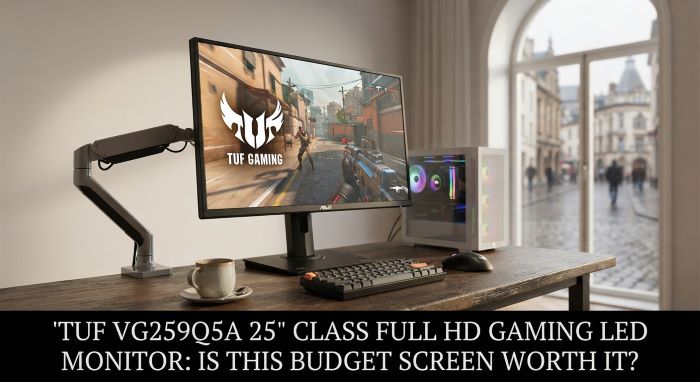
The panel: fast IPS at 200Hz
The heart of any gaming display is the panel, and this one uses a Fast IPS design. IPS gives you good color and wide viewing angles, while the “Fast” part cuts down the sluggish response times that older IPS screens suffered from. The TUF VG259Q5A 25″ class full hd gaming led monitor runs at a 200Hz refresh rate with a 0.3ms minimum response time (1ms gray-to-gray). In plain terms, motion looks clean, fast camera swings stay readable, and you get very little of the smearing that ruins tracking in competitive play.
At 1920 by 1080 resolution on a 24.5-inch viewable area, the pixel density sits at a comfortable spot for this size. Text stays crisp and games look sharp without pushing your graphics card as hard as a 1440p or 4K screen would. That is part of the appeal. A 200Hz Full HD panel is far easier to feed with high frame rates than a higher-resolution display, so more of your hardware goes toward keeping the action smooth.
Color and picture quality
Numbers only tell part of the story, but they help set expectations. The TUF VG259Q5A 25″ class full hd gaming led monitor covers 99% of the sRGB color space, reaches 300 nits of typical brightness, and holds a 1000:1 contrast ratio. It also supports HDR10, though at this brightness level HDR is more of a bonus than a headline feature. Do not expect the punchy highlights of a premium HDR display. Do expect accurate, vivid color for everyday gaming, streaming, and general use.
The anti-glare coating keeps reflections down, and the 178-degree viewing angles mean the image stays consistent even when you glance from the side. For a budget screen, the picture holds up well across games, movies, and desktop work alike.
Smooth motion without tearing
Screen tearing pulls you out of a game fast. To fight it, the TUF VG259Q5A 25″ class full hd gaming led monitor supports Adaptive-Sync, which shows up as AMD FreeSync Premium and works as G-SYNC compatible on the NVIDIA side. This syncs the refresh rate to your frame rate, so the image stays whole even when frames fluctuate.
ASUS also includes its Extreme Low Motion Blur (ELMB) technology, which sharpens fast movement by reducing blur between frames. Between adaptive sync and ELMB, you get a smooth, tear-free picture across a wide range of frame rates. That matters more in practice than any single spec on the box.
Ports and extras
Connectivity is straightforward and covers what most players need:
- 2 x HDMI 2.0 ports
- 1 x DisplayPort 1.4
- A headphone jack
- Built-in stereo speakers
The DisplayPort 1.4 connection is the one to use for the full 200Hz refresh rate. The built-in speakers are fine for system sounds and casual use, though most gamers will reach for a headset or external speakers. ASUS layers on its usual gaming software too, including GamePlus overlays like crosshairs and timers, GameVisual picture modes, and Shadow Boost to lift detail in dark areas. There is also DisplayWidget Center, which lets you adjust settings with your mouse instead of fumbling with buttons under the bezel.
How it compares to its predecessor
If you looked at the older VG259Q3A, the upgrades here are worth knowing. The TUF VG259Q5A 25″ class full hd gaming led monitor is brighter, faster, and better connected than the model it replaces.
| Feature | VG259Q3A (older) | VG259Q5A (newer) |
|---|---|---|
| Refresh rate | 180Hz | 200Hz |
| Brightness | 250 nits | 300 nits |
| DisplayPort | 1.2 | 1.4 |
| Panel | Fast IPS | Fast IPS |
The jumps are modest but real, and they arrive without a big price increase. If you are choosing between the two, the newer model is the easy pick.
Who should buy it
This monitor is built for a specific buyer, and it serves that buyer well. Consider the TUF VG259Q5A 25″ class full hd gaming led monitor if you:
- Play competitive or fast-paced games and value smooth motion
- Run a mid-range PC that hits high frame rates at 1080p
- Want good color and viewing angles without paying for IPS at a premium
- Have a desk where a 24.5-inch screen fits comfortably
- Care about value more than flashy extras
Look elsewhere if you want higher resolution for detailed single-player games or creative work, or if you sit far from your screen and need something larger. A 1440p or 4K panel makes more sense for those needs.
The bottom line
The TUF VG259Q5A 25″ class full hd gaming led monitor does the important things right. It runs fast, it looks clean, it handles tearing and blur well, and it keeps the price reasonable. It will not wow you with HDR fireworks or ultra-high resolution, and it does not try to. What it delivers is a smooth, sharp, dependable gaming experience at a price that makes sense for most players. For competitive gaming on a budget, this is one of the safer picks you can make.
Key Takeaways
- The TUF VG259Q5A 25″ class full hd gaming led monitor pairs a Fast IPS panel with a 200Hz refresh rate and a 0.3ms minimum response time for smooth, clean motion.
- At 1920 by 1080 on a 24.5-inch viewable area, it is easy for mid-range hardware to drive at high frame rates, which is a big part of its value.
- Picture quality covers 99% sRGB, 300 nits brightness, 1000:1 contrast, and HDR10 support, with HDR being a minor bonus rather than a strong feature at this brightness.
- Adaptive-Sync (FreeSync Premium and G-SYNC compatible) plus ASUS ELMB keep the image tear-free and sharp across a wide range of frame rates.
- Ports include 2 x HDMI 2.0 and 1 x DisplayPort 1.4, plus a headphone jack and built-in speakers, with DisplayPort 1.4 needed for the full 200Hz.
- Compared with the older VG259Q3A, it adds a higher refresh rate, more brightness, and DisplayPort 1.4, all without a large price jump.
- It is a strong buy for budget-minded competitive players and a poor fit for anyone who needs higher resolution or a larger screen for detailed or creative work.