Why Can’t I Download Apps on My iPhone Without Payment Method: A Complete Guide
It’s frustrating. You find the perfect free app, tap download, and suddenly the App Store asks for a payment method. No credit card? No app download. This isn’t a glitch. It’s by design, and Apple has specific reasons for requiring payment information even for free app installations. Understanding why can’t i download apps on my iPhone without payment method helps you work around the restrictions and get your apps installed.
You’re not alone in this confusion. Thousands of iPhone and iPad users face this issue every week. Some need to update apps on iPhone but hit the same payment requirement wall. Others wonder if their device is broken. The truth is simpler than you think, and there are real solutions that work.
Why Apple Requires a Payment Method for Free Apps
Understanding Apple’s Payment Policy
Apple requires a payment method on your account for several important reasons. The first is fraud prevention. By having payment information on file, Apple can verify you’re a real person making real purchases and downloads. This protects both their ecosystem and legitimate users.
The second reason is to prepare your account for in-app purchases. Many free apps generate revenue through in-app transactions. Your favorite social media app might be free to download, but cosmetics inside cost money. Apple wants to ensure your account is ready for those transactions.
Third, it’s about age verification. Apps have ratings. Some are restricted to adults. Without a valid payment method, Apple struggles to confirm your age. They use payment history to verify you’re who you claim to be.
The fourth reason involves legal compliance and tax tracking. When you download an app, Apple needs to track that transaction, even if it’s free. This impacts tax reporting and regulatory requirements in different countries.
When Payment Methods Are Actually Required
Free Apps vs. Paid Apps
Not every download requires payment. Here’s what actually triggers the payment requirement:
- Free apps without in-app purchases should download without a payment method, but this varies by account.
- Free apps with in-app purchases almost always require a valid payment method to download.
- Paid apps require a payment method because you’re technically buying them, even if the price is $0.99.
- Subscriptions require payment information because they charge recurring fees.
- Free trials require a payment method because you’re expected to pay after the trial ends.
The confusion happens because Apple treats many free apps as if they might generate revenue later.
Age Restrictions and Content Ratings
Apps marked for ages 12 and up, 17 and up, or 4+ trigger different verification rules. If your account lacks proper age verification, Apple might block downloads of age-restricted apps without a payment method on file.
This is also why update apps on iPhone sometimes fails. If you’re trying to update an age-restricted app and your account isn’t properly verified, the system stops the update and asks for payment information.
Verification Required Error Messages Explained
What “Verification Required” Actually Means
When you see verification required app store messages, Apple is telling you one of several things:
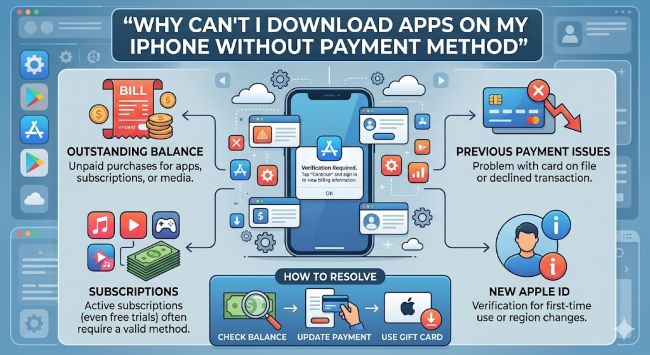
Your payment method expired or failed. Even if you don’t use your saved card, Apple validates it regularly. An expired or declined card triggers verification screens.
Your billing address changed or doesn’t match what’s on file. This is a common reason why won’t my iPad update after you move or change your address.
Your account hasn’t made a purchase in a long time. Apple flags dormant accounts and requires re-verification.
Your payment method is associated with fraud alerts or unusual activity.
You’re in a country or region where different payment rules apply.
How to Add a Payment Method to Your Apple Account
Setting Up Your Payment Information
Adding a payment method is straightforward. Here’s how:
Open Settings on your iPhone or iPad. Tap your name at the top. Select Media & Purchases. Choose Payment Methods. Tap Add Payment Method. Enter your credit card, debit card, or Apple ID balance details.
You can also add Apple gift cards to your account instead of using a credit card. This is useful if you don’t want to store credit card information but still need to download apps.
Another option is Apple Pay. If you have Apple Pay set up, you can use that for app downloads instead of storing a traditional payment method.
Can You Download Apps Without Any Payment Method
The Real Answer About Free App Downloads
Here’s the honest answer: why can’t i download apps on my iPhone without payment method sometimes depends on the app itself and your account status. Some users genuinely download free apps without any payment method on file. Others hit immediate restrictions.
The difference usually comes down to:
- Account age and history
- Location and region settings
- Whether you’ve ever made a purchase before
- The specific app’s configuration and content rating
- Your account’s age verification status
If you’ve never added a payment method to your account and apps are downloading fine, you might be in the clear. But if you hit a wall, adding payment information is the only reliable solution.
Why Free Apps Still Require Verification
Even genuinely free apps with zero monetization sometimes require verification required app store prompts. This isn’t because the app developer set it that way. Apple enforces this at the account level.
Free apps that are fully free still appear as transactions in Apple’s system. Your download is logged, tracked, and reported. Apple needs to verify your account is in good standing before processing any transaction, free or paid.
Troubleshooting App Store Download Issues
When Apps Won’t Download at All
If apps aren’t working or won’t download, start with these steps:
Check your internet connection. A weak WiFi signal or poor cellular connection prevents app downloads from completing. Switch between WiFi and cellular data to test.
Update your iOS version. Old iOS versions have compatibility issues with newer apps. Go to Settings, General, Software Update to check for available updates.
Restart your iPhone or iPad. Hold the power button, slide to power off, wait 30 seconds, then power back on.
Sign out of the App Store and sign back in. This refreshes your account connection. Go to Settings, Media & Purchases, tap your account, and select Sign Out.
Clear your App Store cache. Go to Settings, General, iPhone Storage, find App Store, and offload it. Then reinstall it from the App Store.
Delete and reinstall the app you’re trying to download. If one app won’t download but others do, the app itself might be corrupted in your account.
Fixing Update Issues
When you can’t update apps on iPhone, the solution often differs from download issues.
Ensure you’re on WiFi or have strong cellular. Updates are larger than initial downloads and need stable connections.
Check your available storage. Your iPhone needs free space to update apps. Go to Settings, General, iPhone Storage to see what’s taking up space.
Update your iOS first. System updates sometimes prevent app updates until completed.
Wait a few hours. If Apple’s servers are experiencing issues, retrying later works.
Force close the App Store. Swipe up from the bottom and close the App Store, then reopen it.
Payment Methods Apple Accepts
Valid Payment Options in the App Store
Apple accepts:
- Credit cards: Visa, Mastercard, American Express
- Debit cards: Any major debit card with a Visa or Mastercard logo
- Apple ID balance: Add funds via gift cards or credit cards, then use that balance
- Apple Pay: If enabled on your device and account
- Family Sharing: Parents can manage payment for family members
- Carrier billing: In some countries, your phone bill covers App Store charges
You need to update an app on iPhone, and you can use any of these payment methods. The payment method doesn’t actually charge you for free apps. It just needs to be valid and current.
How to Stop Verification Required Prompts
Preventing Repeated Payment Verification
If you’re tired of seeing how to stop verification required when installing free apps prompts, here are proven methods:
Make sure your payment method is current. Update any expired cards immediately.
Verify your billing address matches what’s on file with your bank or credit card company.
If you haven’t purchased anything recently, make a small purchase to reactivate your account. A 99-cent app or song does it.
Update your iOS to the latest version. Older iOS versions have more frequent verification prompts.
Check that your account email is correct and matches your recovery email.
If you’re in a different country than your account was created in, update your location settings.
Add Apple gift card balance instead of relying on a credit card. This sometimes reduces verification prompts.
Common Mistakes People Make
What Not to Do When Facing Download Issues
Don’t delete your entire Apple ID and create a new one. This causes more problems than it solves.
Don’t share your Apple ID with others. Each person should have their own account.
Don’t try to bypass the system with VPNs or region changers. Apple detects these and locks your account.
Don’t enter fake payment information. This triggers fraud alerts and locks your account.
Don’t assume all free apps should download without a payment method. Apple’s rules apply across the board.
Region-Specific Payment Requirements
How Your Location Affects Downloads
Your can’t download apps from App Store issue might be location-related. Different countries have different payment requirements.
Some regions require prepaid app store credit instead of credit cards. Others require payment methods tied to that country.
If you’ve moved recently or travel frequently, check your region setting. Go to Settings, General, Language & Region.
Updating your region might require updating your payment method. Make sure any new payment method is registered in your current country.
If you’re having trouble, contact Apple Support with your location information. They can reset regional restrictions.
When to Contact Apple Support
Getting Help From Apple
If you’ve tried everything and apps still won’t download or update, it’s time for professional help.
Visit appleid.apple.com and sign in. Check for alerts on your account page.
Open the Apple Support app or visit support.apple.com.
Chat with support or schedule a call. Explain your situation clearly: which apps won’t download, what error messages you see, and what you’ve already tried.
Provide your why is my app store not working details. Apple support can see your account’s payment method status, age verification, and any flags.
Apple support can remove blocks, update your account verification, and resolve issues that individual users can’t fix.
Quick Reference for Common App Problems
Fast Solutions for Apps Not Working
If apps not working on your device, these quick fixes help:
- Restart the app
- Update the app to the latest version
- Restart your iPhone
- Check internet connection
- Ensure iOS is current
- Clear app cache by offloading and reinstalling
- Check that the app is compatible with your iOS version
Key Takeaways
- Why can’t i download apps on my iPhone without payment method is because Apple requires payment verification for account security and transaction tracking, even for free apps.
- Free apps with in-app purchases and age-restricted apps almost always require a valid payment method.
- Verification required app store messages mean your payment method is expired, your address is incorrect, or your account needs re-verification.
- You can add a credit card, debit card, Apple ID balance, Apple Pay, or carrier billing to solve download issues.
- If apps won’t download, try updating iOS, restarting your device, checking storage space, and signing out of the App Store.
- Update apps on iPhone by ensuring WiFi connection, checking available storage, and updating iOS first.
- How to stop verification required when installing free apps involves keeping your payment method current and verifying your billing address.
- Contact Apple Support if you’ve tried all troubleshooting steps and apps still won’t download or update.
For a deeper understanding of how digital systems handle user data and security, explore resources on digital security best practices that explain why verification matters. You might also benefit from learning about app development best practices to understand how apps handle payments. Additionally, understanding user experience design helps explain why Apple implemented these verification requirements in the first place.