How I Publish My Posts In 10 Minutes

You always see inspiration posts in blogs like 45 free fonts,50 website layouts,70 logo design tutuorials etc…..

Of course no need to say but it is really hard to decide and find the sources of your contents and it really takes time for all of us.I have an advantage of being a full time blogger which spend 10 hours of a day in front my computer and made ready 15 unique posts ready up until now which are all waiting to be published:)

Anyway,today i want to tell you how i put all the screenshots and the links in a post in about 10 minutes.

Step 1.

Assuming that you saved all the screenshots in a folder by marking the image file names  with numbers like photoshop logo tutorial_1,png,photoshop logo tutorial_2.png...etc..

When you find the source ,copy all the URL in Notepad,again putting numbers in front of them.(same screenshot number with same URL.)

Step 2.

Now we will insert all the screenshots and URLs.

To do this we need a wordpress plugin to insert all the images with a few clicks.Faster Image Insert Plugin is a really great plugin which you can insert all the images in your post with one click.

Download the plugin and activate it.

Select all the images in your folder and start uploading.Uploading time depends on your server and your internet connection speed.
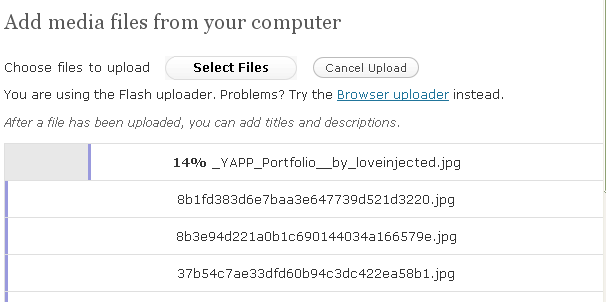
ScreenHunter_01 Oct. 12 15.58

After all the images are uploaded,click on the Media Library or Gallery and you will the see the uploaded images.Now put a tick to all the images and hit Insert selected Images.
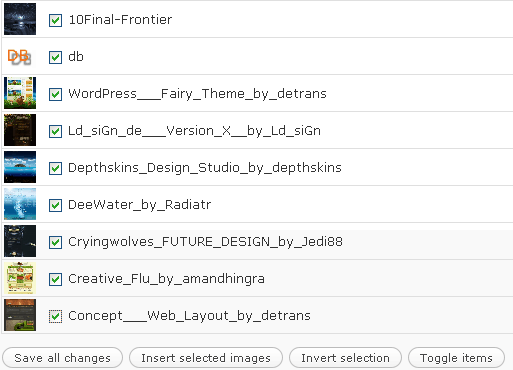
ScreenHunter_02 Oct. 12 16.00

All your images are inserted in your post.

Step 3.

According to your wordpress template you may need to adjust the width or height of your images from the HTML Section of the post.

Depending on your choice leave blanks between your images and write the titles of each image source and insert the links as you copied in Notepad(same image number with same link number)

That’s all.:)

Related Posts with Thumbnails

Filed Under: INSPIRATIONS

Tags: , , ,

-->

About the Author

Arshad is 36 years old amateur blogger, designer and photographer from Europe.My aim is to help the Design Community with quality resources and tutorials and photographs.You can find me at StumbleUpon as well as Twitter.

Comments (4)

Trackback URL | Comments RSS Feed

  1. designfollow says:

    great post.

    thanks.

  2. Not only a great post, but a great blog. Thanks for your efforts.

  3. Hmmmmm…It is helpful and great post too…..Thanks for teaching us……….!

    :)

  4. Joseph Fine says:

    This is such a special resource that you are rendering and you give it away for free. I enjoy seeing internet sites that understand the value of providing a supreme resource for free. I truly enjoyed reading your post. Thanks!

Leave a Reply


If you want a picture to show with your comment, go get a Gravatar.

  • Categories

  • Community News

    • 7 ‘Scroll to Top’ jQuery SolutionsFebruary 28, 2010

      In this post you will find seven jQuery solutions which allow your visitors to smoothly scroll right to the top of a page, making your website more user friendly.

    • 18 Amazing Cats WallpapersFebruary 28, 2010

      I have collected and compiled some & cute looking wallpapers of Cats.

    • 99 Alternatives to 99designsFebruary 27, 2010

      Just getting started in design? Tempted to try out crowdsourcing or spec work? Before you head down that path check out these 99 alternatives to build your portfolio, expand your skill set, and mak…

    • 76 Free Beautiful Twitter Button And Icon SetsFebruary 27, 2010

      Twitter fever is upon us and it will definitely stay with us for a while. Whether you are a web designer, blogger, or developer, you simply cannot ignore the Twitter phenomenon. Twitter is also no …

    • 30 Free Online Photo editors for fun and workFebruary 27, 2010

      I have gathered 30 the best online photo editors. With these editors you’ll be able to use both for work purposes: quickly adjust your images as well as the joy of creating fun photo manipula…

  • Add News


    Captcha
    To prevent spam, please type the text (all uppercase) from this image in the textbox below.

Get Adobe Flash playerPlugin by wpburn.com wordpress themes